2024年5月15日星期三

What scanner does GM use?


GM uses two main scanners for diagnostic purposes: the GM Tech 2 and the MDI 2 Diagnostic Tool. Both scanners offer advanced capabilities and are widely used by GM technicians.


The GM Tech 2 is the official factory scan tool used in all GM dealers since 1996. It provides comprehensive coverage for all makes and models of GM vehicles, including passenger cars, trucks, and vans. Unlike generic scanners that simply show and decode error codes, the Tech 2 can provide detailed information about the errors and even allows technicians to set brand/type-specific settings. It is a versatile tool that is highly regarded in the automotive industry.

There are four main reasons to choose the GM Tech 2 scanner. Firstly, it supports multiple languages, including English, Italian, French, Portuguese, German, Spanish, Korean, Japanese, Thai, and Chinese. This makes it accessible and user-friendly for technicians from different regions. Secondly, the Tech 2 can be updated via a 32MB software card, allowing technicians to stay up to date with the latest software. If there is a newer version available, a new card can be purchased to update the scanner. Thirdly, the Tech 2 is compatible with a wide range of car models, including GM, SAAB, Opel, Suzuki, Isuzu, and Holden vehicles. Lastly, it has a wide year coverage, being able to diagnose vehicles from 1992 to 2014. Additionally, with the help of the Tis2000 software, it can also perform programming for cars manufactured before 2007.

The MDI 2 Diagnostic Tool is another high-quality scanner used by GM. It offers advanced diagnostic capabilities and is known for its reliability. Some highlights of the MDI 2 scanner include its multi-language support, extensive year coverage, optional software package, support for new cars, and WIFI connectivity.

Similar to the Tech 2, the MDI 2 supports multiple languages, making it accessible to technicians from different regions. It has extensive year coverage, being able to diagnose cars from 1990 to 2024, making it compatible with both older and newer models. The MDI 2 scanner can be purchased with or without a pre-installed software package. If the package with software is chosen, the MDI 2 software will be installed on a 250G SATA interface laptop HDD. The HDD is compatible with laptops that have a SATA hard disk interface and were manufactured after 2008. The MDI 2 is specifically designed to support vehicles manufactured from 2010 to 2024. Additionally, it offers WIFI connectivity, allowing for convenient and wireless diagnostic operations.


In conclusion, GM uses the GM Tech 2 and MDI 2 scanners for diagnostic purposes. These scanners provide comprehensive coverage for GM vehicles, and each offers unique features and capabilities. By utilizing these advanced scanning tools, GM technicians can effectively diagnose and address any issues that arise in GM vehicles.


2024年5月5日星期日

piwis 2 vs piwis 3 vs piwis 4

 
In the ever-evolving automotive industry, staying up-to-date with the latest technology is crucial. For Porsche owners and enthusiasts, the PIWIS diagnostic tool has become an indispensable resource for diagnosing, programming, and maintaining their vehicles. In this blog post, we delve into the various versions of PIWIS and their capabilities, highlighting how they have revolutionized the way Porsche cars are serviced.

PIWIS II: Unlocking the Potential of Porsche Diagnostics
As a professional tester for Porsche, the PIWIS II is renowned for its powerful diagnostic and offline programming capabilities. It provides full access to a wide range of Porsche models, allowing technicians to effectively diagnose and troubleshoot issues. With PIWIS II, cars up to and including the 2017 model year can be handled, ensuring thorough support for older Porsche vehicles.

PIWIS III: Embracing Innovation and Expanding Compatibility
The PIWIS III represents a significant advancement in Porsche diagnostics, offering support for a broader range of models, including the Panamera, Cayenne, Macan, 911, and the legendary 918 Spyder. Serving as the successor to the PIWIS II system, this cutting-edge tool covers all Porsche vehicles manufactured up to the present year. Its enhanced capabilities empower technicians to address complex issues and perform comprehensive maintenance tasks.

PIWIS IV: Shaping the Future of Porsche Diagnostics
While details regarding PIWIS IV's specific vehicle support may be limited, it is widely anticipated to continue and expand compatibility for all modern Porsche models. This advanced version of the diagnostic tool aims to focus on the newest and forthcoming Porsche releases, including electric vehicle models. By integrating the latest technological advancements, PIWIS IV ensures that technicians are equipped to address the unique challenges posed by the ever-evolving automotive landscape.

The Power of PIWIS: Simplifying Porsche Maintenance and Repairs
The PIWIS suite of diagnostic tools has revolutionized the way Porsche vehicles are serviced. By utilizing these state-of-the-art tools, technicians can efficiently diagnose problems, perform essential maintenance tasks, and even program new components. This not only saves time but also enhances the overall performance and reliability of Porsche cars.

Conclusion:
In the realm of Porsche diagnostics, the PIWIS series stands as the ultimate toolset for technicians and enthusiasts alike. From the powerful PIWIS II, which covers cars up to the 2017 model year, to the innovative PIWIS III, designed to handle the latest Porsche releases, and the future-ready PIWIS IV, these diagnostic tools continue to shape the way Porsche vehicles are serviced. By embracing the power of PIWIS, Porsche owners can ensure their cars receive the utmost care and attention, guaranteeing optimal performance and driving pleasure for years to come.

2023年2月23日星期四

Xhorse Dolphin XP005 Error Code 29 Solution


Here share the solution to resolve Xhorse Dolphin XP005 Error Code 29.

Problem:

Use Dolphin XP005 to cut key, it can’t cut key normally. Try the height adjustment, the X-axis motor test and the Z-axis motor test, all fail and get the error code: 29. I also do a conductivity test, the cutter and clamp are fine, but the probe and clamp are showing always tests on.


Engineer replied:

The milling cutter shorted out, please follow the following post to check

Xhorse Dolphin XP005 probe and milling cutter abnormal conductivity detect method

After that, clean the iron filings inside.

2023年2月21日星期二

Check the Cylinder Compression using TECHSTREAM (TIS) Software


Check the Cylinder Compression

INSPECT COMPRESSION
1). Manually using the pressure gauge (cylinder compression pressure).
* Remove Cylinder Head cover.
* Remove 4 Ignition Coil.
* Remove 4 Spark Plug (Busi).
* Remove connector Fuel Injector.

-Install compression gauge to the Spark Plug port.
-Place the throttle on fully open.
-START (cranking) the engine, and measure through the compression gauge.

* 1471 kPa (15.0 kgf/cm², 213 psi)
* Minimum pressure: 1079 kPa (11.0 kgf/cm², 156 psi)
* Differences between the cylinder: 98 kPa (1.0 kgf/cm², 14 psi or less)

-Use fully charged-battery, So the Engine Speed while START can reach 250 rpm or more.
-Inspect the another cylinder with the same way.

2). Using TECHSTREAM (TIS) Software.
#Check the Cylinder Compression
* Connecting MINI-VCI adapter to OBDII Diagnostic Port on your Car. Read More: Install MINI-VCI J2534 Driver untuk TECHSTREAM (Toyota TIS) Software
* Once connected, click the “Engine and ECT” on “System Selection Menu”.

* Click “Active Test” on the left side menu, and “Active Test Selection” displayed as Figure 1.3 below. Choose “Check the Cylinder Compression” from the “Active Test List”, then click “OK”.

On this “Active Test”, Fuel and Ignition all cylinders are cut, cranking occurs for approximately 10 seconds. Then, each cylinder measures the Engine rpm. If a cylinder’s Engine rpm is higher than the other, that cylinder’s compression pressure is compared to the other, and is determined whether it is low or not.

Operate with Ignition ON, Engine OFF, Shift Selector in P (AT) or Neutral (MT).
-Command: ON/ OFF.

This test requires the Engine to crank continuously for approximately 10 seconds. Push button ignition switches may require button to be held down for approximately 5 to 10 seconds to complete this test. Please connect a battery charger if insufficient battery voltage.*

* Change monitoring “Data List” to “Compression”, we need to monitoring the “Engine Speed of Cyl #1 – #4”. Read More: Monitoring Parameter Data List on Your Car (Real Time) using TECHSTREAM (TIS Software).
* Click on “<” to activate (ON), and “>” to deactivate (OFF).
* When the “Check the Cylinder Compression” ON, cranking/ START the Engine for approximately more than 10 seconds, and please monitoring the Engine Speed from each cylinder (Cyl #1 – #4).

2023年2月16日星期四

iProg programmer do odometer programming for Honda MB91F061BS


This post show a feedback on iProg programmer do odometer programming for Honda MB91F061BS.

Notice:You need have scripts,otherwise you can not do it.

Preparations:

Newest iProg Pro Plus iProg+ v87 v84 v82 Free Download


Procedures:

Build connection by iProg programmer

Then run iProg software,then select “Honda MB91F061BS”

Click “Read EEPROM”,wait processing

Now enter a new value

Click “Write EEPROM”

Wait processing,when “Write EEPROM” ok in message box

The dashboard will restart

After dashboard light on,it will show a new value you input just now.

2023年1月6日星期五

Caterpillar electronic technician


Caterpillar electronic technician 2022A (replaces CAT ET 2021C, 2021B, 2021A, 2020A, 2019C, 2019B) with Win Flash future is an updated version of the caterpillar dealer diagnostic software that can help technicians to diagnose existing and potential problems with their electronically controlled Caterpillar Engines and Machines.

Pls note: if you buy cat 2022A software, we will send the software by email, please download and install the software into your laptop.then send the Todesk id and password to us,we will activate it for you soon for free one time.

The Built-in Factory Password Generator: the CAT 2022A software include the 10 Bit factory passwords when you push the ctrl+f2 shortcut button,you can open the 10 bits of password generator.

Cat works with the Caterpillar Communication Adapters family.

CAT 2022A software can work with Windows 7 32 bit, Windows 7 64 bit, Windows 8/8.1 32 bit, Windows 8/8.1 64 bit, Windows 10 32 bit, Windows 10 64 bit

If you want to learn more, you can contact with us :sale@cnautotool.com or you can search on our store directly : https://www.cnautotool.com

2022年12月12日星期一

Solve KT200 Delphi DCM6.2C OBD Car Not Start?


KT200 can read and write Delphi dcm 6.2c via OBD 100% but Jumpy doesn't start! Checksum automatic mode and calculate with Winols but car doesn't start! Id ecu ok. How to do?


Solution:

try to write ori file - car still won't start.

Sometimes you need to wait 15mins after write file.

Disconnect ECU, battery - nothing work.

disconnect battery for 5mins reconnect, Close car with remote, wait, open car, place ignition on 15 mins, then try to start.

2022年10月30日星期日

Witech Micropod2 Program 2005 Chrysler 200 All Keys Lost


Confirmed! wiTech Micropod 2 is able to do online programming to Chrysler including ECU programming and key adding even when all keys are lost. Here you go.


Purpose: Micropod 2 clone programs new key fobik to Chrysler 200 when all keys are lost

Car: 2015 Chrysler 200 (The 2015 Chrysler 200, along with other Fiat-based models like the Jeep Renegade, Jeep Cherokee, and Ram Promaster, are all equipped with a rolling PIN Code.)


What you need:

Locksmith Identification Number (LSID through NASTF)

Proper keys to be programmed

PIN Code

Laptop

MicroPOD II good quality clone or the genuine

wiTECH diagnostic application


Before you begin the programming process, you should the Key Code (key cut code) and Authorized PIN (key programming).


VERY VERY VERY IMPORTANT:

    You must be online to program the key with Micropod 2 clone.
    You can pull the PIN Code with OBDSTAR F104 key tool.
    If you input the wrong code for 3 times, it locks the BCM and you cannot service the vehicle for 24 hours.
    The key is one-time programmable. Once married to the vehicle it is locked to the car forever. The key can be erased from the car and put back into the same car, but can’t be switched to another car.
    The placement of the key during initialization is important. It needs to be placed either behind the shifter or in the center console.


How to program fobik with wiTECH app:


Step 1:

Plug the MicroPOD II adapter into the OBD port and connect the USB cable from the device to your laptop. This wakes the BUS on the car.


Step 2:


Manually enter the VIN of the vehicle. This gives you access to the module list.  Select the RFH (Radio Frequency Hub) module. This is the module where the key is registered.


Step 3:


Next select “Miscellaneous Functions,” then “Program Ignition Fobiks.”  At this point, you are prompted to enter the VIN again, followed by the four-digit PIN Code.


Step 4:


After the four-digit pin is entered you are prompted to hit continue to “Program Ignition FOBIK.” Once you hit continue you must press the UNLOCK button on the FOBIK within 30 seconds (the FOBIK needs to be located near the center console during this procedure).


Step 5:


Programming of the Ignition FOBIK is now successful. The new key key is accepted into the car, and the ignition will now turn on and start the car. At this point, you also have the option to program a second key with wiTech application.


www.cnautotool.com


2022年10月21日星期五

Solve CG FC200 E135 Device not activated


How to Solve CG FC200 E135 Device not activated?

Here shares the solution to resolve CG FC200 Error ‘E135: device not activated’.


 the solution:

    FC200 activation requires network connection.

Make sure the computer is connected to the internet with stable signal.

    Connect FC200, ECU and computer again.

Make sure the device connection is normal.

    Update the software

In FC200 software, first click ‘Check for updates’ to check if there is new version for update. If yes, click ‘Firmware upgrade’ to update.


2022年10月8日星期六

How to use Cummins INSITE Software to connect to CUMMINS engine

How to use Cummins INSITE Software to connect to CUMMINS engine-1
There Share details of connecting Cummins engines with Cummins INSITE software

Proceed as follows:
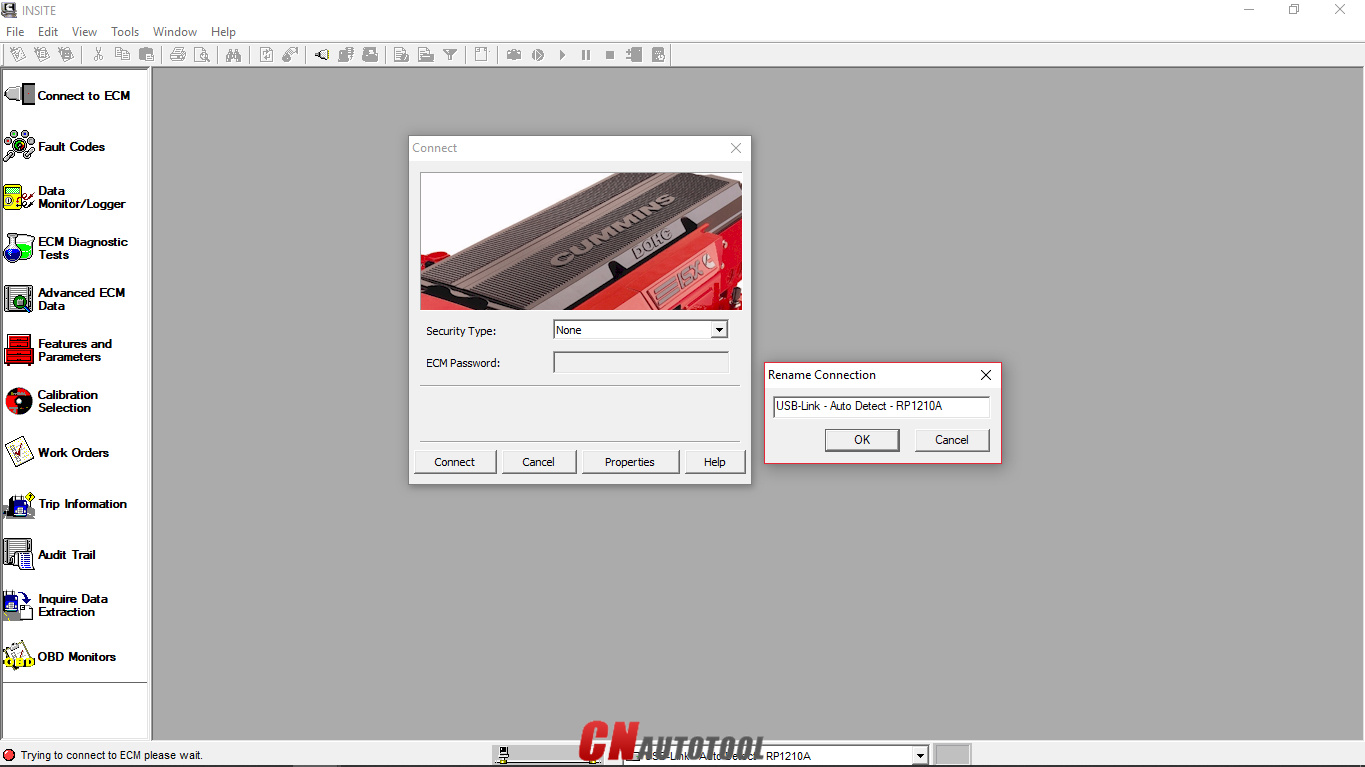
Open “Cummins INSITE” via the shortcut on the desktop. Use the status bar to select connection options

How to use Cummins INSITE Software to connect to CUMMINS engine-2
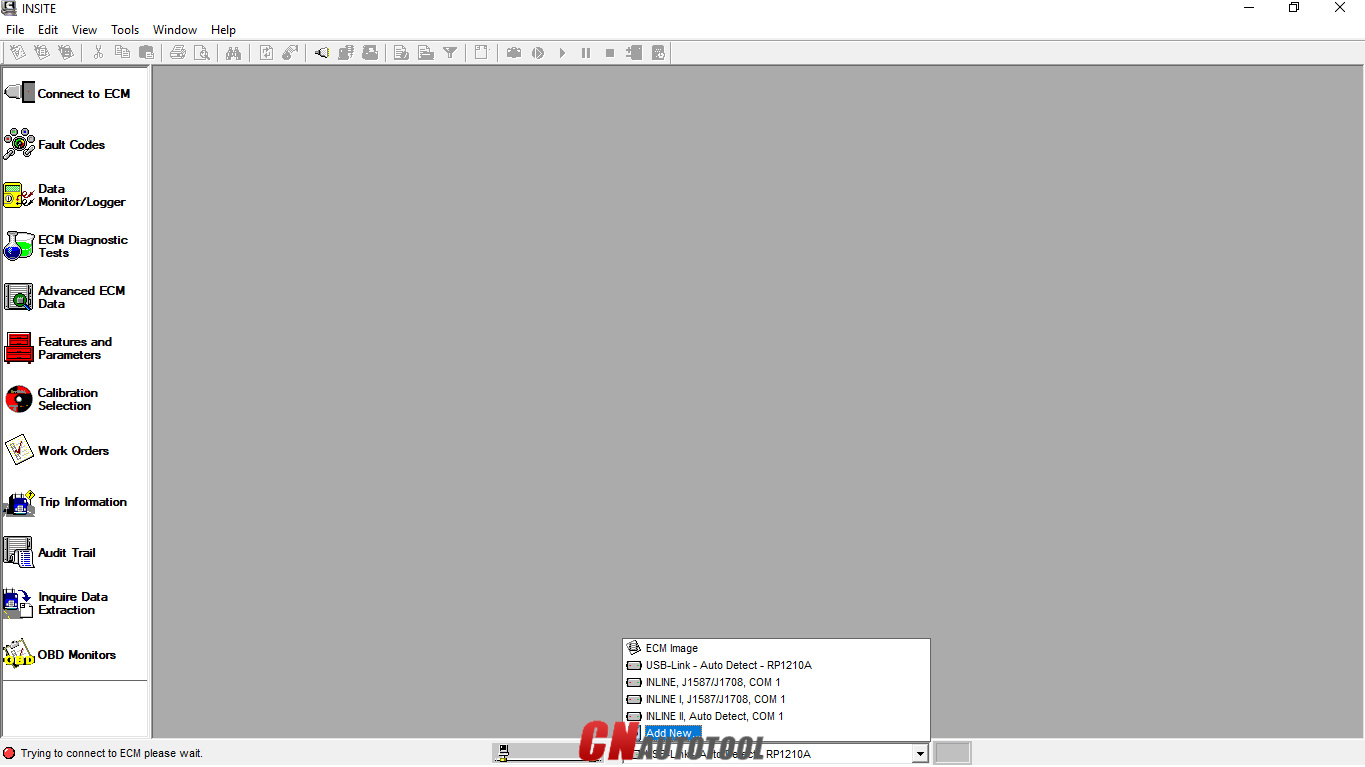
Figure 1.2 – Status bar (Connection Options)

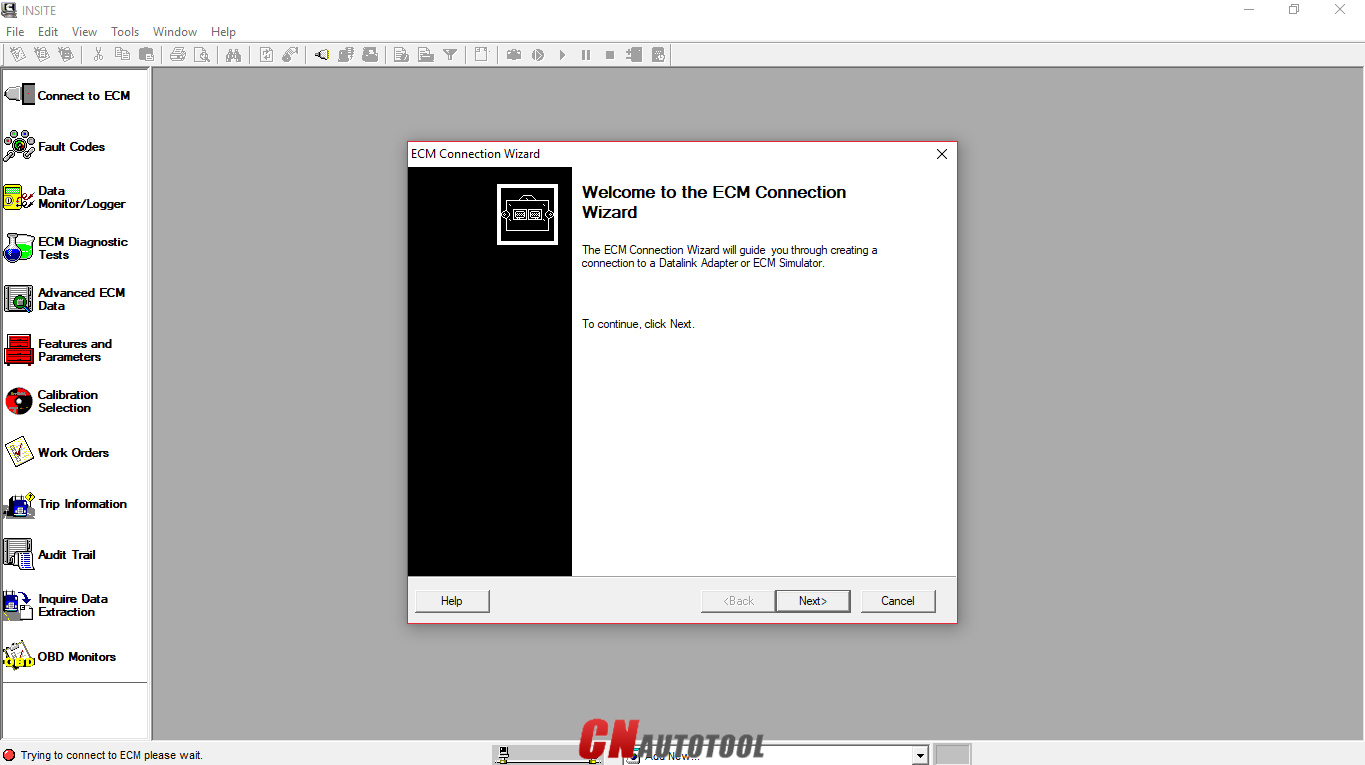
Click the dropdown box on the “Status bar” to view a list of all currently available connection options, or click “Add New” to create one, then click “Next”.
How to use Cummins INSITE Software to connect to CUMMINS engine-3

Figure 1.3 – ECM Connection Wizard

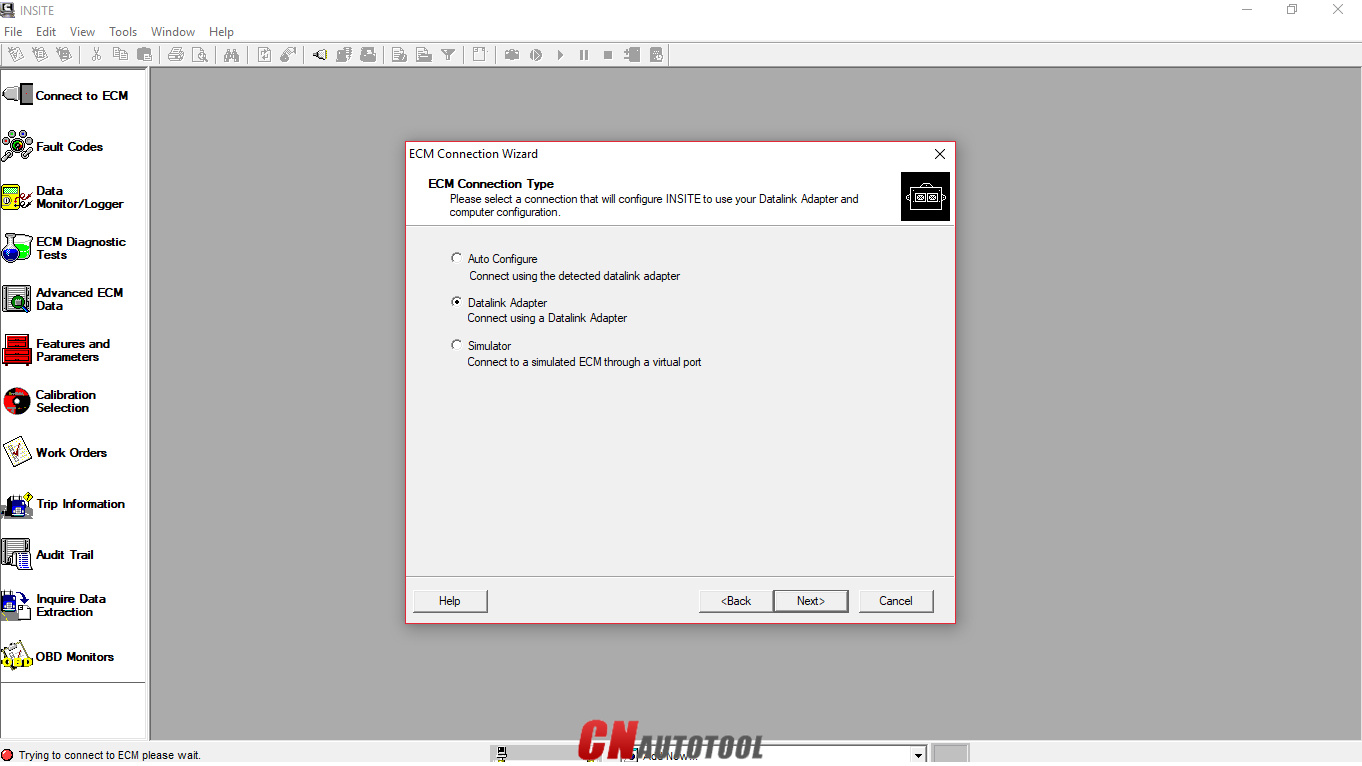
Use the “ECM Connection Type” page, and choose “Datalink Adapter” (Connect using a Datalink Adapter), then click “Next”.
How to use Cummins INSITE Software to connect to CUMMINS engine-4
Figure 1.4 – ECM Connection Type
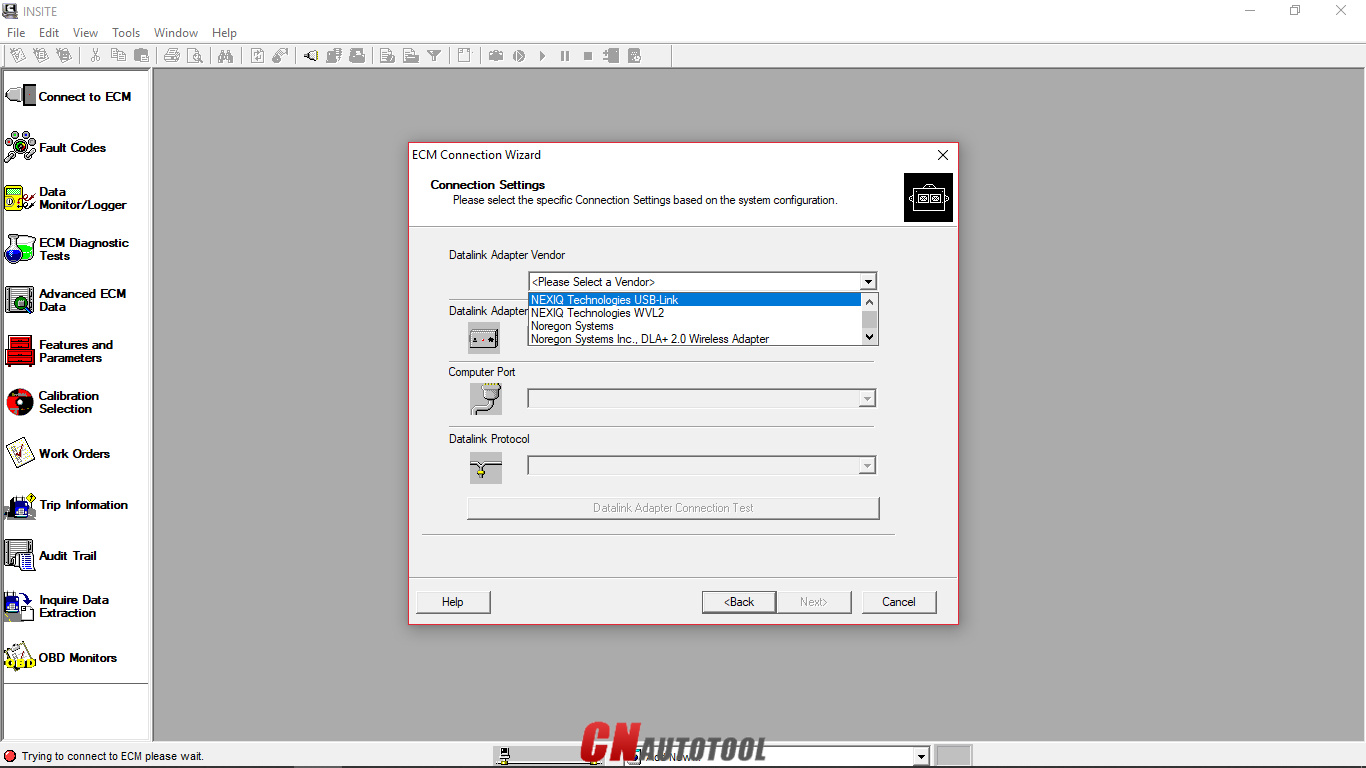
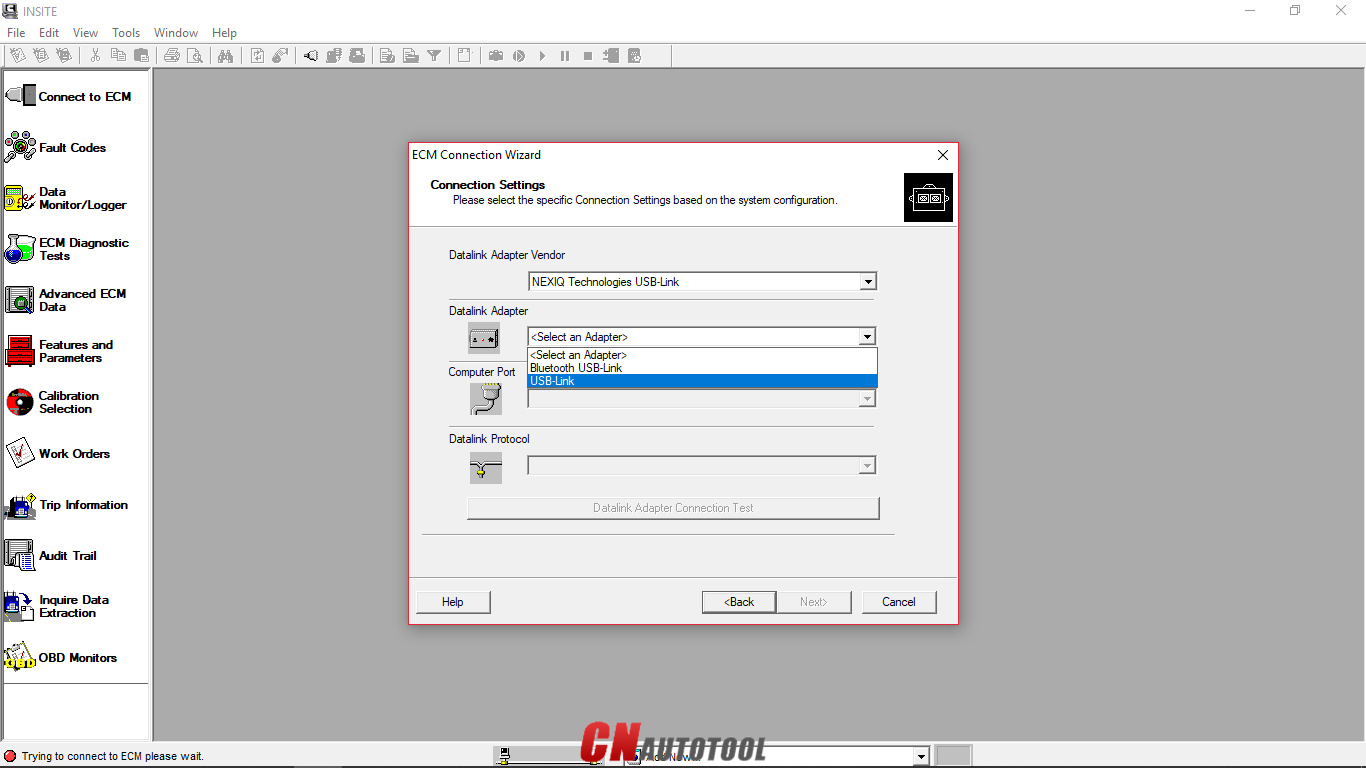
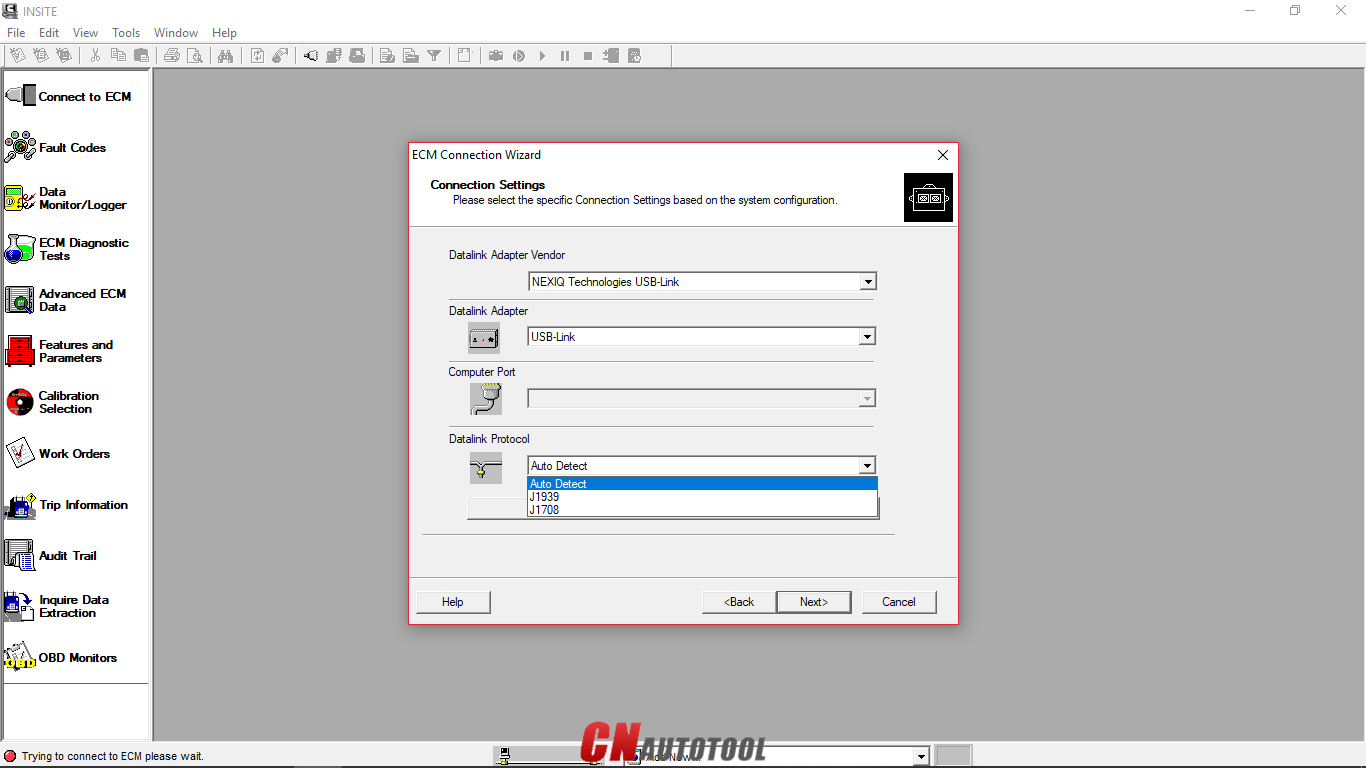
Choose “Connection Settings”, select your “Datalink Adapter Vendor”, “Datalink Adapter”, and “Datalink Protocol”, then click “Next”.
How to use Cummins INSITE Software to connect to CUMMINS engine-5

Figure 1.5 – Datalink Adapter Vendor

How to use Cummins INSITE Software to connect to CUMMINS engine-6
Figure 1.6 – Datalink Adapter
How to use Cummins INSITE Software to connect to CUMMINS engine-7

Figure 1.7 – Datalink Protocol

Click “Connect to ECM”
-If you are connecting to a new ECM or an ECM without existing ECM passwords, select “None” in the Security Type: dropdown list.
-If you then want to define ECM security type passwords, select ECM Passwords on the Tools menu once connected to the ECM.

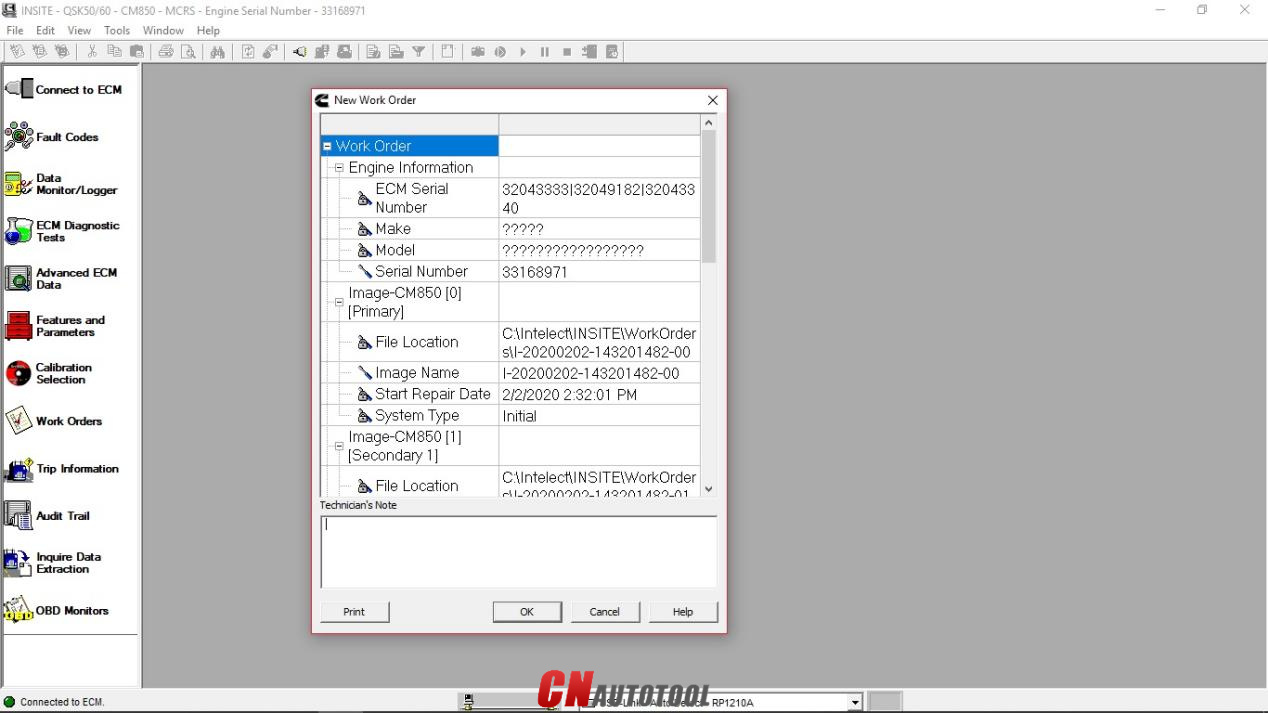
The “Work Order Wizard” is automatically displayed for you to create a work order for the selected connection, then click “OK”. NOTE: You can disable the Wizard from starting automatically by unchecking the Enable Work Order Mode checkbox in the Work Orders page of the Options window.

How to use Cummins INSITE Software to connect to CUMMINS engine-8
Figure 1.8 – New Work Order

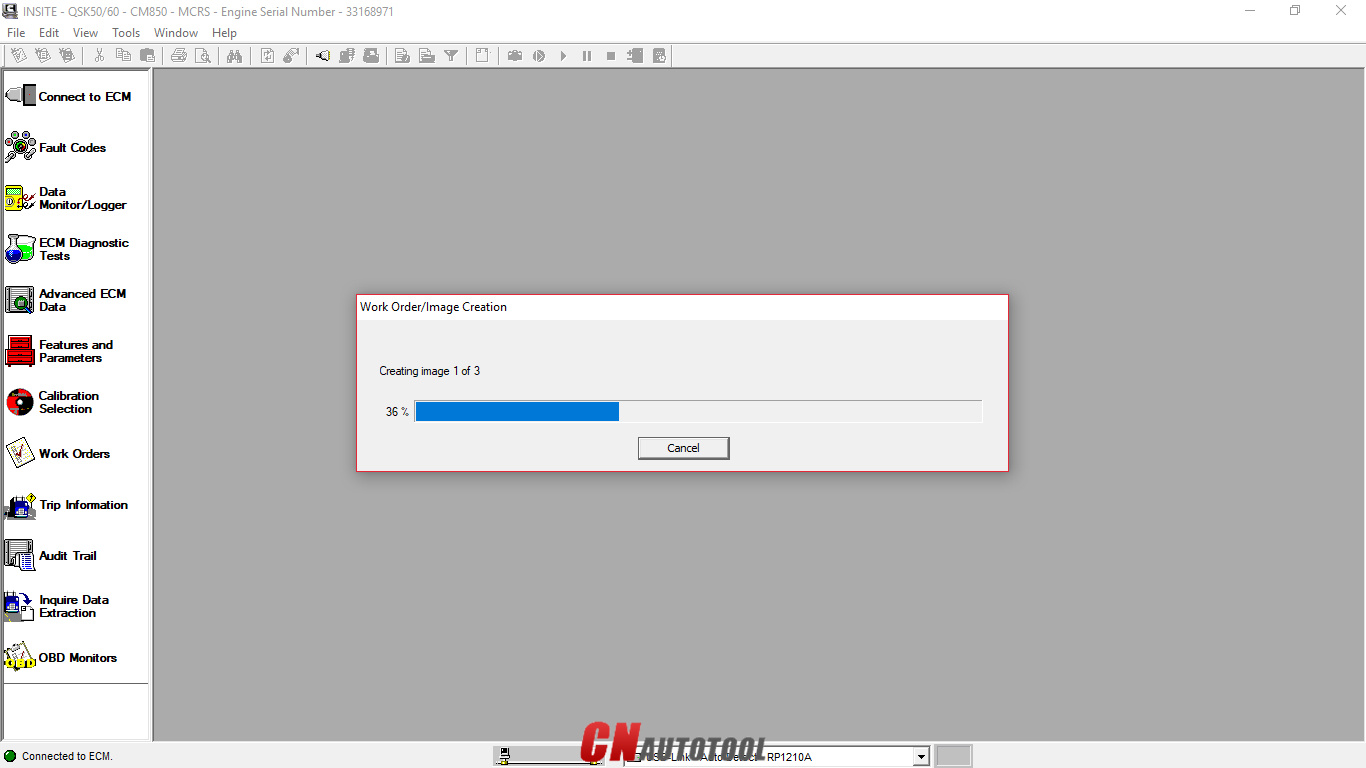
Wait the “Work Order/Image Creation” until 100% of creating image.

How to use Cummins INSITE Software to connect to CUMMINS engine-9
Figure 1.9 – Work Order/Image Creation

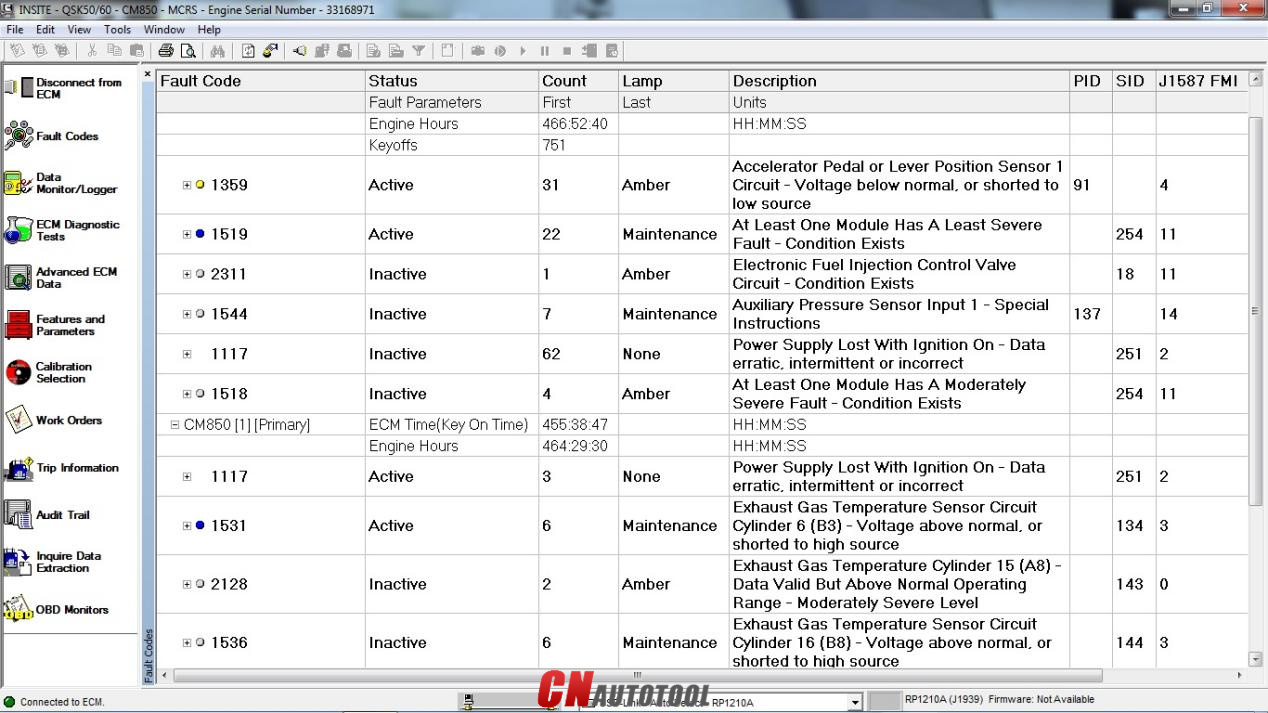
For example, “Fault Codes” display on Cummins INSITE software.
How to use Cummins INSITE Software to connect to CUMMINS engine-10

Figure 2.1 – Fault Codes

How to use Cummins INSITE Software to connect to CUMMINS engine-11
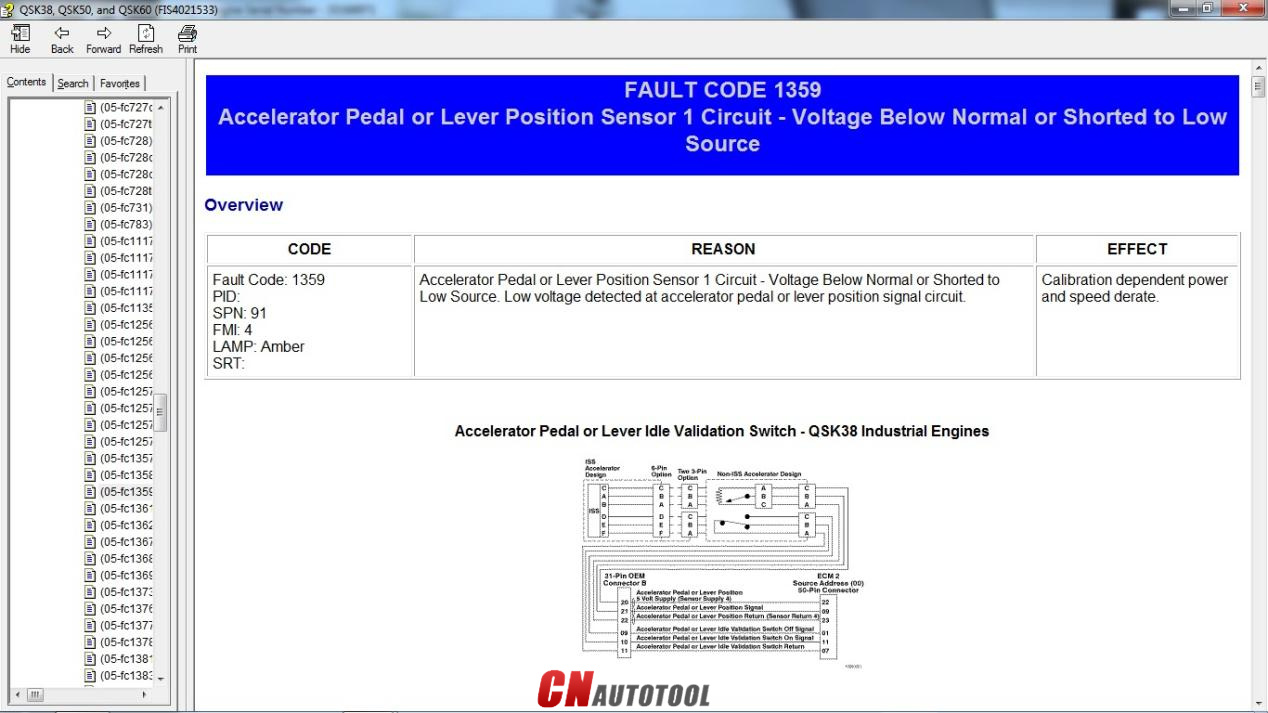
Figure 2.2 – Fault Codes (Overview)


Looking forward to your consultation our website sale@cnautotool.com

2022年6月29日星期三

How to pair the MaxiFlash with the IM608 Tablet?


 How to pair the MaxiFlash with the autel maxiim im608 auto key programmer?
1. Power on the tablet.
2. Insert the 16-pin vehicle data connector of the MaxiFlash to the vehicle data link connector (DLC).
3. Tap the VCI Manager application on the MaxiFlash Job Menu of the tablet.
4. Select BT from the connection mode list.
5. Tap the Scan button at the top right corner. Now the device starts searching for available pairing units.
6. The device name may display as MaxiFlash suffixed with a serial number. Select the appropriate device for pairing.
7. When paring is successfully done, the connection status displayed to the right of the device name is shown as Paired.
8. Once paired, the VCI button on the system Navigation bar at the Connection LED on the MaxiFlash illuminates solid blue. This signifies that the tablet is connected to the MaxiFlash, and is ready to perform vehicle diagnosis.
9. Tap the paired device again to unpair it.
10. Tap the Home button on the top left to return to the MaxiIM Job Menu

2022年6月12日星期日

Porsche PIWIS 3 Notes

The Porsche PIWIS 3 (PST3) is the newest Diagnostic Tool in the market. It can read trouble code, clear trouble code, shows ECU information. It test live data, display actual values, and programs.


The Porsche PIWIS 3 (PST3) Tester III Diagnostic Tool :
1. Exclusive support for Porsche third generation diagnostic PIWIS 3
2. New DoIP Ethernet diagnostic technology
3. Luxury car diagnosis, ultra low threshold
4. Support Porsche Models after 1996.
Update method : Send SSD back or buy a new SSD

Power-on password :123456

Notice:
1. The SSD cannot be copied.
2. Piwis 3 Software SSD can ONLY use as internal disk, NEVER use as external hard drive, otherwise it will be useless and damage the SSD.
We don't provide after sale service once the SSD used as external hard drive.
3. Laptop Specs Requirements: Lenovo laptop (1920*1080 resolution memory 4G I5CPU or above)
We standard package with laptop comes with Lenovo Yoga S1 i5 8G laptop is recommended.

4. This is hardware with software, if you need Piwis iii with laptop complete ready to use, please click: https://www.cnautotool.com/goods-6976-Porsche-Tester-III-Diagnostic-Tool-Piwis-3-Software-Installed-Laptop.html

5. Not support install printer on the hard disk yourself , its was protection , if you need install printer , please tell us in advance with your printer dirve , then we will install printer drive for you before the shipment  

Multi-Language: German, English, US English, French, Italian, Spanish, Japanese, Chinese, Russia, Portuguese, Nederlands


CnAutotool.com offer PIWIS Tester III Porsche PIWIS 3 Software, need know Piwis 3 Price just contact us
 

2022年6月1日星期三

CAT ET Software - 2022A

  CAT ET Software - 2022A


If you are seeking a good device to identify the problems in a Cat device or engine, you may wish to take into consideration buying the CAT ET software. This program is an electronic communication system that interacts with the equipment's ECM. It assists you to fix engine concerns and also displays the hours of procedure. The software application is cost-free for download from the supplier's site and consists of detailed directions for usage. CAT ET Software is a digital diagnostic software program that assists technicians and Principal Engineers in repairing problems in online regulated Cat equipments and engines.


The program is simple to use and also accesses details from the electronic control components found on Cat engines. The software application includes useful tests as well as standing criteria, as well as data logs for both active and logged codes. The software program is specifically helpful for mechanics who service heavy equipment. Its recommended PC needs as well as interaction equipment are listed on the product's web site. You can acquire the software program at a Michigan dealer or online. The Caterpillar ET analysis device is a program that permits solution personnel to reprogram the ECMs as well as evaluate essential system information. This software uses an exclusive data link network to interact with the maker's ECM.


It connects to the car's engine's ECM by means of an ATA or J1939 cable television as well as permits professionals to watch a group of diagnostics all at once. It shows present setup of an ECM. The software additionally has an innovative graphical interface as well as separate pull-down food selections. The program permits individuals to see a vehicle's version identification, version, as well as various other crucial info. A brand-new variation of Caterpillar ET software application has just been launched for your shop. CAT ET 2020A changes CAT ET 2019C as well as CAT ET 2018A, which are both previous variations. . It likewise includes a keygen for CAT ET 2020A. To utilize cat et software application, you should have a computer that fulfills a specific minimum arrangement.


 These updated variations of the software will allow your technicians to deal with electronically controlled Cat machines as well as engines. The most recent versions of the software will come with a manufacturing facility password generator constructed in .It is not advised that you purchase a brand-new computer, however it will work well if you have an existing computer system that satisfies the minimum demands. Furthermore, you have to utilize Microsoft Side or another security-sensitive web browser such as Firefox or Chrome. The most current version of these internet browsers may not be validated to work with the solution device. Check out this related post to get more enlightened on the topic:https://www.cnautotool.com/search.php?keywords=Caterpillar+ET3+Adapter+III&imageField=+


Please feel free to contact us ,If you have any question:

Live Support: Chat with us online
Whatsapp: +8618437976115
Email:
www.cnautotool.com


Skype:cnautotoolcom
Please bookmark our website so that you can check the order information and contact us.


2022年5月31日星期二

Volvo VOCOM 88890300 black look vs classic shell

 There are two Volvo VOCOM 88890300 Volvo/Renault/UD/Mack Truck diagnostic tool china clones- one with a Black look hardware clone over internet, the other with the classic metal shell. So any difference of them?


The two VOCOM 88890300 china clones are THE SAME actually.

2022年5月25日星期三

Porsche Piwis 3 language


The Porsche PIWIS 3 (PST3) is the newest Diagnostic Tool in the market. It can read trouble code, clear trouble code, shows ECU information. It test live data, display actual values, and programs. On all; process malfunction navigation, showing all interior circuit diagram. Specially if  were produced after 2005. The PIWIS III has original oscillometer and multi-meter Function. It is the absolutely necessarily tool for the job.

Porsche Piwis 3 Multi-Language: German, English, US English, French, Italian, Spanish, Japanese, Chinese, Russia, Portuguese, Nederlands


1.Piwis 3 With V40.900 Piwis III Software for Porsche Cars diagnostic & Programming.
2.Piwis 3 with developer mode software & TeamViewer Installed Lenovo Laptop Ready To Use, cover all piwis 2 functions.
3.With New DoIP Ethernet diagnostic technology,Supports Porsche Models after 2002


www.cnautotool.com


2022年5月19日星期四

Distinctive features of the Porsche PIWIS 3

 Porsche Piwis 3 Tester III equipment


    Product Name: Porsche Piwis 3 Tester III Diagnostic Tool Programming and Diagnostics Support
    Type: Electrical diagnostic system.
    Voltage: 12V / 24V
    Weight: 1kg
    Connection: USB
    Function: Diagnosis and Programming
    Support vehicles: All Porsche models up to 2021

Top 4 Reason to get Tester III Diagnostic Tool :
1. Exclusive support for P0rsche third generation diagnostic PIWIS 3
2. New DoIP Ethernet diagnostic technology
3. Luxury car diagnosis, ultra low threshold
4. Support Porsche Models after 2002.
Update method : Send SSD back or buy a new SSD

Distinctive features of the Porsche PIWIS 3

    Diagnostic application
    Guided bug finding
    Actual value / input signal function
    Driving test/link function
    Maintenance/repair function group
    Programming/coding function group
    Journaling
    Filter
    Wiring Diagram Application
    Instrumentation interface
    Spending an amount equal to your breakfast for 3 months can own a quality computer for your work for a decade (10 years)

Functions of Porsche PIWIS 3

    Read/clear error codes
    Capture the data stream
    Computer programming match
    Check ingredients
    Refer to maintenance information
    Component site drawings
    Wiring diagram

All Porsche models from 2010 to present (recommended for use with vehicles after 2012): Porsche 911 (997) (991) Boxster / Cayman (987) Cayenne to Cayenne MY 2010 from MY 2011 PanameraEspecially the latest car models: Paramera (971) 2018 Caynenne (92A) 2018 Macan (95B) 2018 911 (991) 2018 and other old cars

    Porsche 911, 992, 991, 997, 996, 996 GT2, 996 GT3, 993, 964
    Porsche Boxster 982, 981, 987, 986
    Porsche Cayman 982, 981, 987
    Porsche Cayenne 9YA, Operation 9YA, 92A, 9PA
    Porsche Panamera 971, 970
    Porsche Racing 935, 991 GT2 RS Clubsport, 982 Cayman GT4
    Clubsport, 981 Cayman GT4 Clubsport
    Other: Macan, Taycan, 981 Spyder, Carrera GT, GT1, 968, 944, 928.


Piwis III Supports New & Old Cars:
All Porsche from 1998-2022:
1.Porsche 911(997) (991)
2.Boxster/Cayman (987)
3.Cayenne up to MY 2022
4.Cayenne from MY 2011
5.Panamera

Especially the latest models:
1.Paramera (971) 2022
2.Caynenne (92A) 2022
3.Macan (95B) 2022
4.911 (991) 2022

Also support All Other Old car models

1.Piwis 3 With V40.900 Piwis III Software for Porsche Cars diagnostic & Programming.
2.Piwis 3 with developer mode software & TeamViewer Installed Lenovo Laptop Ready To Use, cover all piwis 2 functions.
3.With New DoIP Ethernet diagnostic technology,Supports Porsche Models after 2002

The Porsche PIWIS 3 (PST3) is the newest Diagnostic Tool in the market. It can read trouble code, clear trouble code, shows ECU information. It test live data, display actual values, and programs. On all; process malfunction navigation, showing all interior circuit diagram. Specially if  were produced after 2005. The PIWIS III has original oscillometer and multi-meter Function. It is the absolutely necessarily tool for the job.

Package Listing :
1× Piws 3 Tester
1× OBDII Cable
1× USB Cable
1× 256GB Software SSD
1× Lenovo S1 yoga12 I5 5300U 8GB


 Ultra-low price Porsche Piwis 3 Tester III Diagnostic Software for Porsche :https://www.cnautotool.com/search.php?keywords=Piwis+III&imageField=+


https://www.cnautotool.com/category-2-b0-Car+Diagnostic+Tools.html


2022年5月17日星期二

Caterpillar ET (Electronic Technician)

  Caterpillar Communication Adapter 3 is a CAT group dealer workshop diagnostic tool built to work with Caterpillar heavy vehicles and Caterpillar engines. This adapter connects any computer (notebook or PC) to CAT vehicle or engine and can perform all diagnostic services by Caterpillar ET (Electronic Technician – Caterpillar Electronic Technician) software.
 
CAT adapter can do diagnostic operations for all Caterpillar vehicle and engine models with electronic controls.
 
Communication:
 
Allows communication between service tools and engine controls using various data links such as J1939/11, DeviceNet (future release), CAT DataLink, and J1708 (ATA) vehicle networks;
Flash program allows adapter firmware upgrades as additional features become available;
Uses J1939/11, high-speed data link (part of ADEM III controls), substantially reducing flash times;
Automatically selects J1939/11 when flashing the engine (reduces the flash time approximately 80%, from 14 minutes to 3 minutes).

With the CAT Diagnostic Tool, you can:
View active and logged diagnostics
View events where irregularities occurred and were logged by the ECM
View the status of a group of parameters (temperatures, pressures, etc.) simultaneously
Record and log performance data
Graph a group of status parameters
View the current configuration of an ECM
Change ECM configurations
Perform diagnostic tests
Perform calibrations
Print reports and diagnostic results
For some machine and engine products, additional functionality has been included with the service tool program


To get the vehicle information the Cat ET software must be connected to the Electronic Control Module (ECM). For this purpose, you need a suitable diagnostic link adapter (DLA), for instance, Genuine CAT Comm Adapter III

The list of supported CAT machines and engines can be found below(if your vehicle is missing, please contact us we will double check):
Engines:
Electric Power
Electric Power Generation
Industrial
Marine Power Systems
Oil and Gas

Machines:
Articulated Trucks
Asphalt Pavers
Backhoe Loaders
Cold Planers
Compactors
Dozers
Drills
Excavators
Feller Bunchers
Forest Machines
Forwarders
Harvesters
Hydraulic Mining Shovels
Knuckleboom Loaders
Material Handlers
Motor Graders
Off-Highway Trucks
Pipelayers
Road Reclaimers
Site Prep Tractors
Skid Steer and Compact Track Loaders
Skidders
Telehandlers
Track Loaders
Underground - Hard Rock
Underground - Longwall
Underground - Room and Pillar
Utility Vehicles
Wheel Dozers
Wheel Excavators
Wheel Loaders
Wheel Tractor-Scrapers