2022年10月30日星期日

Witech Micropod2 Program 2005 Chrysler 200 All Keys Lost


Confirmed! wiTech Micropod 2 is able to do online programming to Chrysler including ECU programming and key adding even when all keys are lost. Here you go.


Purpose: Micropod 2 clone programs new key fobik to Chrysler 200 when all keys are lost

Car: 2015 Chrysler 200 (The 2015 Chrysler 200, along with other Fiat-based models like the Jeep Renegade, Jeep Cherokee, and Ram Promaster, are all equipped with a rolling PIN Code.)


What you need:

Locksmith Identification Number (LSID through NASTF)

Proper keys to be programmed

PIN Code

Laptop

MicroPOD II good quality clone or the genuine

wiTECH diagnostic application


Before you begin the programming process, you should the Key Code (key cut code) and Authorized PIN (key programming).


VERY VERY VERY IMPORTANT:

    You must be online to program the key with Micropod 2 clone.
    You can pull the PIN Code with OBDSTAR F104 key tool.
    If you input the wrong code for 3 times, it locks the BCM and you cannot service the vehicle for 24 hours.
    The key is one-time programmable. Once married to the vehicle it is locked to the car forever. The key can be erased from the car and put back into the same car, but can’t be switched to another car.
    The placement of the key during initialization is important. It needs to be placed either behind the shifter or in the center console.


How to program fobik with wiTECH app:


Step 1:

Plug the MicroPOD II adapter into the OBD port and connect the USB cable from the device to your laptop. This wakes the BUS on the car.


Step 2:


Manually enter the VIN of the vehicle. This gives you access to the module list.  Select the RFH (Radio Frequency Hub) module. This is the module where the key is registered.


Step 3:


Next select “Miscellaneous Functions,” then “Program Ignition Fobiks.”  At this point, you are prompted to enter the VIN again, followed by the four-digit PIN Code.


Step 4:


After the four-digit pin is entered you are prompted to hit continue to “Program Ignition FOBIK.” Once you hit continue you must press the UNLOCK button on the FOBIK within 30 seconds (the FOBIK needs to be located near the center console during this procedure).


Step 5:


Programming of the Ignition FOBIK is now successful. The new key key is accepted into the car, and the ignition will now turn on and start the car. At this point, you also have the option to program a second key with wiTech application.


www.cnautotool.com


2022年10月21日星期五

Solve CG FC200 E135 Device not activated


How to Solve CG FC200 E135 Device not activated?

Here shares the solution to resolve CG FC200 Error ‘E135: device not activated’.


 the solution:

    FC200 activation requires network connection.

Make sure the computer is connected to the internet with stable signal.

    Connect FC200, ECU and computer again.

Make sure the device connection is normal.

    Update the software

In FC200 software, first click ‘Check for updates’ to check if there is new version for update. If yes, click ‘Firmware upgrade’ to update.


2022年10月8日星期六

How to use Cummins INSITE Software to connect to CUMMINS engine

How to use Cummins INSITE Software to connect to CUMMINS engine-1
There Share details of connecting Cummins engines with Cummins INSITE software

Proceed as follows:
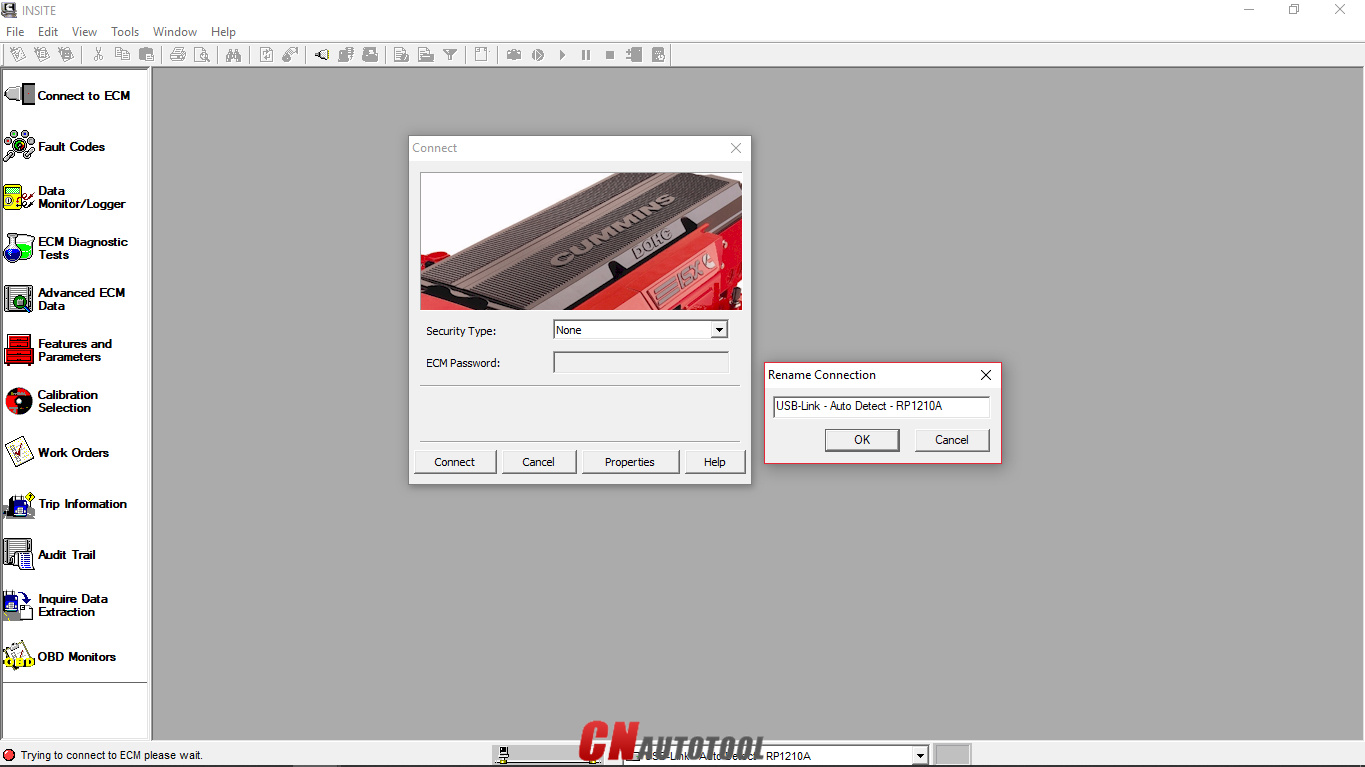
Open “Cummins INSITE” via the shortcut on the desktop. Use the status bar to select connection options

How to use Cummins INSITE Software to connect to CUMMINS engine-2
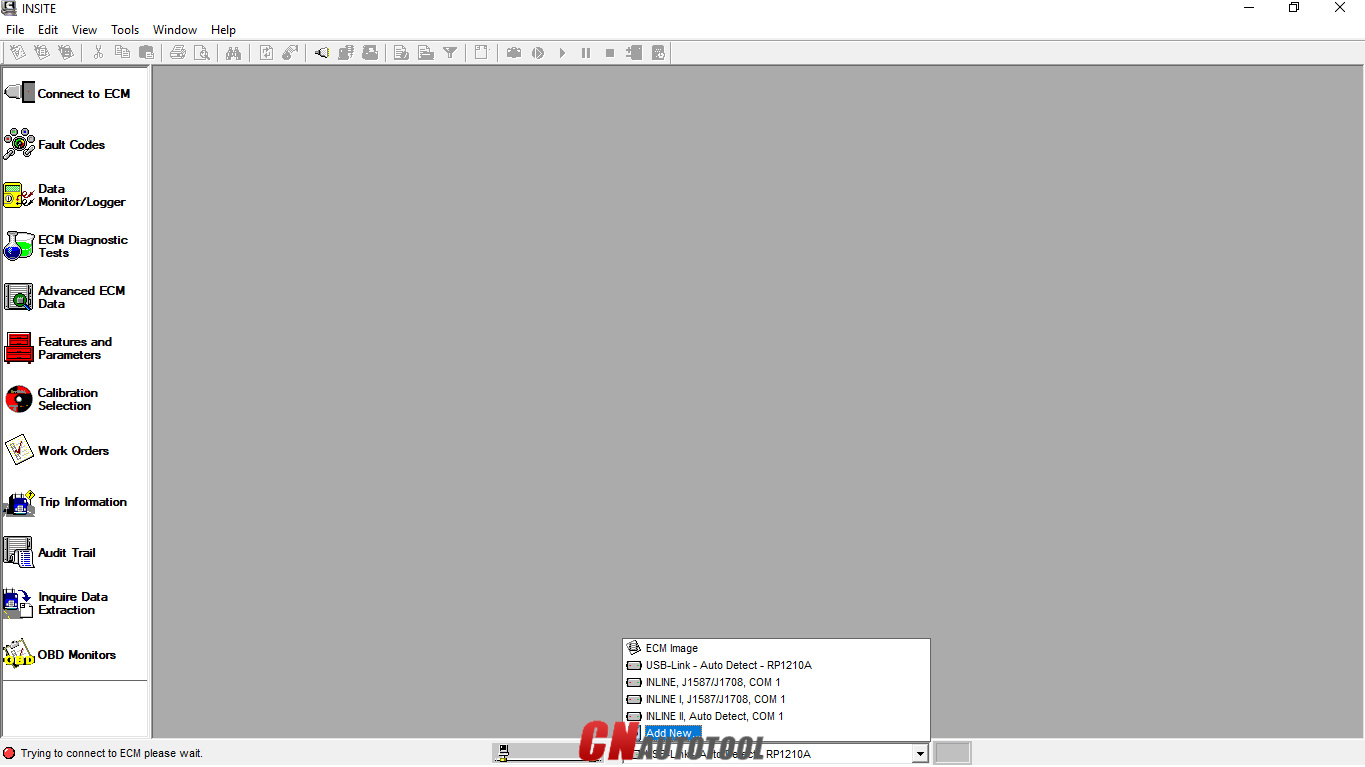
Figure 1.2 – Status bar (Connection Options)

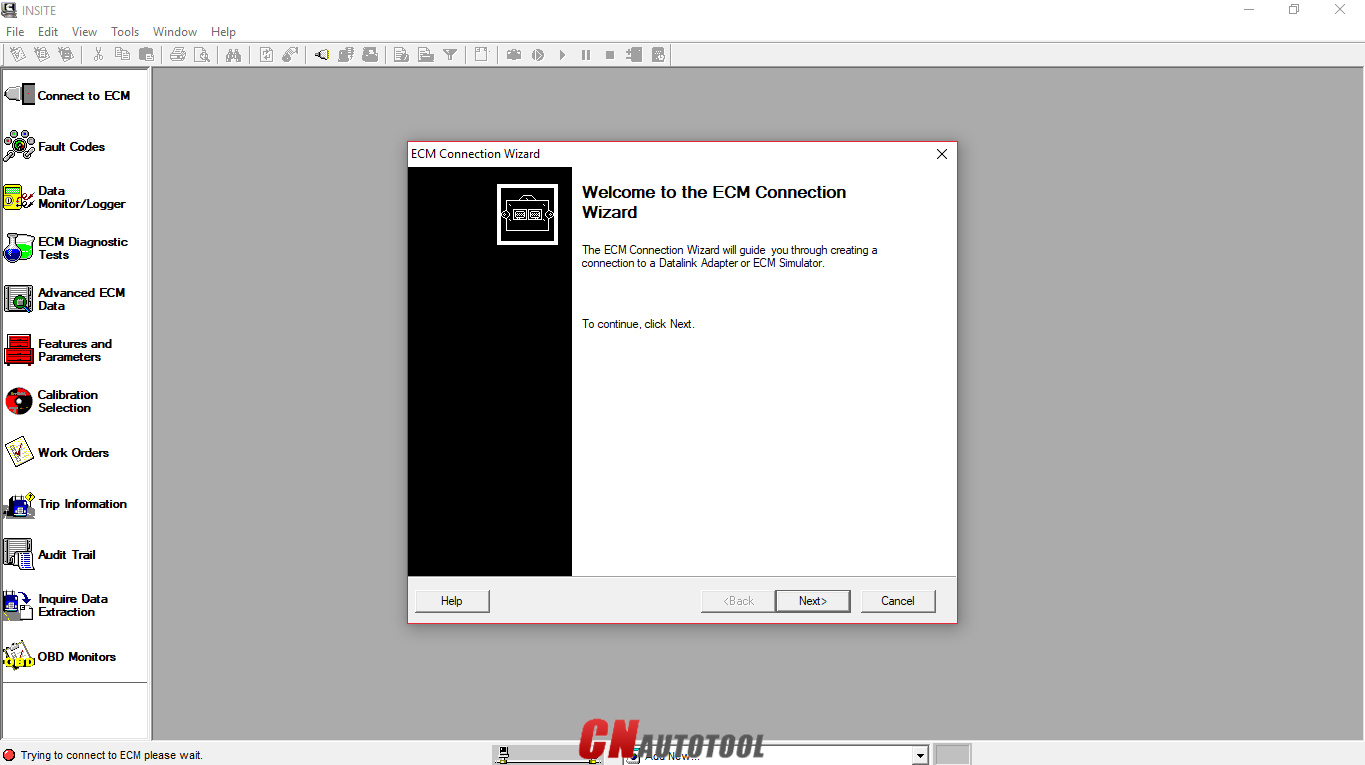
Click the dropdown box on the “Status bar” to view a list of all currently available connection options, or click “Add New” to create one, then click “Next”.
How to use Cummins INSITE Software to connect to CUMMINS engine-3

Figure 1.3 – ECM Connection Wizard

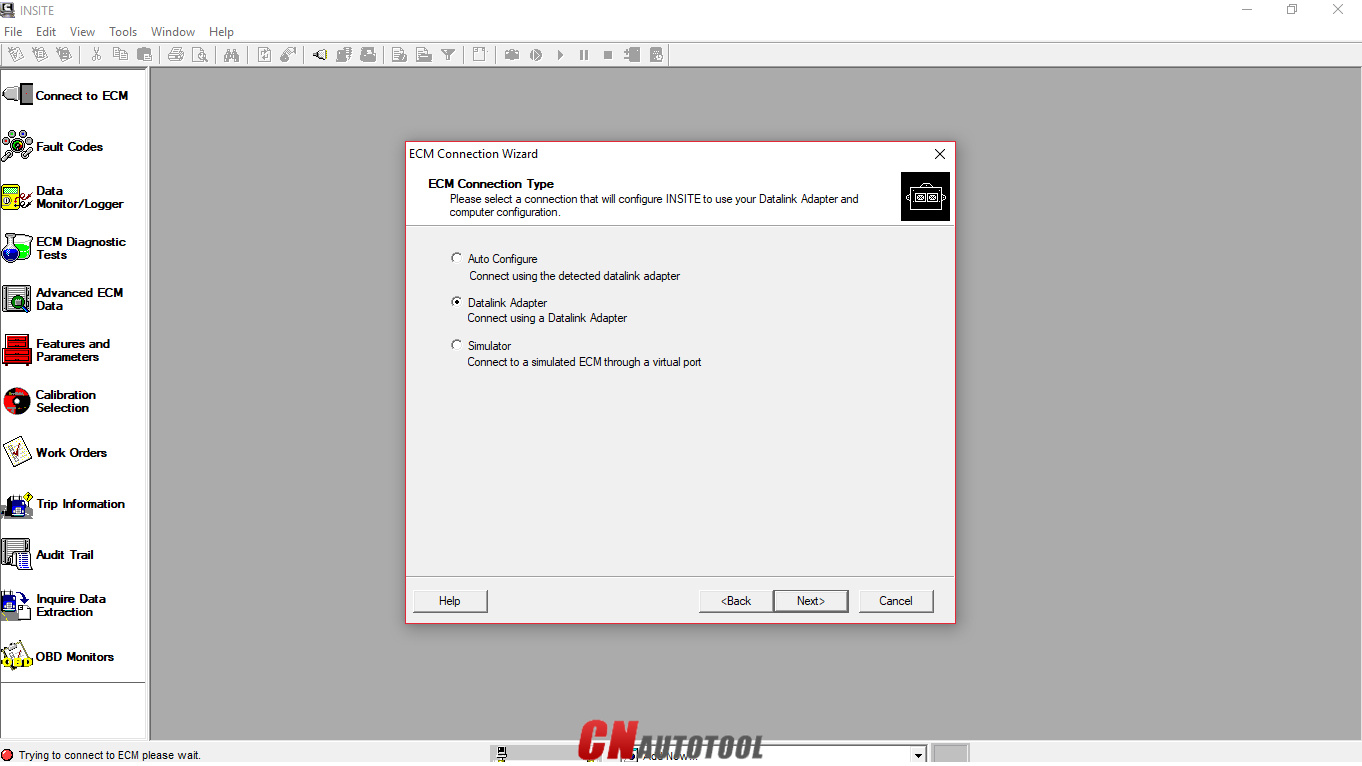
Use the “ECM Connection Type” page, and choose “Datalink Adapter” (Connect using a Datalink Adapter), then click “Next”.
How to use Cummins INSITE Software to connect to CUMMINS engine-4
Figure 1.4 – ECM Connection Type
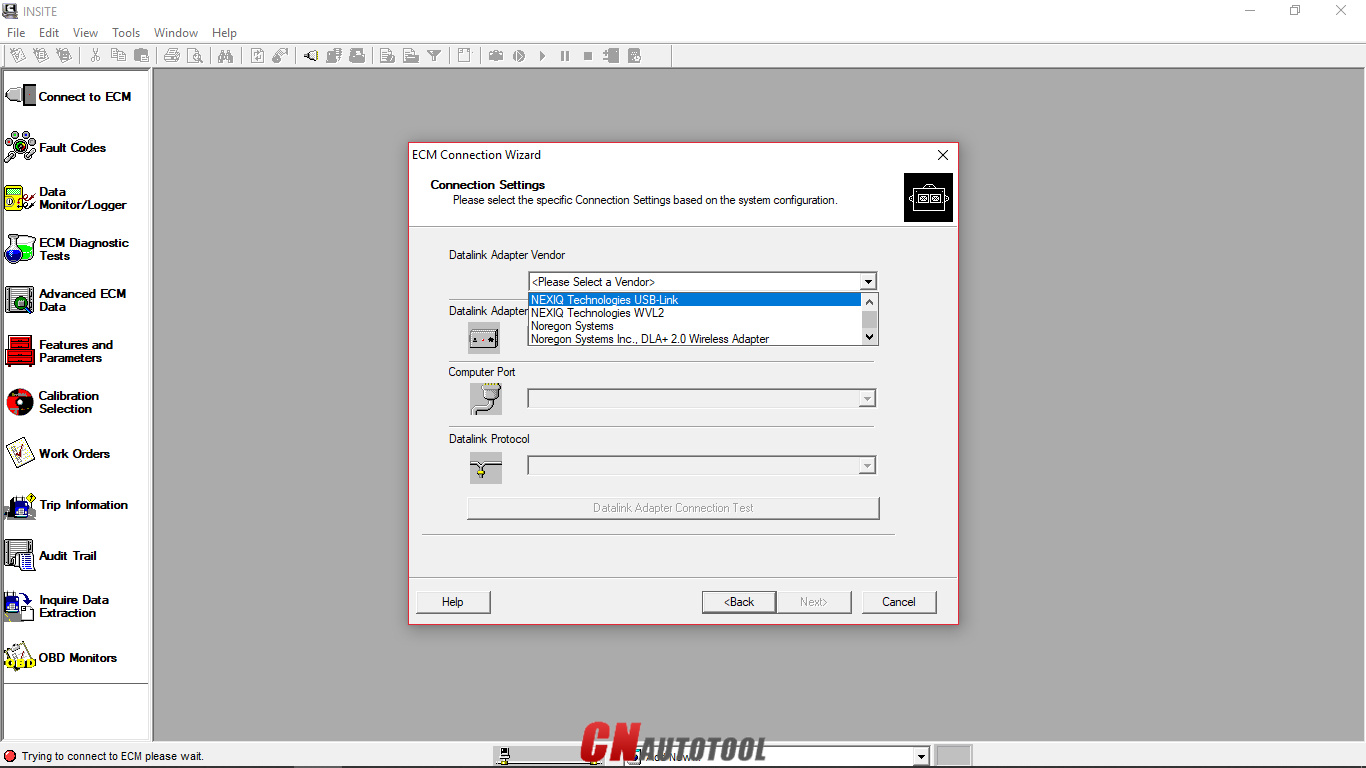
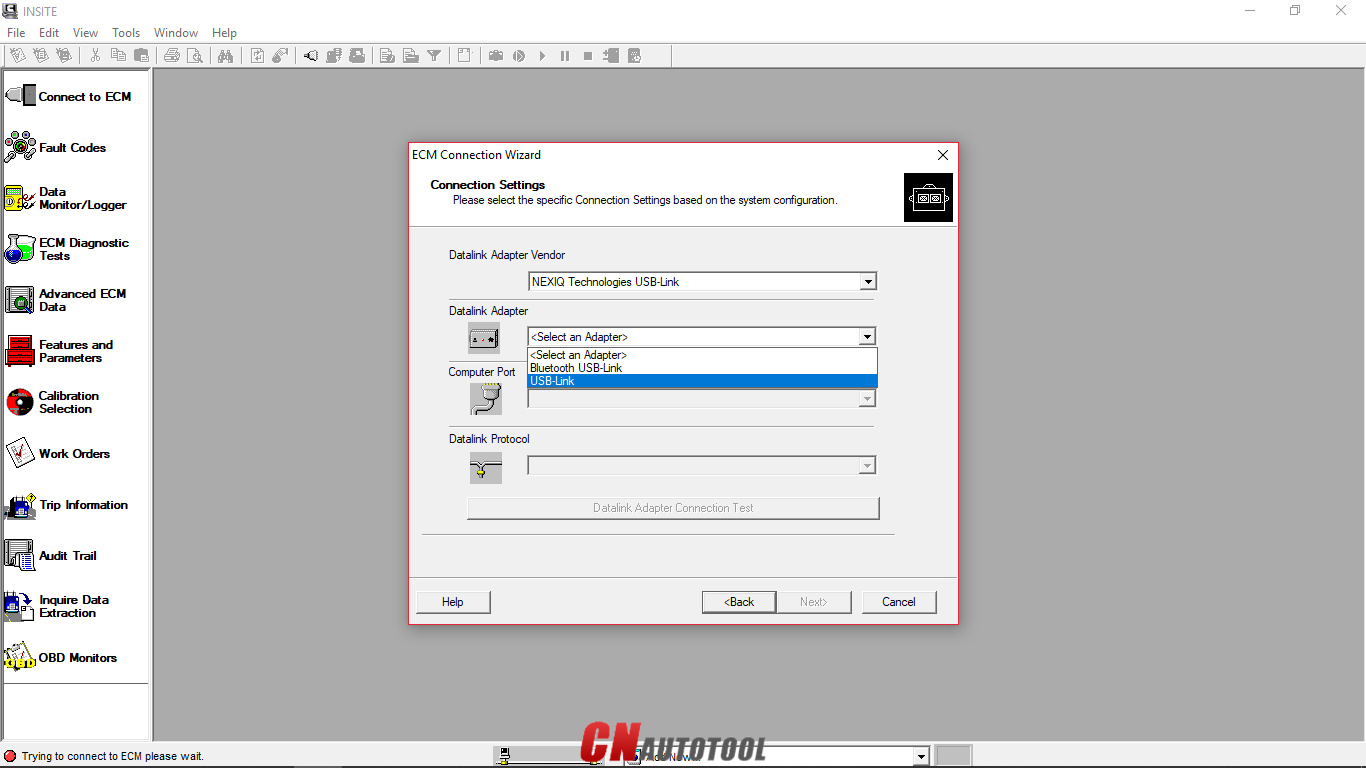
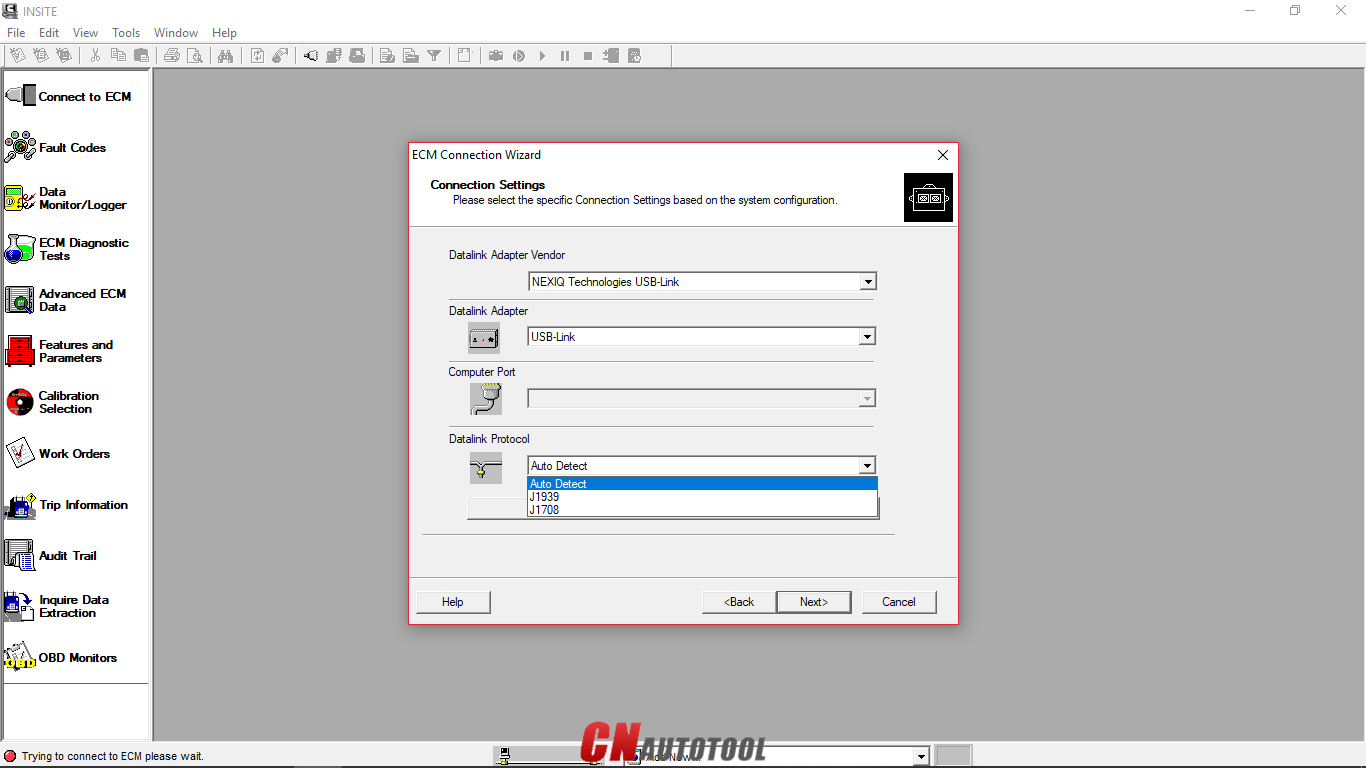
Choose “Connection Settings”, select your “Datalink Adapter Vendor”, “Datalink Adapter”, and “Datalink Protocol”, then click “Next”.
How to use Cummins INSITE Software to connect to CUMMINS engine-5

Figure 1.5 – Datalink Adapter Vendor

How to use Cummins INSITE Software to connect to CUMMINS engine-6
Figure 1.6 – Datalink Adapter
How to use Cummins INSITE Software to connect to CUMMINS engine-7

Figure 1.7 – Datalink Protocol

Click “Connect to ECM”
-If you are connecting to a new ECM or an ECM without existing ECM passwords, select “None” in the Security Type: dropdown list.
-If you then want to define ECM security type passwords, select ECM Passwords on the Tools menu once connected to the ECM.

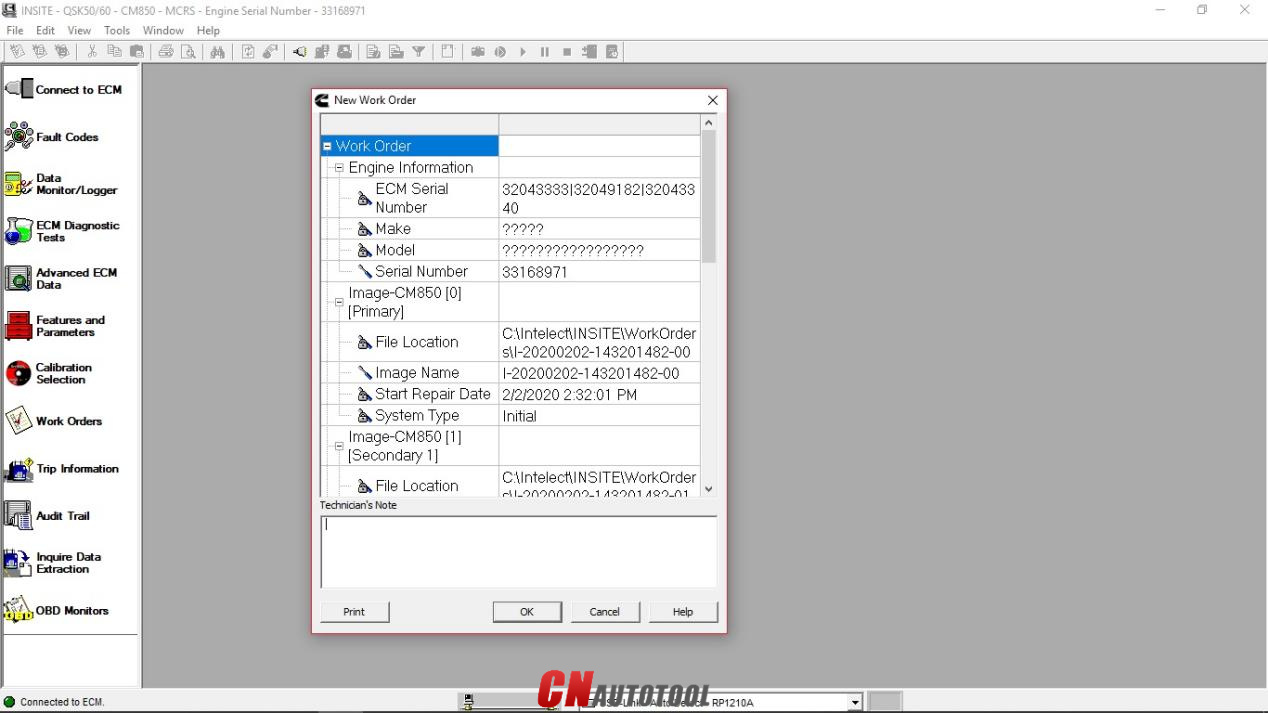
The “Work Order Wizard” is automatically displayed for you to create a work order for the selected connection, then click “OK”. NOTE: You can disable the Wizard from starting automatically by unchecking the Enable Work Order Mode checkbox in the Work Orders page of the Options window.

How to use Cummins INSITE Software to connect to CUMMINS engine-8
Figure 1.8 – New Work Order

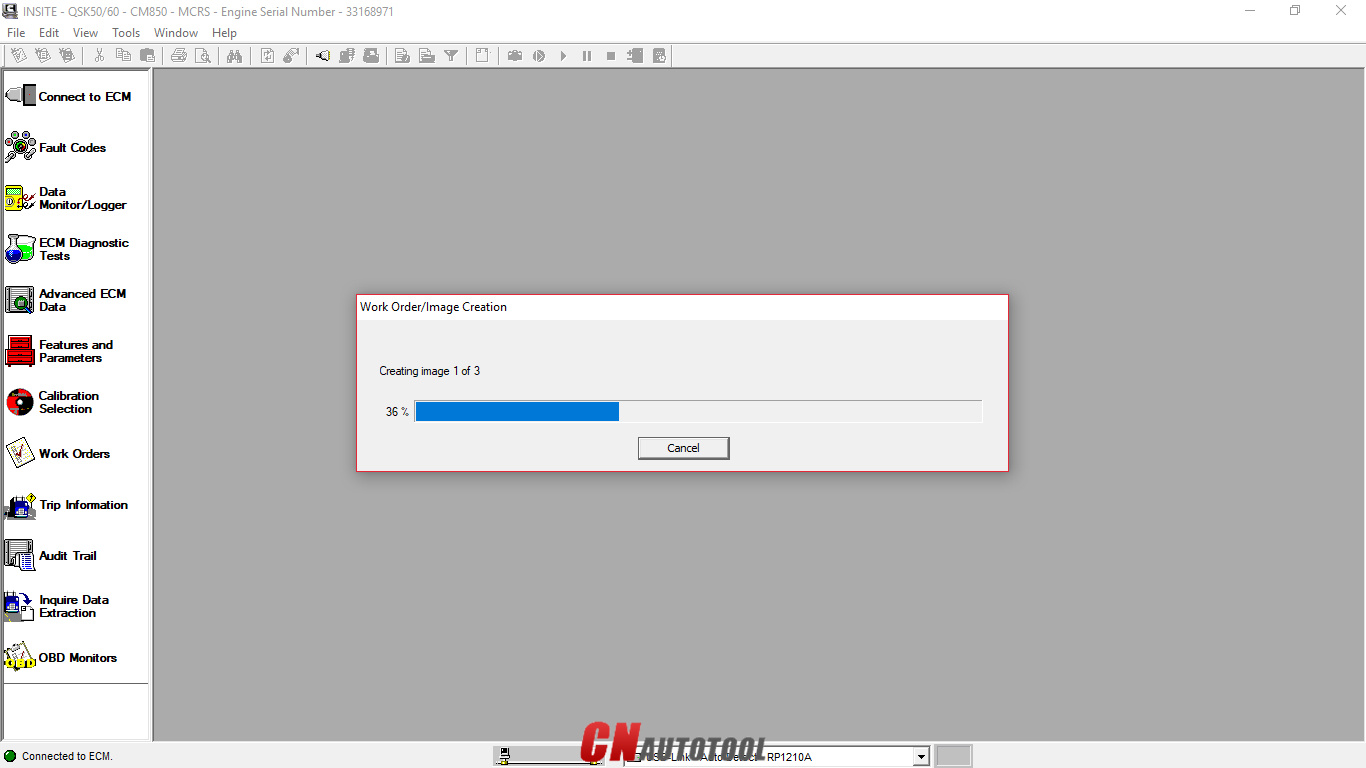
Wait the “Work Order/Image Creation” until 100% of creating image.

How to use Cummins INSITE Software to connect to CUMMINS engine-9
Figure 1.9 – Work Order/Image Creation

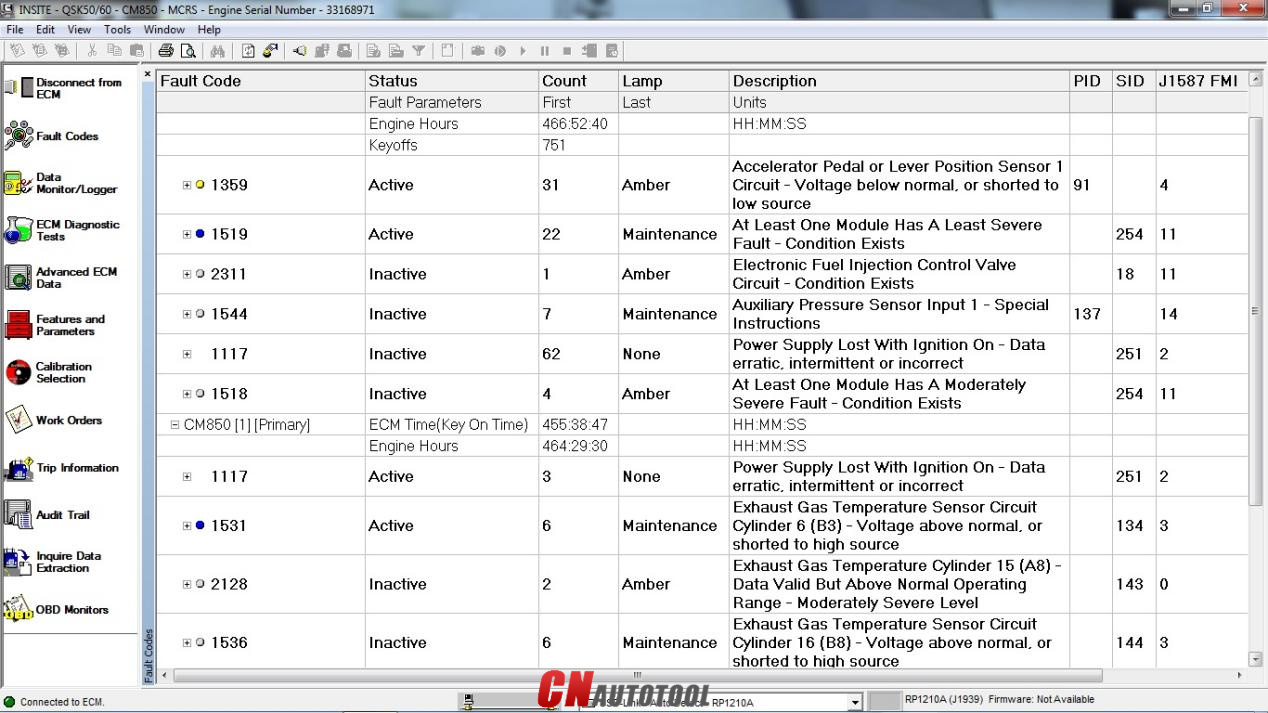
For example, “Fault Codes” display on Cummins INSITE software.
How to use Cummins INSITE Software to connect to CUMMINS engine-10

Figure 2.1 – Fault Codes

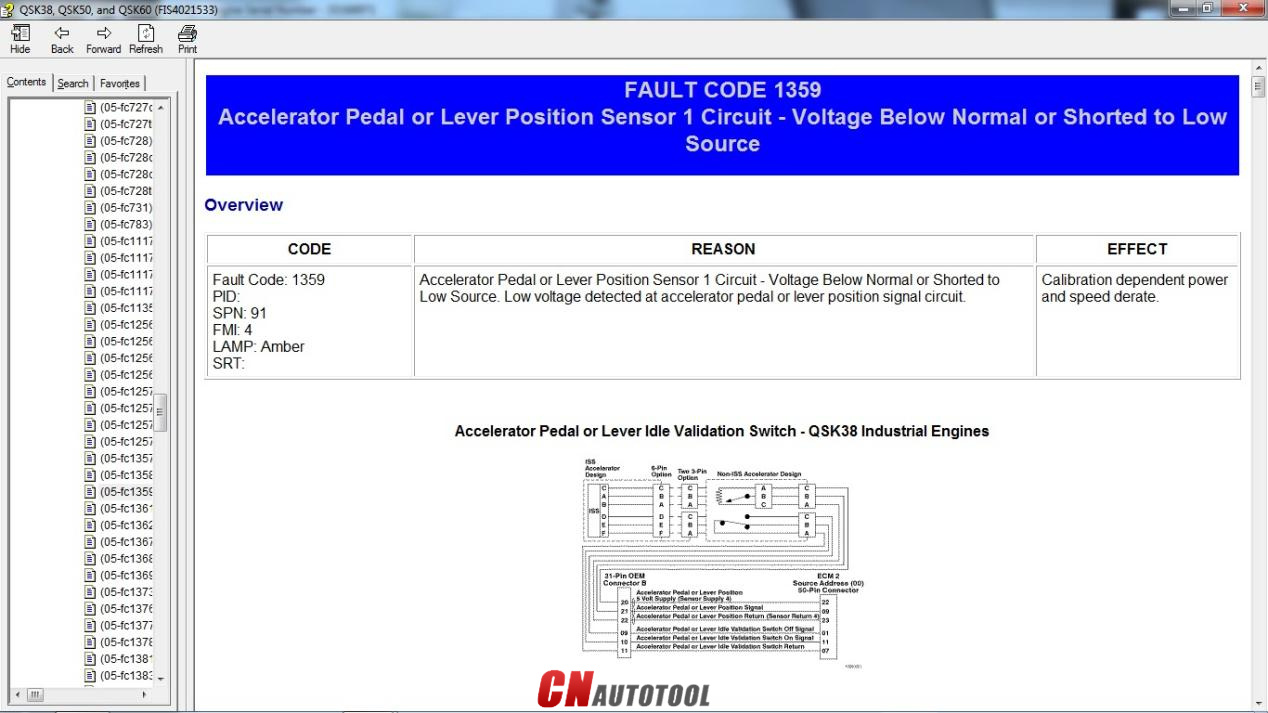
How to use Cummins INSITE Software to connect to CUMMINS engine-11
Figure 2.2 – Fault Codes (Overview)


Looking forward to your consultation our website sale@cnautotool.com

2022年6月29日星期三

How to pair the MaxiFlash with the IM608 Tablet?


 How to pair the MaxiFlash with the autel maxiim im608 auto key programmer?
1. Power on the tablet.
2. Insert the 16-pin vehicle data connector of the MaxiFlash to the vehicle data link connector (DLC).
3. Tap the VCI Manager application on the MaxiFlash Job Menu of the tablet.
4. Select BT from the connection mode list.
5. Tap the Scan button at the top right corner. Now the device starts searching for available pairing units.
6. The device name may display as MaxiFlash suffixed with a serial number. Select the appropriate device for pairing.
7. When paring is successfully done, the connection status displayed to the right of the device name is shown as Paired.
8. Once paired, the VCI button on the system Navigation bar at the Connection LED on the MaxiFlash illuminates solid blue. This signifies that the tablet is connected to the MaxiFlash, and is ready to perform vehicle diagnosis.
9. Tap the paired device again to unpair it.
10. Tap the Home button on the top left to return to the MaxiIM Job Menu

2022年6月12日星期日

Porsche PIWIS 3 Notes

The Porsche PIWIS 3 (PST3) is the newest Diagnostic Tool in the market. It can read trouble code, clear trouble code, shows ECU information. It test live data, display actual values, and programs.


The Porsche PIWIS 3 (PST3) Tester III Diagnostic Tool :
1. Exclusive support for Porsche third generation diagnostic PIWIS 3
2. New DoIP Ethernet diagnostic technology
3. Luxury car diagnosis, ultra low threshold
4. Support Porsche Models after 1996.
Update method : Send SSD back or buy a new SSD

Power-on password :123456

Notice:
1. The SSD cannot be copied.
2. Piwis 3 Software SSD can ONLY use as internal disk, NEVER use as external hard drive, otherwise it will be useless and damage the SSD.
We don't provide after sale service once the SSD used as external hard drive.
3. Laptop Specs Requirements: Lenovo laptop (1920*1080 resolution memory 4G I5CPU or above)
We standard package with laptop comes with Lenovo Yoga S1 i5 8G laptop is recommended.

4. This is hardware with software, if you need Piwis iii with laptop complete ready to use, please click: https://www.cnautotool.com/goods-6976-Porsche-Tester-III-Diagnostic-Tool-Piwis-3-Software-Installed-Laptop.html

5. Not support install printer on the hard disk yourself , its was protection , if you need install printer , please tell us in advance with your printer dirve , then we will install printer drive for you before the shipment  

Multi-Language: German, English, US English, French, Italian, Spanish, Japanese, Chinese, Russia, Portuguese, Nederlands


CnAutotool.com offer PIWIS Tester III Porsche PIWIS 3 Software, need know Piwis 3 Price just contact us
 

2022年6月1日星期三

CAT ET Software - 2022A

  CAT ET Software - 2022A


If you are seeking a good device to identify the problems in a Cat device or engine, you may wish to take into consideration buying the CAT ET software. This program is an electronic communication system that interacts with the equipment's ECM. It assists you to fix engine concerns and also displays the hours of procedure. The software application is cost-free for download from the supplier's site and consists of detailed directions for usage. CAT ET Software is a digital diagnostic software program that assists technicians and Principal Engineers in repairing problems in online regulated Cat equipments and engines.


The program is simple to use and also accesses details from the electronic control components found on Cat engines. The software application includes useful tests as well as standing criteria, as well as data logs for both active and logged codes. The software program is specifically helpful for mechanics who service heavy equipment. Its recommended PC needs as well as interaction equipment are listed on the product's web site. You can acquire the software program at a Michigan dealer or online. The Caterpillar ET analysis device is a program that permits solution personnel to reprogram the ECMs as well as evaluate essential system information. This software uses an exclusive data link network to interact with the maker's ECM.


It connects to the car's engine's ECM by means of an ATA or J1939 cable television as well as permits professionals to watch a group of diagnostics all at once. It shows present setup of an ECM. The software additionally has an innovative graphical interface as well as separate pull-down food selections. The program permits individuals to see a vehicle's version identification, version, as well as various other crucial info. A brand-new variation of Caterpillar ET software application has just been launched for your shop. CAT ET 2020A changes CAT ET 2019C as well as CAT ET 2018A, which are both previous variations. . It likewise includes a keygen for CAT ET 2020A. To utilize cat et software application, you should have a computer that fulfills a specific minimum arrangement.


 These updated variations of the software will allow your technicians to deal with electronically controlled Cat machines as well as engines. The most recent versions of the software will come with a manufacturing facility password generator constructed in .It is not advised that you purchase a brand-new computer, however it will work well if you have an existing computer system that satisfies the minimum demands. Furthermore, you have to utilize Microsoft Side or another security-sensitive web browser such as Firefox or Chrome. The most current version of these internet browsers may not be validated to work with the solution device. Check out this related post to get more enlightened on the topic:https://www.cnautotool.com/search.php?keywords=Caterpillar+ET3+Adapter+III&imageField=+


Please feel free to contact us ,If you have any question:

Live Support: Chat with us online
Whatsapp: +8618437976115
Email:
www.cnautotool.com


Skype:cnautotoolcom
Please bookmark our website so that you can check the order information and contact us.


2022年5月31日星期二

Volvo VOCOM 88890300 black look vs classic shell

 There are two Volvo VOCOM 88890300 Volvo/Renault/UD/Mack Truck diagnostic tool china clones- one with a Black look hardware clone over internet, the other with the classic metal shell. So any difference of them?


The two VOCOM 88890300 china clones are THE SAME actually.