2018年2月17日星期六

Software Activation – Cat ET and SIS DVD

Software Activation – Cat ET and SIS DVD
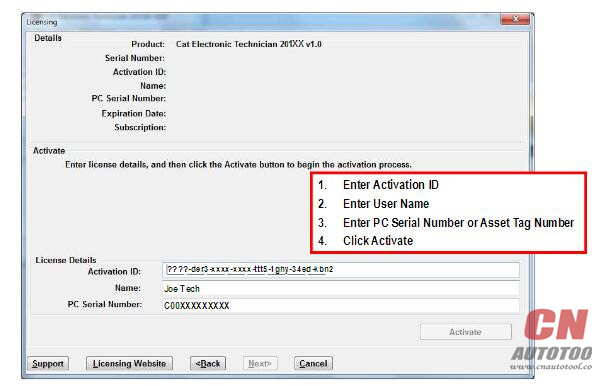
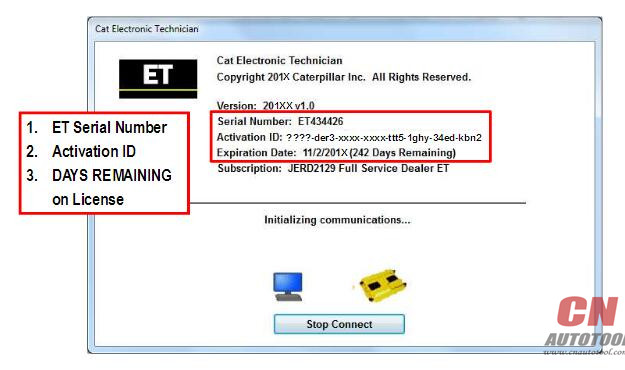
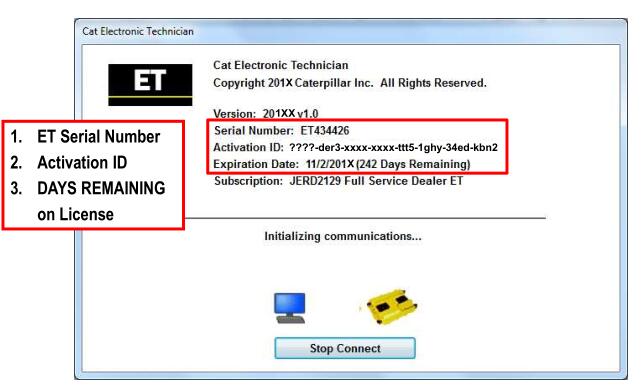
-> Software users MUST be assigned an Activation ID that will license their copy of CAT SIS and SIS DVD
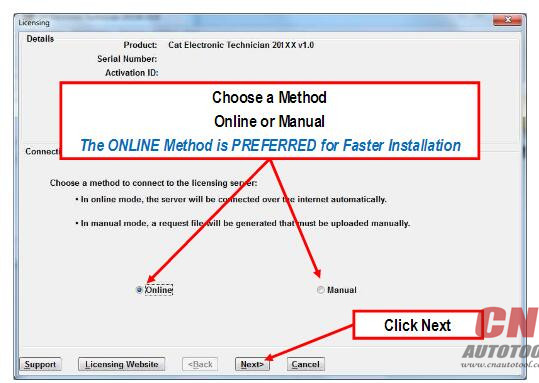
-> After software is installed, the Activation ID must be installed to Activate the software Software may be licensed Online or Manually
Online is the PREFERRED Method
-> Manual licensing forces the user to obtain a file via the Internet during the process
Online Service Software Activation
-> Instructions for the Activation of Cat ET and SIS DVD service software follow the same format.
-> The examples that are shown in this presentation represent the Cat ET procedure.
-> Please follow the same process for SIS DVD.
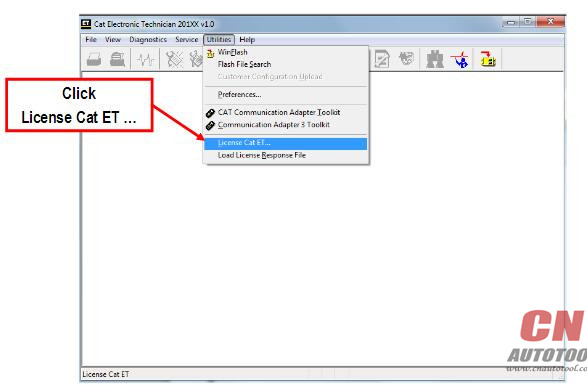
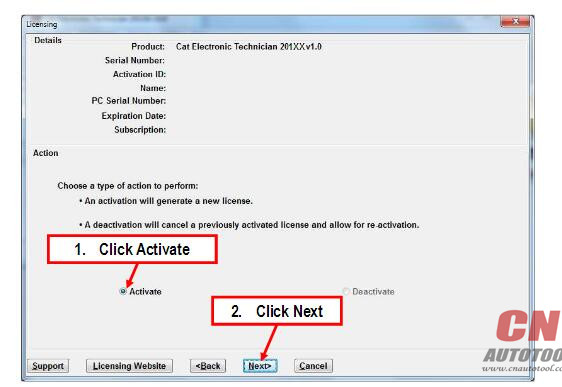
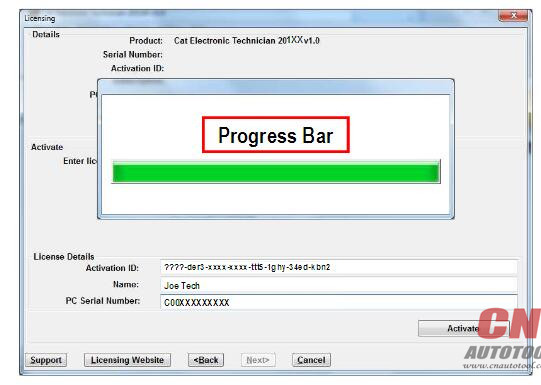
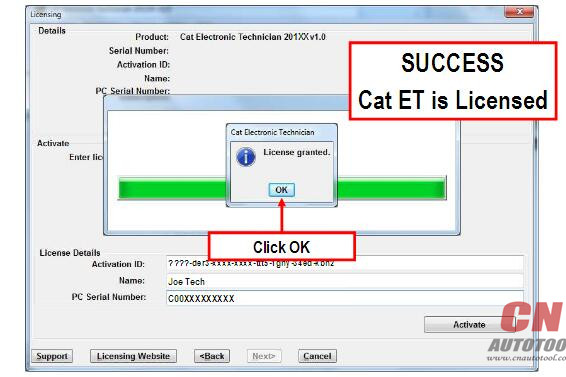
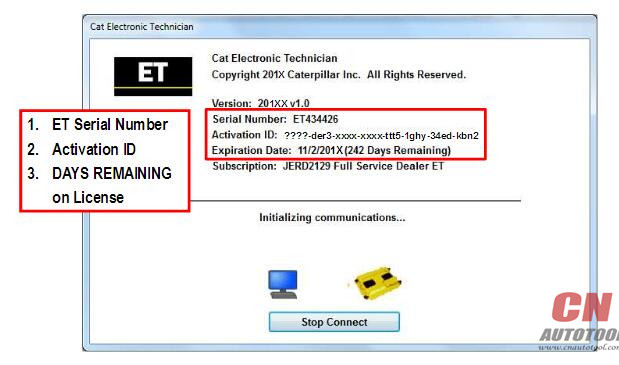
Online Activation – Cat ET
10-1 10-2 10-3 10-4 10-5 10-6 10-7
Manual Service Software Activation
-> Instructions for the Manual Activation of Cat ET and SIS DVD service software follow the same format.
-> The examples that are shown in this presentation represent the CAT ET procedure.
Please follow the same process for SIS DVD
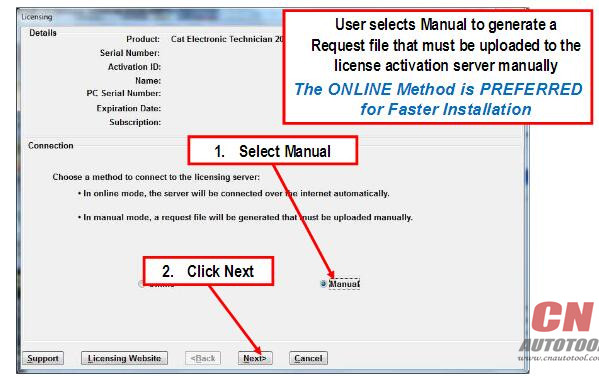
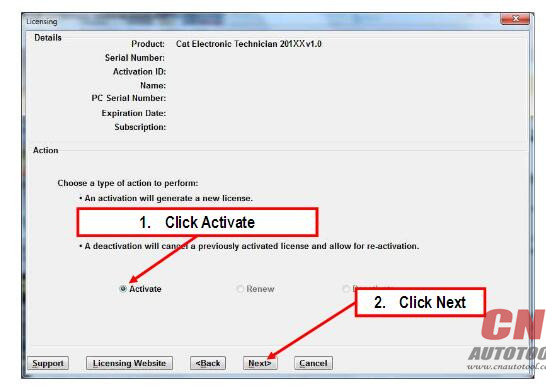
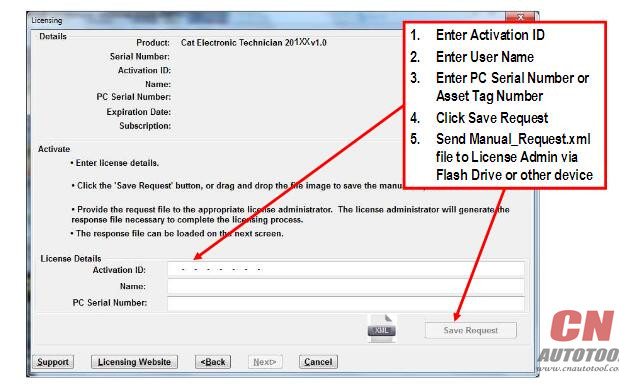
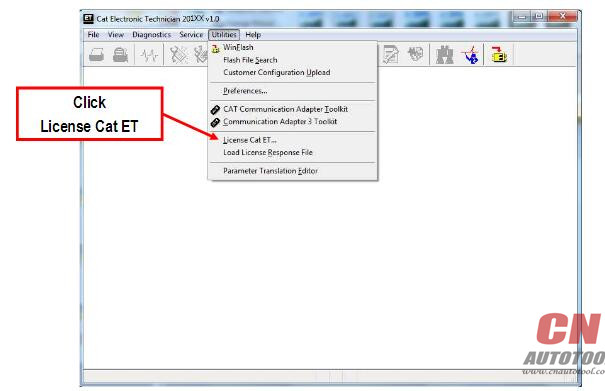
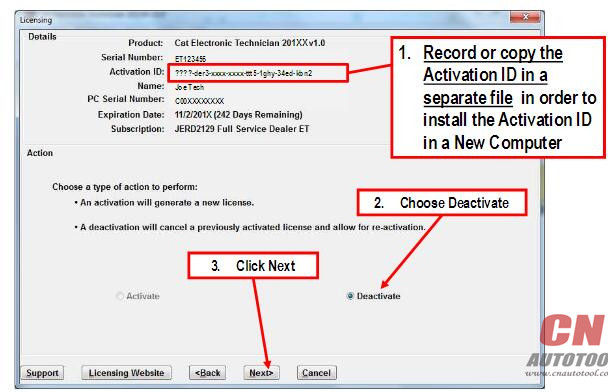
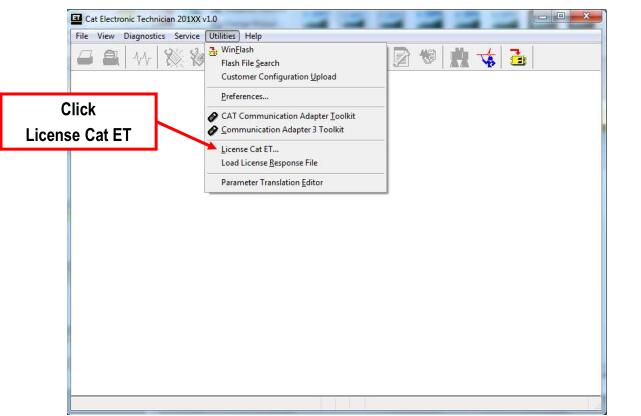
Manual Activation – Cat ET
10-8 10-9 10-10
Manual Activation – Cat ET
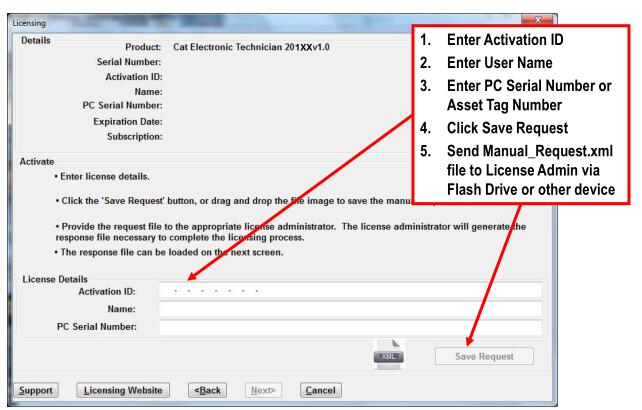
-> Dealer License Administrator uses DSL to send Manual_Request.xml file to License Security Server
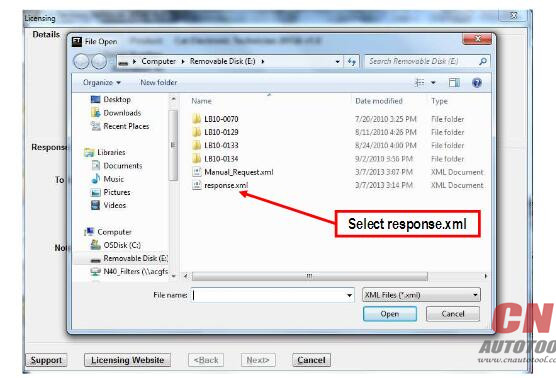
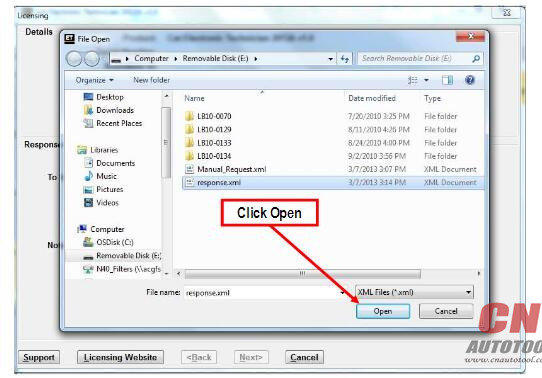
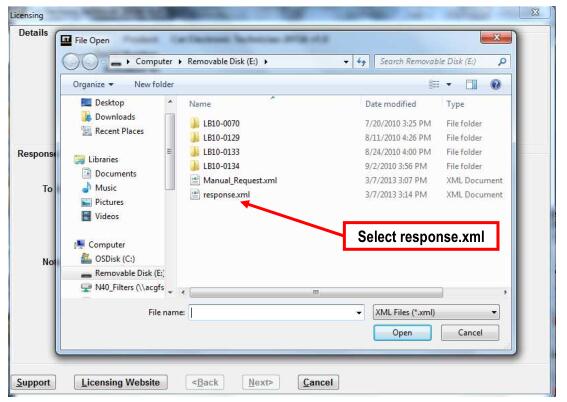
-> Dealer License Admin generates Response File and saves response.xml Response File to Flash Drive or other device
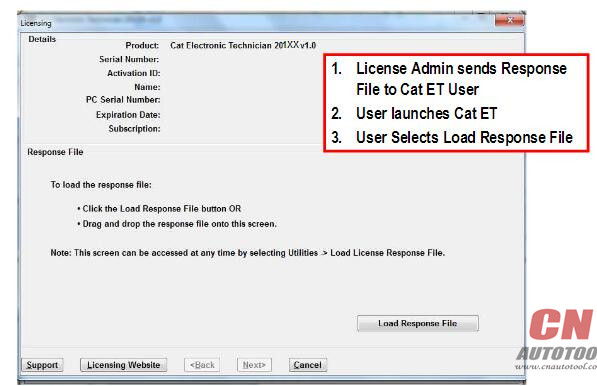
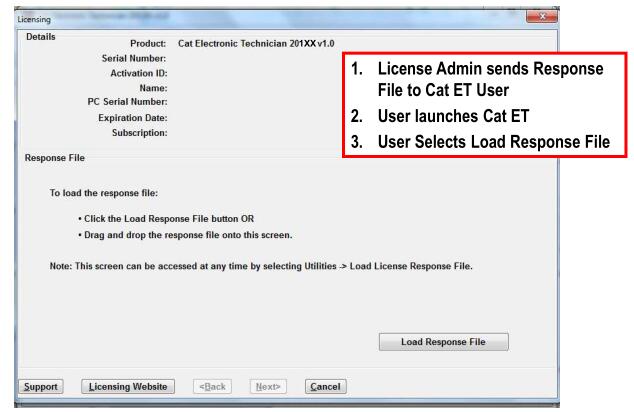
-> Automotive Scan Tool Cat ET User Loads response.xml file Response File on User’s PC
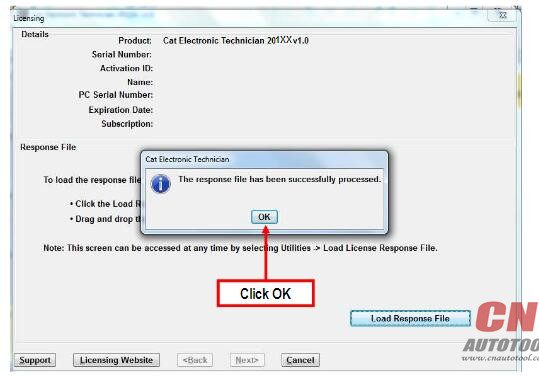
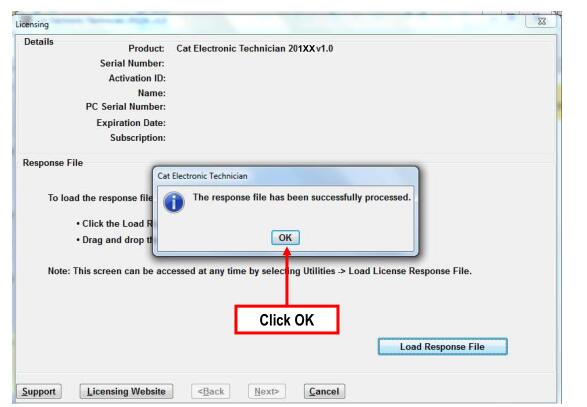
-> Service Software application prompts user to accept the license in order to install the Activation ID onto PC
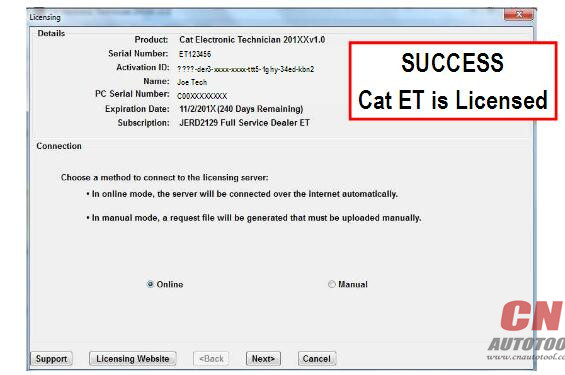
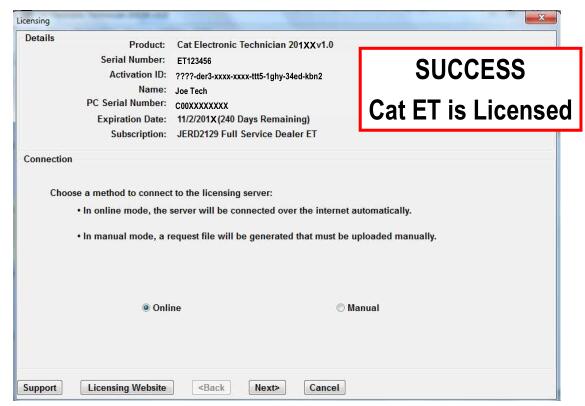
-> Application is enabled with the proper level of functionality
-> License is enabled for 365 days
-> Manual licensing forces the user to obtain a file via the Internet during the process
Manual Activation – Cat ET
10-11 10-12 10-13 10-14 10-15 10-16 10-17

Manual Activation – Cat ET

Manual Service Software Activation
* Instructions for the Manual Activation of CAT ET and SIS DVD service software follow the same format.
* The examples that are shown in this presentation represent the Cat ET procedure.
* Please follow the same process for SIS DVD.
11-1 11-021 11-022
Manual Activation – CAT Electronic Technician
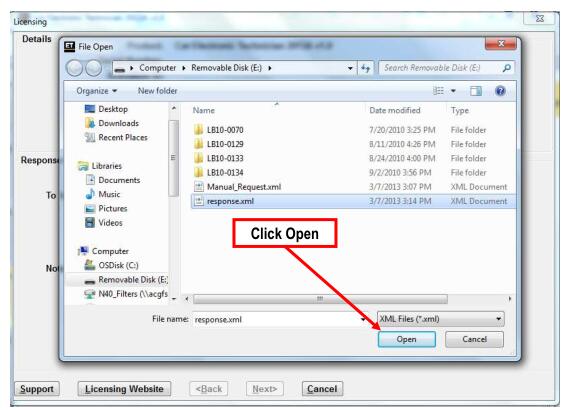
* Dealer License Administrator uses DSL to send Manual_Request.xml file to License Security Server
* Dealer License Admin generates Response File and saves response.xml Response File to Flash Drive or
other device
* Cat ET User Loads response.xml file Response File on User’s PC
* Service Software application prompts user to accept the license in order to install the Activation
ID onto PC
* Application is enabled with the proper level of functionality
* License is enabled for 365 days
* Manual licensing forces the user to obtain a file via the Internet during the process
11-023 11-024 11-025 11-026 11-027 11-028

2018年2月6日星期二

How to Install Ford IDS V108.01 Full without Activation

Latest Ford IDS V108.01 Full Software for Ford VCM II support online programming released on Jan. 2018.
Software Version: 108.01, no need activation
Operating system: Windows XP/Windows 7 32/64 bit

Tested with all VCM2 SP177 series,  Ford VCM2 2-in-1 clone and VXDIAG VCX NANO Ford: Never failed!!
Online programming: Supported! but you should have an account yourself.
Ford IDS v108.01 function: Confirmed!
1.Able to download the very latest calibration files/software from Ford server if the network connection available at the time of connecting to vehicles
2.Read and decode fault codes
3.Delete fault codes
4.Display System current parameters in digital form
5.Combined displaying of data
6.Logs Keeping: write and keep of digital parameters in memory
7.Special functions: changing of permissible seeting of blocks, programming etc.
FAQ:
Q: Whether it can work with Ford VCM 1 Clone?
A: Yes, it can work with Ford VCM 1 clone
Q: Is this vmware or native
A: This is native, install on new and clean windows xp/7
How to install Ford IDS V108 step by step?
Preparation:
1. Please backup the important files on the desktop and disk C because the next operation will cover the content in the disk C.
2.Disable both local area and wireless network connection
3. If your computer hard drive only has one partition, please prepare a 16 GB U flash drive, if has 2 partitions, please unzip the software of CD into another partition except disk C
Step 1: Recover System
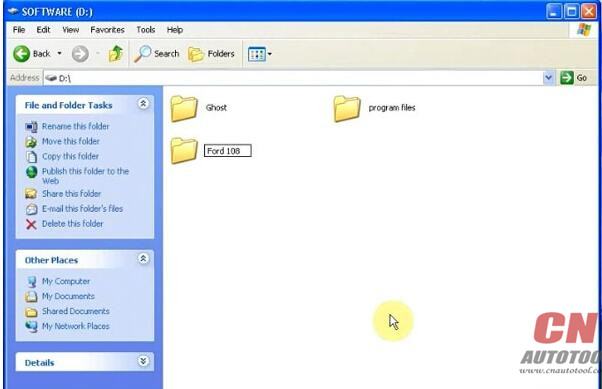
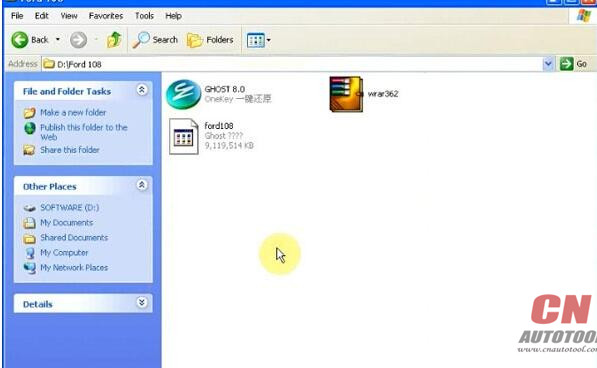
Open Software D (Disk D)
5-1
Create new folder Ford 108
5-2
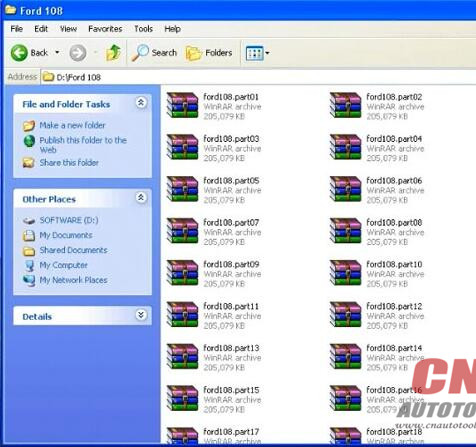
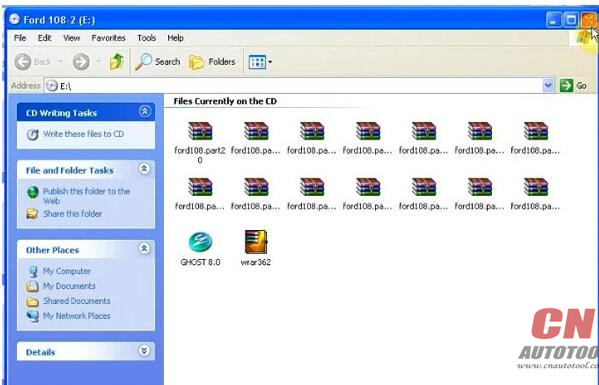
Copy all zip file on Ford 108-2 software CD to Ford 108 folder
Eject Ford 108-2 DVD-ROM to DVD/CD-RW Drive
5-3
Copy all contents to Ford 108 folder again
Extract ford108.part01 zip files to Ford 108 folder
5-4
Then delete all other zip files, ford108.part01-ford108.part33
(only 3 files left)
Open Ghost 8.0
5-5
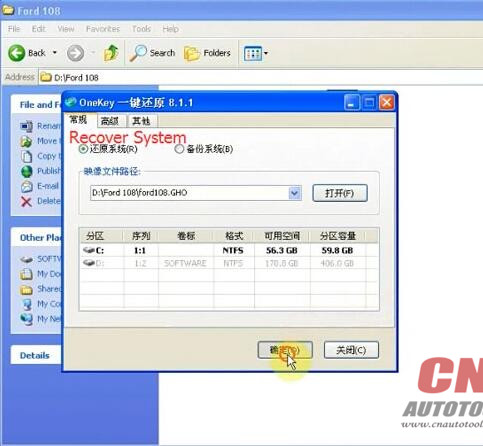
Recover system, choose destination D:/Ford 108/ford108.GHD
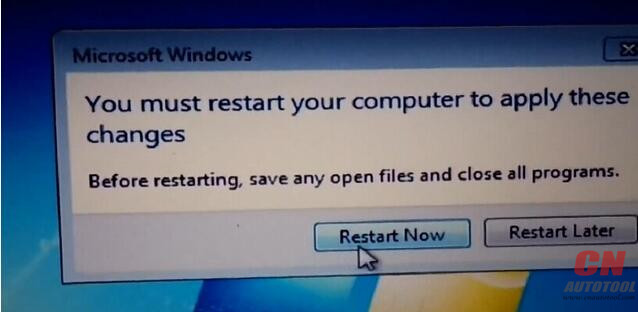
Restart computer and recover system
5-6
Step 2: Install Ford IDS 108 Setup
5-7
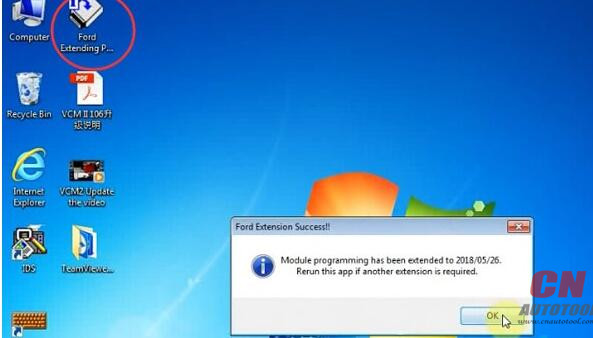
Run Ford Module Programming Limit as Administrator
Ford Extension Success, press OK
Module programming has been extended to 2018/05.26
5-8
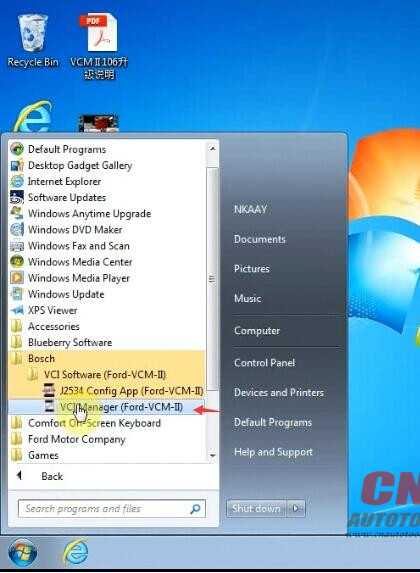
Click on Start menu->All Program->Bosch->VCM Manager (Ford-VCM-II)
If system prompt PC software initialization error, press OK to ignore
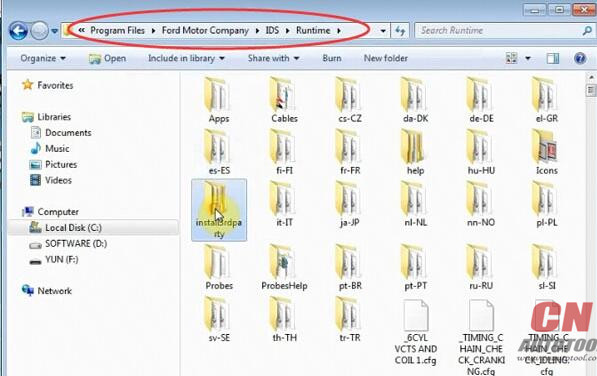
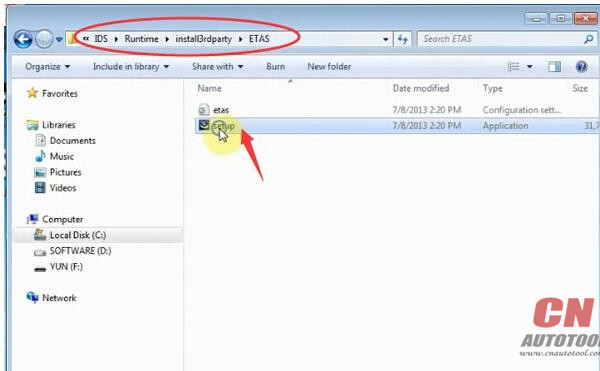
Open Disk C/Progam Files/Ford Motor Company->IDS->Runtime->install3rdparty->
ETAS, Run setup as Administrator
5-9
5-10
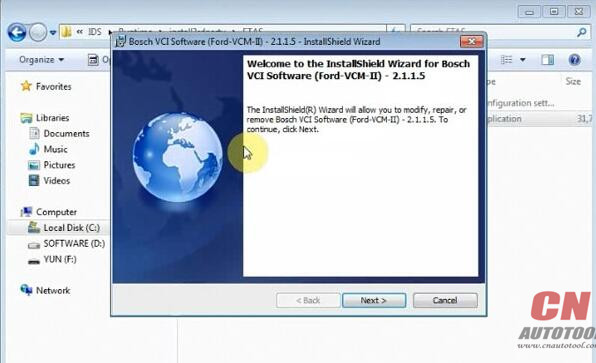
Install Bosch VCI software Ford VCM II
5-11
click Next
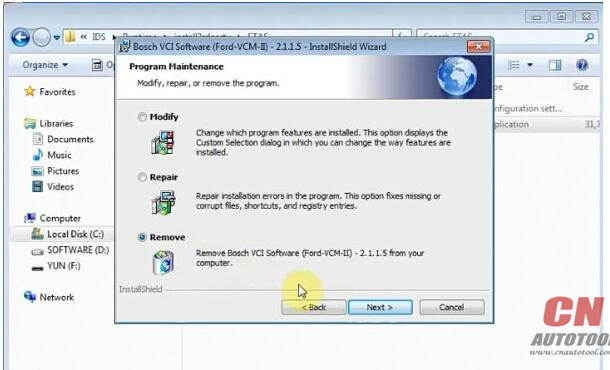
Select Remove Bosch VIC software from your computer, click Next
5-12
Press Remove
Click Finish
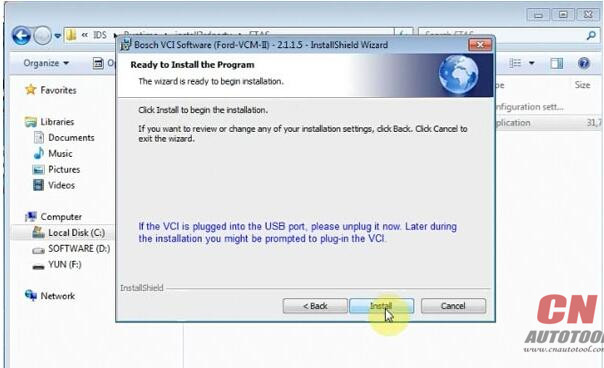
Again run setup as Administrator
click Next
5-13
Ready to install the program
Click Finish
Install setup completed.
Step 3: Make Connection
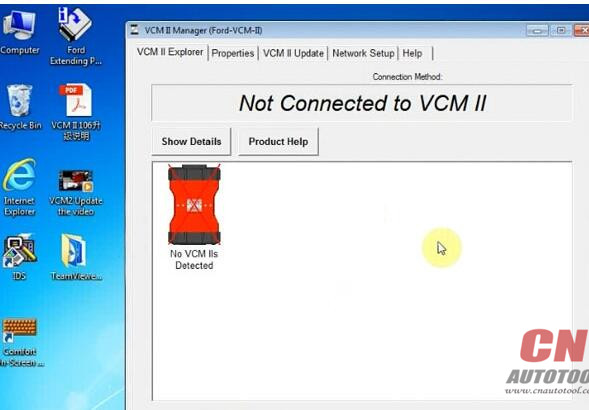
Click Start menu->VCI Manger (Ford-VCM-II)
5-14
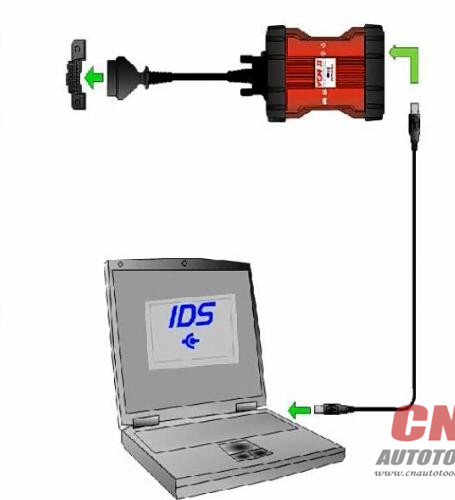
Connect VCMII with computer follow the diagram below
5-15
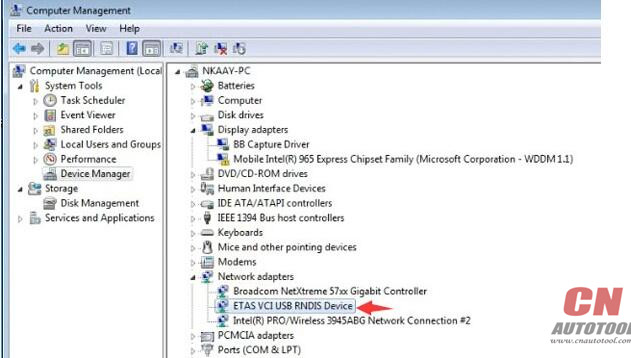
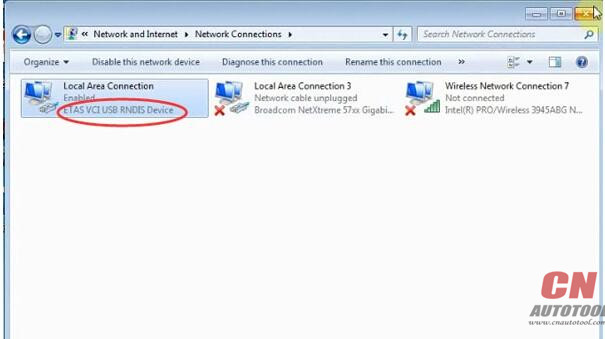
Open Computer->Manager->Device Manger->Network adapters->ETAS VCI USB RNDIS Device
to check connection is built
5-16
Open Network and Sharing center->Change adapter settings
Make sure you have disable both local area and wireless network connection
5-17
Step 4: Run software
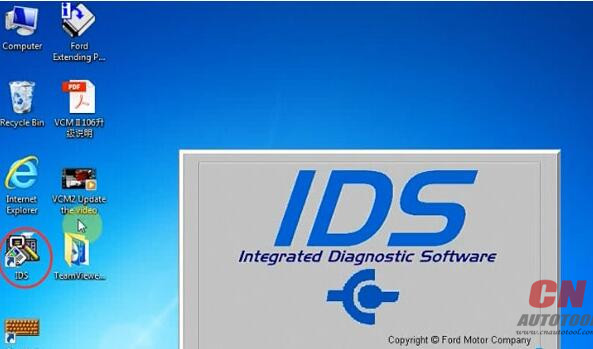
Open Ford IDS v108 software on desktop
5-18
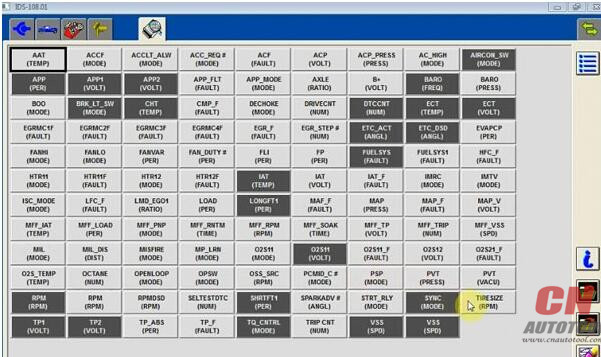
Network test, gathering vehicle data
5-19
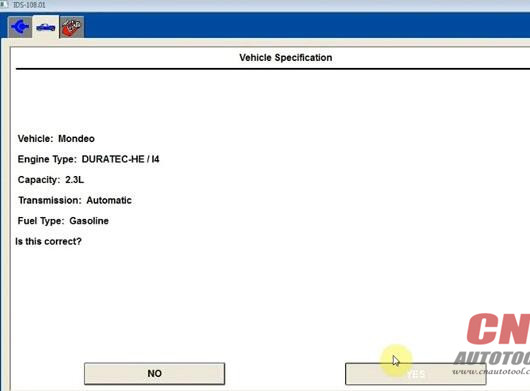
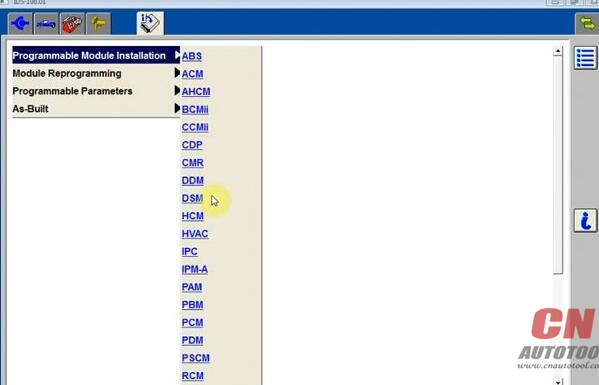
check language options, programming modules and options
5-20
5-21
Done.

Lonsdor K518ISE odometer adjustment coverage

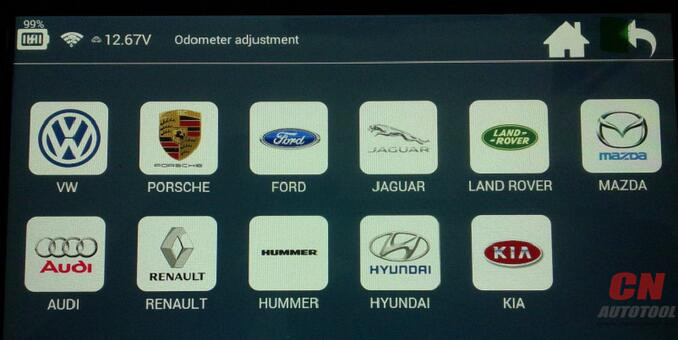
Lonsdor K518ISE is able to perform odometer adjustment on some car models including VW, Porsche, Ford, Jaguar, Land Rover, Mazda, Audi, Renault, Hummer, Hyundai, Kia etc.
3-1
Car Key Programmer Lonsdor K518ISE odometer adjustment car list
Here we go one by one.
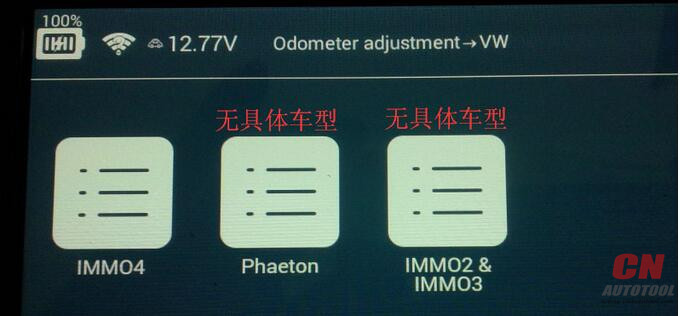
1.Tab “VW”, get option: IMMO4, Phaeton, IMMO2 & IMMO3.
3-2
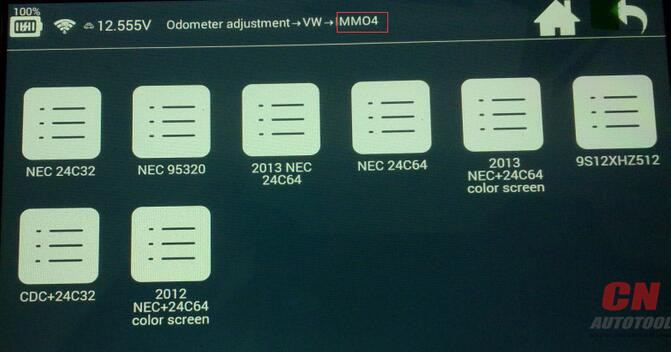
Tab “IMMO 4”, have options: NEC 24C32, NEC 95320, 2013 NEC 24C64, NEC 24C64, 2013 NEC+24C64 color screen, 9S12XHZ512, CDC + 24C32 and 2012 NEC+24C64 color screen.
3-3
2.Tab “Prosche”, you get options : Cayenne  2010-   panamera  2010-     918  2015
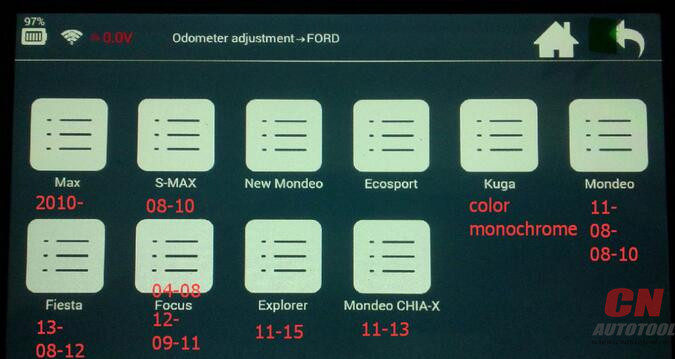
3.Tab “Ford” and you get options: Max (2010 -), S-Max (08-10), New Mondeo, Ecosport, Kuga (Color monochrome), Mondeo (11-, 08-, 08-10), Fiesta (13-, 08-12), Focus (04-08, 12-, 09-11), Explorer (11-15), Mondeo Chia-X (11-13).
3-4
4.Tab “Jaguar ” and you get options: Xj  f-type    xe2015-
5.Land rover coverage: Evoque 11-  range rover 10-  discovery 4  freelander2
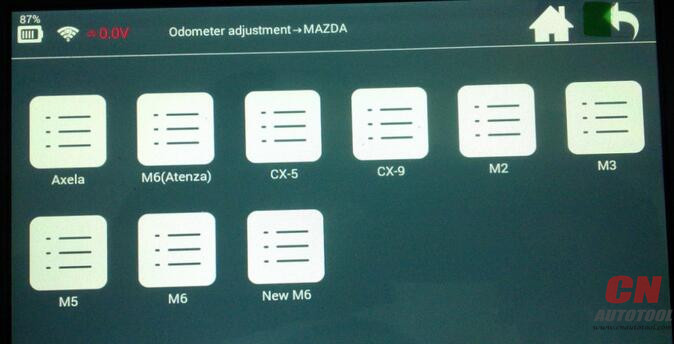
6.Tab “Mazda” and get options: Axela, M6(Atenza), CX-5, CX-9, M2, M3, M5, M6, New M6.
3-5
7.Audi coverage: a6L -2009
8.Renault coverage: type1
9.Hummer coverage:  h2 2007-
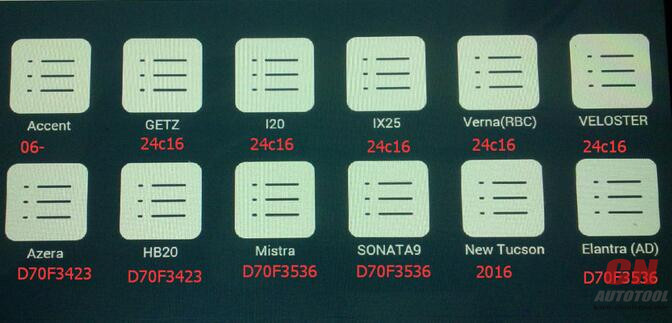
10.HYUNDAI coverage: Accent (06- ), Getz (24c16), I20 (24c16), IX25 (24C16), Verna (RBC) 24c16, Veloster ((24C16), Azera (D70F3423), HB20 (D70F3423), Mistra (D70F3536), Sonata9 (D70F3536), New Tucsom (2016), Elantra (AD) D70F3536.
3-6
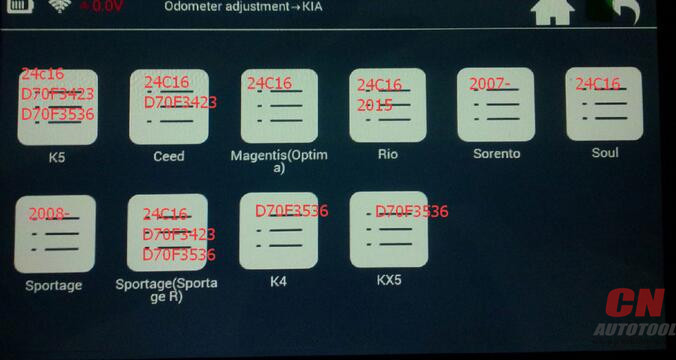
11.Kia coverage: K5 (24c16, D70F3423, D70F3536), Ceed (24c16,D70F3423), Magentis (Optima) 24C16, Rio (24C16 2015 ), Sorento (2007-), Soul (24C16), Sportage (2008-), Sportage (Sportage R) 24C16, D70F3423, D70F3536, K4 D70F3536, KX5 D70F3536.
3-7
More to be upgraded…
Thanks.

2018年2月4日星期日

About MaxiTPMS TS608


Autel MAXITPMS Diag/TPMS/Service Tablet TS608


The Autel TS608 MaxiTPMS Tablet is diagnostics, service and TPMS tablet with mini Bluetooth Vehicle Communications Interface (VCI) for wireless connectivity. The tool features an embedded antenna for TPMS sensor activation and MX-Sensor programming to replace damaged sensors Compatible with vehicles 1996 and newer, the TS608 can diagnose all system modules, offers an array of system services including ABS, SRS, EPB and OLS maintenance tasks and is a complete TPMS service tool with OBD2 Auto Scanner relearn capability. The TS608 includes a one-year warranty and a year of free software updates.


Complete TPMS & all System Service Tablet Tool

As the first comprehensive TPMS & Diagnostic tool in the market, Autel Scan Tool MaxiTPMS TS608 provides you with superior experience in TPMS health check, sensor programming, TPMS relearn, all system diagnostics as well as special service functions. Equipped with a 7-inch touch screen with 1024 * 600P resolution and a VCI mini for wireless communication with the test vehicle, powered by the quad-core Cortex-A9 processor for smooth operation and featured by advanced TPMS & Diagnostic technology, Professional Diagnostic Tools MaxiTPMS TS608 is setting new standards for TPMS service tools.

Autel MAXITPMS Diag/TPMS/Service Tablet MaxiTPMS TS608


● Complete full service projects faster with TPMS and all systems diagnostics in one mobile tool.
● OBDII connection to read & clear codes
● Detect & display TPMS system faults
● Activate & relearn all known sensors
● Read sensor ID info & battery power level
● Sensor position relearn assist procedure
● Status screen
● Single screen to easily view feedback of all sensors and pinpoint TPMS system faults
● Toolkit Features
● Check MX sensor ID
● Unlock REDI 7002A
● Check FOB signal
● Wake-up sensor
● Three tools in one tablet: Complete TPMS diagnostics, advanced service features and all systems diagnostics
● SENSOR PROGRAM OPTIONS:
● Copy by activation
● Copy by manual Input
● Auto create 1-16 Sensors
● Copy by OBD
● Read & clear codes (Generic&Manufacturer, Pending and Stored)
● Control & test ABS; SRS; EPB; DPF Groups
● Diesel particulate Filter Service
● Set Inspection 1 & 2 Service Intervals
● View and Graph Live Freeze Frame Data
● Perform 02 Monitor, On-Board Monitor, I/M Readiness and Component Testing
● Reset Steering Angle Sensors (SAS)
● Read & Clear Codes For All Module Systems Powertrain, Body, Chassis, Communication
● Supports All 10 OBDII Test Modes – Freeze Frame, Enhanced Mode 6, ltM Readiness, Vehicle Information & Component Tests
● Open & Close EPB Pads For Service
● Diagnose EPB/SBC Caliper Functionality
● Oil & Service Resets; Battery Registration
● Hardware Specifications:
● OPERATING SYSTEM: Android● 4.4.2 KitKat OS
● PROCESSOR: 1.5GHz Cortex-A9 Processor
● MEMORY: 1GB RAM DDR3 / 32GB On-board ROM Memory
● DISPLAY: 7-inch LED capacitive touch screen with 1024 x 600 resolution
● CONNECTIVITY:
● Wifi (802.11 a/b/g/n)
● BT V.2.1 + EDR
● SD Card (Support up to 32GB)
● USB: 2.0
● HDMI
● BATTERY: 5000 mAh 3. 7 V lithium-polymer battery/ 7 hour continuous battery life
● POWER: Charging via 5 VDC power supply
● AUDIO INPUT/OUTPUT:
● Microphone
● 4-Band 3.5 mm stereo/standard headset jack
● Dual Speakers
● SENSORS Gravity Accelerometer, Ambient Light Sensor (ALS)
● INPUT VOLTAGE: 5 V (I.SA)
● POWER CONSUMPTION: 600 mA (LCD on with default brightness, Wi-Fi on) @3. 7 V
● OPERATING TEMP: -10 to 60°C (14 to l40°F)
● STORAGE TEMP: -20 to 70°C (-4 to 158°F)
● HOUSING: Strong plastic housing with protective rubber boot
● DIMENSIONS: 270.8 mm (10″) x 176 mm (6.9″) x 36 mm (1.4″)
● NET WEIGHT: 885 g (2.31 lb)
● IS09141-2, IS014230-2, IS015765, KIL-Line, Flashing Code, SAE-J1850 VPW, SAE-J1850PWM,
● PROTOCOLS: ISOl 1898 (Highspeed, Middlespeed, Lowspeed and Single wire CAN, fault-tolerant CAN), SAE-J2610, GM UART, UART Echo Byte Protocol, Honda Diag-H Protocol, TP2.0, TPl.6