显示标签为“BMW ICOM”的博文。显示所有博文

2021年3月4日星期四

BMW ICOM V2021.01 With free Software


BMW ICOM A+B+C with 2021.01 Engineer version ICOM HDD Plus Dell D630 Laptop


BMW ICOM V2021.01, With free Software:

Software Version : V2021.01
ISTA – D: 4.27.20,with SDP Programming Database 4.27.20
ISTA – P: 3.67.1.000 with Engineer Programming,supports the programming of BMW motorcycles and electric vehicles can program F/G/I/K chassis for car (through the ICOM, not other cable )
Vin: V2020.9.22
BMW ETK: 2019.12
BMW KSD: 2019.12  Multilanguage
BMW FSC Navigation Code Generator
BMWAiCoder for BMW Coding

BMW ICOM V2021.01, With free Software:
1. Get engineer version, INPA 5.00,winkfp 5.2.3,NCS 3.5.1, e-sys 3.30,data V67.0
2. get Chinese software DR.GINI B020
3. get count code navigation tool software FSC operator code
4. get one-clik hidden brush tool BMWAi V4.6
5. Add DIS Software for Old cars, DISV57 and DISV44,diagnosis and programming for BMW virtual machines
7. Support Vehicles: For BMW Cars,For BMW Motorcycle,For Rolls-Royce, For Mini Cooper


BMW ICOM Descriptions:
ICOM A–OBD style diagnostic vehicle connector with communication protocols for MOST, K-CAN, D-CAN, KL15/30 detection, ignition failure status, battery status and TD signal for measurements.
ICOM B–OBD style diagnostic vehicle connector with a high speed MOST extension for ICOM A. Uses USB connection to the ICOM A.
ICOM C–Old style 20 pin diagnostic vehicle connector (in engine compartment) to OBD. Service interval reset and engine speed signal.

BMW ISIS/ICOM
3G COMPONENTSIntegrated Service Information Server (ISIS) – ISIS will come as an enclosed server rack for protection. Included are two high performance servers, an Uninterruptible Power Supply (UPS), and a 100 Gigabit switch

In its introductory stage, ISIS will be loaded with the first version of Integrated Service Technical Application (ISTA-formerly known as ANTARES). The first version of ISTA (1.1) will encompass the Repair Manuals currently housed on the TIS website. Look for in-depth ISTA information in a future Service Information. Access to ISTA information can be accomplished via any ISID or properly configured PC with access to the workshop network.

The ultimate configuration of ISIS will also be a central storage point for all Technical Information, diagnostic and programming data updated automatically via JET stream. Updated information is utilized by all workshop equipment.

Integrated Service Information Display (ISID) – ISID will eventually replace the GT1 and DISplus. ISID will support the new service processes with numerous functions of diagnosis and later programming. ISID will have a direct data connection with ISIS. It is lighter than a GT1, costs less per unit and is standard with 2 batteries-one of which is housed in the docking station for charging.

Integrated Communication Optical Module (ICOM) – ICOM is a high performance vehicle interface that will take the place of the GT1/DISplus diagnostic head and will eventually phase out the OPS/OPPS heads. While it supports the new service processes, it also is integrated to older model series. ICOM will have a direct data connection with ISIS and runs wireless at 100 megabit as opposed to the 2 megabit existing wireless 2G network, for a performance improvement of 50 times. It is lighter than it predecessors and costs less per unit.

BMW ICOM Diagnostic Tool Package List:
1pc x BMW ICOM Main Unit
1pc x Most Module
1pc x BMW 20PIN Cable
1pc x BMW 16PIN Cable
1pc x LAN Cable
1pc x USB Cable
1pc x Second hand Dell D630 Laptop with latest software


http://obd2scanner.info/2021/03/05/bmw-icom-v2021-01-with-free-software/

2021年2月25日星期四

About Perform Remote Coding for BMW Through VPN Gateway by use E-sys


What is VPN Gateway E-sys?

VPN gateway on E-sys function is used for remote coding, the client PC without BMW coding software, only with a remote software and a bmw diagnostic scanner or ENET. But your PC need installed BMW coding software. And you are able use your PC to do remote coding for the remote client.

Requirements on the local PC (BMW coder PC)

– Windows 7, 8 or 10
– Full activated E-SYS with valid Token
– Hamachi VPN client by Logmein (https://www.vpn.net/)
– Remote desktop access software such as Ultraviewer (free) or Teamviewer

Requirements on the remote PC
– Windows 7, 8 or 10
– Hamachi VPN client by Logmein (https://www.vpn.net/)
– Remote desktop access software such as Ultraviewer (free) or Teamviewer
– ZGW_SEARCH.exe & MSWINSCK.OCX (From C:\EDIABAS\Hardware\ENET) – No need to install BMW Standard Tools on the remote PC, unless you require.
– ENET OBD cable
– Laptop with RJ45 port

How to configure and prepare your PC as the BMW coder

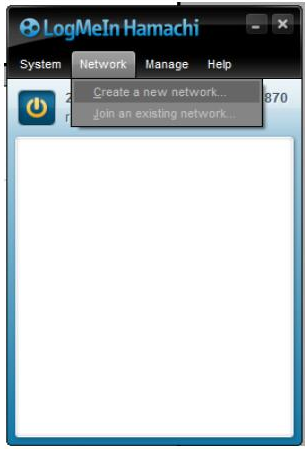
1.Install and register Hamachi with a valid email address
2. Create a network name and assign a password
23-1
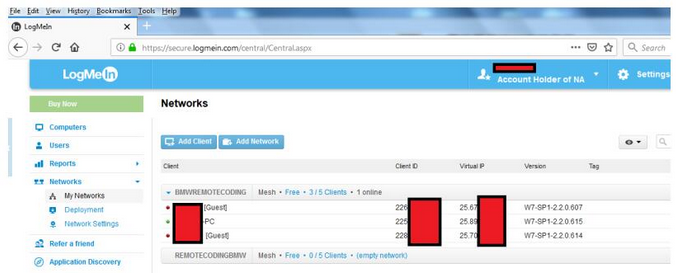
You can manage your network and clients online from the logmein.com website (Free up to 5 clients, delete clients as you need, so you don’t have to pay)
23-2
3 .Make sure your E-SYS is functional and up to date
4. Make sure your remote desktop client is functional and up to date

How to configure and prepare the remote PC

Prior to performing the installation and configuration tasks, make sure the laptop has just been started, sometimes laptop that come back from sleep have network issue until full rebooted.
Also make sure the ENET OBD plug is connected to the car and the laptop and that the car engine is started.

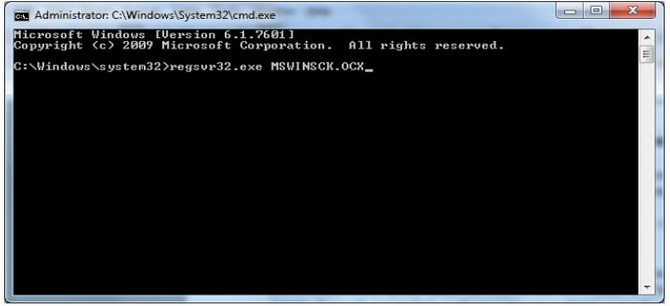
Finally it will save you time to have ZGW_Search.exe and the MSWINSCK.OCX files ready to download from sites such as MEGA or GOOGLE DRIVE prior to connect to the remote PC. If ZGW_Search complains about missing OCX, run the tool as an administrator and/or register the OCX file using the Windows command command Regsvr32

Copy the MSWINSCK.OCX to C:\Windows\System32 for example, then run the CMD.EXE as an administrator and execute the following command.
23-3
1. Login to the remote PC and switch off any firewall and Anti Virus.

2. Run ZGW_SEARCH.exe to figure out the car’s IP address (It should be 169.254.x.y)
If no address are coming up, make sure the relevant network interface is set to DHCP on the laptop and that the car is started/ENET OBD plug is connected.
Sometimes it is not possible to pick up the car’s IP if it has been opened for a while, if that happens, simply lock the car for 5mn and try again (Disconnect OBD lead, switch off engine, car locked)

3. Add a local entry to Windows network table with the following steps
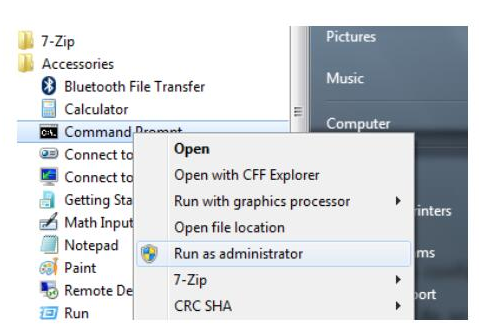
– As an administrator, start a Command prompt Window
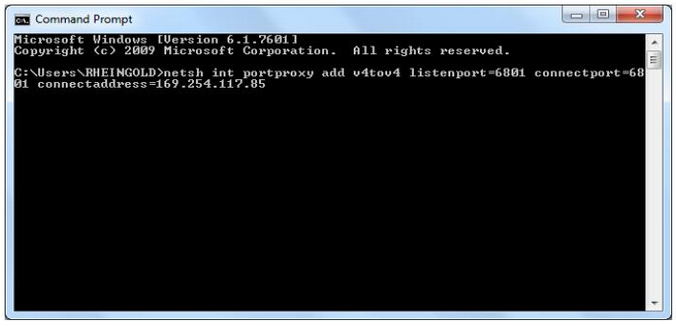
– In the command prompt window, paste the following command and adjust the IP address to the one you found with ZGW_Search netsh int portproxy add v4tov4 listenport=6801 connectport=6801 connectaddress=169.254.x.y
23-4
Run the Command Prompt as an administrator in order to change the network settings
23-5
Ok Press Enter and you have now configured the laptop to accept incoming network traffic the the network port 6801

4. You will now need to do the same with the Hamachi client.
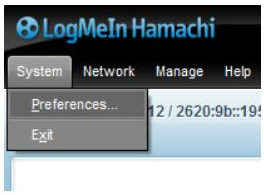
Click System > Preferences…
23-6
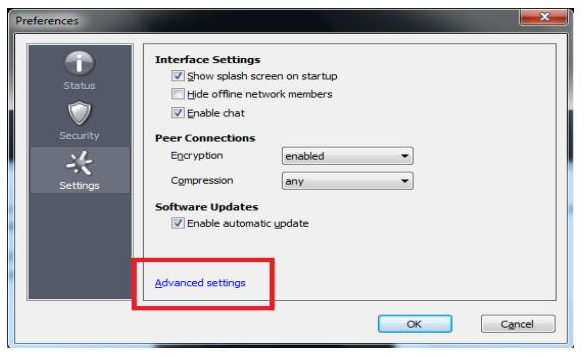
Then go to Advanced settings…
23-7
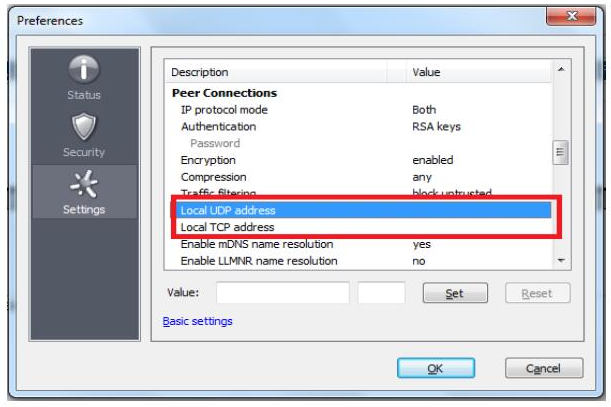
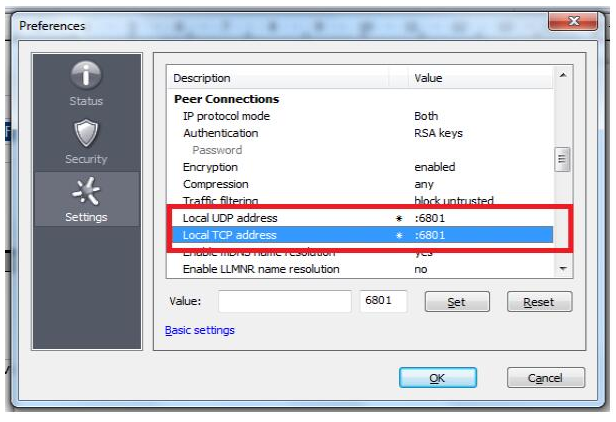
From the Advanced settings menu, go to Peer Connections area and add the following new values in the Local UDP / TCP address
23-8
23-9
Enter the value 6801 on both UDP and TCP fields (2nd box only), Click Set for each line.
Click OK, the remote PC is now fully configured

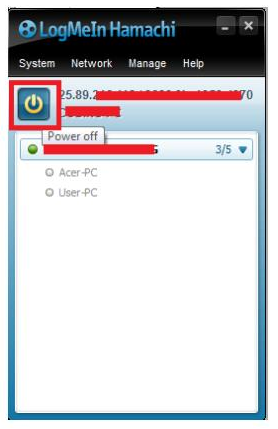
Now on the your coding PC, click the Start button as highlighted below
23-10
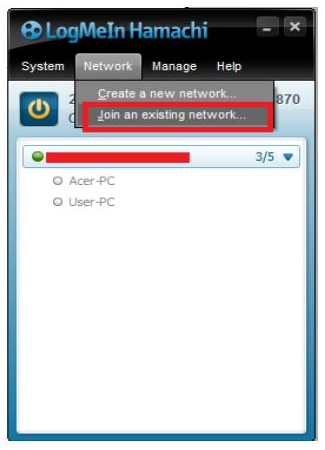
Once the network is started on your local PC, do the same on the remote PC, make sure the remote PC is configured to join your previously set up network. If not, then join now.
23-11
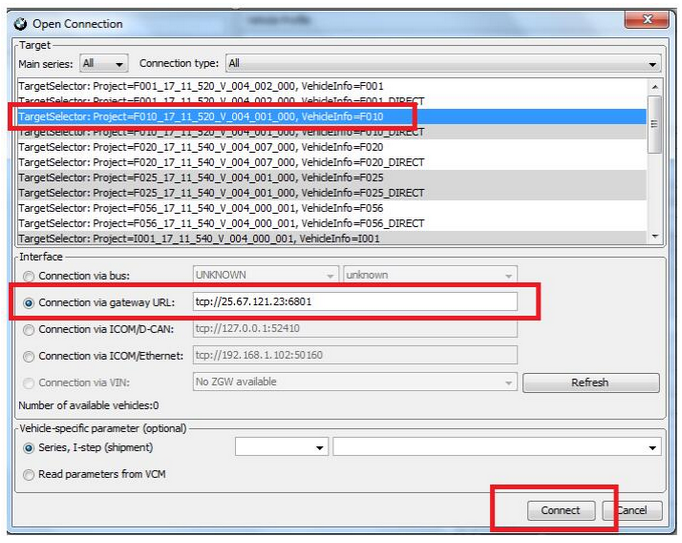
After the remote PC has joined your Hamachi VPN network, then take note of the remote client’s VPN address (Usually starts with 25.x.y.x) and use this IP address in order to connect E-SYS as highlighted on the next screenshot
23-12
Congratulations, you are now able to code the remote vehicle using E-SYS through VPN network.
Select the chassis as usual, then click the Connection via gateway URL an enter the HAMACHI VPN IP address of the remote client.
Finally click Connect and you will be able to proceed with the car coding as usual, as if the car was local to you.

 
www.cnautotool.com

2020年8月6日星期四

How to Restore BMW ICOM?

This post will show an CnAutotool.com customer's solution to BMW ICOM Next restore when you has red LEDs turn on issue when running firmware upgrade. In order to solve your incident, please apply the following 12 steps:


Note: DO NOT UNPLUG the BMW ICOM Next emulator from the {OBD II} jack after an update via {ISTA}, a web interface or an emergency software update.

The {ICOM Next} starts with flashing green SYSTEM {LED}s. After about 10 seconds it shows red {LED}s for about 2 minutes. After this, the {ICOM Next} reboots due to a firmware update.

If the {ICOM Next} {LED}s remain red for more than 10 minutes, or if the {ICOM Next} is unplugged directly after an update, please carry out the following procedure:

1. Please ensure that ALL of the following prerequisites are satisfied:

1.1. You require a USB 2.0 or USB 3.0 flash drive. {USB 1.x flash drives are not supported).

1.2. The USB flash drive must be formatted with a FAT32 file system.

1.3. A minimum of 60 MByte free space is required on the USB flash drive.

2. Navigate to “C:\ProgramData\BMW\ISPI\data\TRIC\ICOMNext\ICOM-Image-03-14-08”.

ProgramData folder is hidden by default. In that case, you have two options in order to access the file or the folder:

– change the settings directly in the Windows Explorer (“Tools => Folder Options => View => Show hidden files, folders or drives”)

– or enter the whole path into the Windows Explorer’s address bar and press enter.

3. Copy “{ICOM_Next-rootfs-010002.tar.gz}” to the root directory of the {USB} flash drive.

4. Copy “{ICOM_Next-app-010008.tar.gz}” to the root directory of the {USB} flash drive.

5. Disconnect the {ICOM Next} from the power supply.

6. Plug the {USB} flash drive into the {ICOM NEXT}.

7. Press and hold the button pressed on the {ICOM Next} and connect the {ICOM NEXT} to the {OBD II} jack of a vehicle.

8. Keep the button pressed. The {ICOM NEXT} starts with all {LED}s glowing red. The {LED}s stay red; some may flicker orange/yellow. Keep the button pressed.

9. Keep the button pressed. After about 4 seconds, all {LED}s turn orange/yellow. All {LED}s now glow in the same colour.

10. Release the button and then press it three times within five seconds. The {LED}s glow or flash red and orange/yellow again.

11. Wait: This procedure may take several minutes. Do not disconnect the {ICOM NEXT} as long as any {LED} glows red.

12. After about 5 minutes the SYSTEM {LED} turns green again. The {ICOM NEXT} has been updated and is ready for use.

IMPORTANT: When the software update is complete, the {ICOM NEXT} needs to be connected to the dealer’s network in order to be reconfigured.

All previous settings are lost during the update. If there is a “{user.settings}” file on the {USB} flash drive, it will be applied after the firmware update.

Free download icom next firmware:

ICOM NEXT firmware 3.14.10:

https://mega.nz/#!uZ0XgTbB!0pW25mgpiUuhB2K5gBIxw9O-Yj65aQ1Jh50RdKAD4Is

ICOM NEXT firmware 3.14.08:

https://mega.nz/#!D0cwTTzb!LCeRki-jObvuV9m6UaRsxiGCuHlwv-u33ShJO4ZGXaQ

ICOM Image 03.14.08 (Application image+ Firmware image+ ICOM NEXT app .tar.gz+ ICOM NEXT rootfs. tar.gz)

https://mega.nz/#F!zZUXiYpI!H9-RKjfqd4Mjk9EoWMlxLw

If you want know more information about BMW ICOM, please click on it.

2019年2月8日星期五

BMW ICOM is Professional diagnostic tool


BMW ICOM is Professional  diagnostic tool for BMW group vehicles.BMW ICOM A2 is upgrade of BMW ICOM, and it’s always next technology of BMW ISTA diagnose and programming product.
BMW ICOM A2+B+C has functions as follow:
A2 – OBD diagnostic supporting MOST, D-CAN and K-CAN protocols;
B – diagnostic via MOST bus, and possess link to A-interface through USB connection;
C – 20-pin cable for previous types.
BMW ICOM A2 Compared with ICOM:
1. The modified ICOM A2 for vehicles with OBD access receives a significantly more powerful processor and more storage capacity.
2. Robust aluminium case will help to avoid damage when using in harsh environments.
3. To protect the MOST connector, the ICOM B for vehicles with optical MOST access will be equipped with a soft cover made of rubber instead of the former plastic cap.
4. The ICOM C for old series with a diagnostics socket will be additionally equipped with an approx. 20 cm long cable, which facilitates the connection of the ICOM A2 and makes storage in the engine compartment easier.
5. BMW ICOM A2+B+C support BMW cars till 2013 year. Support BMW & MINI full system diagnose and offline programming.

BMW ICOM Device Includes:


2019年2月1日星期五

New BMW ICOM A2+B+C


Now there is a newest bmw icom A2+B+C software come out.  It is 2018.12 verison.

It is newest, and better.For more information,please visit our website: www.cnautotool.com

 BMW BICOM A2+B+C Special Features Compared with ICOM :
* The modified ICOM A2 for vehicles with OBD access receives a significantly more powerful processor and more storage capacity.Robust aluminium case will help to avoid damage when using in harsh environments.
* To protect the MOST connector, the ICOM B for vehicles with optical MOST access will be equipped with a soft cover made of rubber instead of the former plastic cap.
* The ICOM C for old series with a diagnostics socket will be additionally equipped with an approx. 20 cm long cable, which facilitates the connection of the ICOM A2 and makes storage in the engine compartment easier.

BMW ICOM A2 Supports almost 95% laptop on the world with Intel chip( I3/I5/I7 series) and have 4GB memory

2018.12 version of the bmw icom a2+b+c scanner tool Supports Multi-Language in diagnose and programming, also TIS diagram circuit:
English, German, Spanish, French, Italian, Polish, Portuguese, Turkish, Czech, Swedish, Dutch, Indian, Greek, Russian, Chinese, Japanese, Korean and Thai.

BMW ICOM A2 System Requirements:

1. Dual-Core Processor, it is recommended that the I3 above,over 4G of memory.
2. More than 4G of memory.
3. we recommend you choose Lenovo ThinkPad X200, X230, X230T, X61T, T410, X61,Dell D630, E49 etc.


2019年1月22日星期二

BMW ICOM A2+B+C WIFI Setting

BMW ICOM A2+B+C diagnostic & programming tool wifi settings maybe a obstacle to some users, this post is on how to set the WIFI on BMW ICOM, hope it helps.

STEP1: ensure your ICOM A2 has a WIFI card
Browse 169.254.92.38/60080
user: root
pass: NZY11502

Do a self-test, then got the test result, the WIFI function must be OK

STEP2: Browse 169.254.92.38/58000 set the WIFI, ( the UOBD2 BMW ICOM a2 WIFI version no need setting)
a . Set the mode to ISPI-NEXT

b. SET WLAN , SSID name ISPI-NEXT PASS:12345678 save

After the setting on ICOM is done , let’s make computer setting, suggest buy the a USB WIFI card , then set it to AP mode

Set same SSID name as ICOM; ISPI-NEXT

And choose WSP2 method , enter same password :12345678

Then OK, unplug ICOM LAN cable, restart ICOM waiting it connect to laptop WIFI!

Then start ISTA/D make diagnostic.

2018年1月25日星期四

The introduction of BMW ICOM a2

Now, mechanics have cars repaired frequently when using the support of OBD2 Scan Tool. Obd2 tools are somewhat essential while in the process of routine maintenance and repairs. at the moment,even more plus more are gaining knowledge of car diagnostic instruments to resolve the little complications in their automobiles, for a few believe that it’s always intriguing and several aspire to preserve upkeep and mend price. The more high-end the vehicle is, the car charge much more in upkeep and service. Subsequently, I want to possess an introduction of BMW ICOM a2 below.
 

BMW ICOM a2 is upgrade of BMW ICOM, and it’s always next technology of BMW ISTA diagnose and programming product. BMW ICOM A2 B C has functions as follow: A2 – OBD diagnostic supporting MOST, D-CAN and K-CAN protocols; B – diagnostic via MOST bus, and possess link to A-interface through USB connection; C – 20-pin cable for previous types.
Almost every auto diagnostic tool is continuous to update to suit for the repairs and servicing will need. And BMW ICOM A2 includes a a lot more robust processor and much more storage capability than BMW ICOM. And now it is actually equipped that has a tender address done of rubber in contrast to the former plastic cap. Lastly, this instrument is likewise geared up with an approx. 20 cm very long cable, which facilitates the connection of your BMW ICOM A2 and helps make storage on the motor compartment simpler. Usually, it is all with regards to the introduction of BMW ICOM a2.

2017年11月25日星期六

Why do i need BMW ICOM A2 icom B icom C icom D?

The passage here explains the reasons for BMW Diagnostic Tool icom a (a2, a3), icom b, icom c and icom d for BMW diagnosis, coding and programming. And also, you will know what you should need for use in different repairing situations.
ICOM A (A2, A3) – OBD diagnostic supporting MOST, D-CAN and K-CAN protocols

ICOM A is a basic component. Physically, on one hand, it supplies the interface that connects with car OBD II diagnosing interface; on the other hand, it can supply the interface that is self-adaptable intergraded into garage. As protocol converter, it is responsible for testing and data exchange in different controlling units, as well as signal processing through a high effective computer core. Electrical power pressure is supplied by vehicle interface. The lowest power pressure of Electrical operation of ICOM A is fixed to 8V. Only it exceeds the lowest value, can a stable function be guaranteed.
ICOM A vs ICOM A2 vs ICOM A3
Modified BMW ICOM A2 for vehicles with OBD access receives a significantly more powerful processor and more storage capacity. And robust aluminium case will help to avoid damage when using in harsh environments. It works better in cooling, runs faster and works more stable, not easier broken than older ICOM A.
ICOM A3 can program all units for all BMW series expect media system, and work more stable and has stronger compatibility than ICOM A2, A1.
ICOM B – diagnosis via MOST bus, and possess link to A-interface through USB connection

ICOM B for vehicles with optical MOST access will be equipped with a soft cover made of rubber instead of the former plastic cap, to protect the MOST connector
ICOM B is the external MOST interface of ICOM A, and it connect with ICOM A by a usual USB or that within supplying. Power is supplied by USB through ICOM A from OBD2TOOL.
Only when the power supplied to ICOM A lower to 8V, can electrical running of ICOM B be ready to connect with standard.
ICOM C–20-pin cable for previous types

ICOM C for old series with a diagnostics socket will be additionally equipped with an approx. 20 cm long cable, which facilitates the connection of the ICOM A2 and makes storage in the engine compartment easier.
ICOM C in an intelligent interface converter, which makes OBD II compatible with BMW round plug. As a lengthened auxiliary module, it makes ICOM A connects with non-OBD II vehicle module. Power is supplied by round plug through KL30.
The lowest pressure of ICOM C electrical running regulated to 8v. Electrical pressure on KL30 is conveyed to OBD II through internal equipment, and then to ICOM A. Only when vehicle battery voltage ICOM C exceeds to the lowest limitation, can it guarantee the stable interactivity of the two equipments.
ICOM A2, ICOM B, ICOM C connection:

ICOM A B C and BMW E & F-series

Save a lot for E and F series:
BMW E series: K+DCAN USB cable
BMW F series: ENET cable
ICOM D – for BMW motorcycles motobikes diagnostics

ICOM D is a 10-pin to 16-pin diagnostic cable for BMW motorcycles motobikes diagnostic and programming together with ICOM A2
It is the TOP 1 in the BMW motor diagnostics list, with the most powerful & stable function and the best reputation.
ICOM D connector location:

2017年11月14日星期二

How to use NCS-Expert With BMW ICOM A2+B+C Diagnostic Scanner Wifi


The belows are the guid for customer how to use NCS-Expert With BMW ICOM A2 Wifi
it’s a dummy guide to help many out and try to make sense of NCS expert with BMW icom A2.
All said by a ICOM A2 user at bmw forum.
5-1
he said;
before all operation, you need a good icom A2 emulator, clone or original
Used BMW ICOM A2+B+C Diagnostic Scanner for years and updated to ISTA-D 3.54 ISTA-P3.58 in SSD…much faster and more stable then, i have to mention that ALL Proceed at your own risk. this is just my interpretation for educational/entertainment value only. I am not responsible for you blowing up your car or damaging your modules.
so here goes the key point
Dummies Guide to Understanding NCS and Coding
This is roughtly how it works, and my dummy interpretation of it.Please read it fully if you want to understand, this isn’t exactly a quick cheat sheet guide.
On pre’02 cars the coding is slightly different method than post 02 cars. I am going to elaborate on coding individual parameters, you can go learn how to code entire modules thru the VO later once you learn the basics below.
The first part to understand is what this stuff about ZCS/VO or “vehicle order” is. When BMW makes a car, they create whats called a “vehicle. this basically a bunch of numbers writen into the car that tell what modules are installed in the car, regional info etc. This is like your car’s DNA! for example if the car has a sunroof, or a convertible or radio etc etc and that is was meant for US,Canada, France etc. Because each car is different with a different set of options/modules or country that its located, the” vehicle order” aka.”ZCS” or”VO” may be differnt. why is it called ZCS you ask ? because its abbreviated german, and its confusting as hell.
The VO is wrriten into a couple modules of the car, usually ones that start with an “A”, Like AKMB or ALSZ. On some cars its written elsewhere. In my 02 M3, the VO Was written in ALSZ and AKMB. On my “00328 Ci it was stored in EWS, KMB. Its nothing more than a string of text/numbers stored in the flash memory of these modules, nothing special. why is it written into two places? because if one module is failed and has to be replaced, then the other will serve as a backup so you can code the new replacement module to your car. for example ALSZ is the “light switch module” in your car .
BMW ICOM is the professional car diagnostic scanner for all bmw cars or trucks . and if you want more details about bmw icom you can contact with us: www.cnautotool.com