2020年12月6日星期日

DSP3+Odometer Correction Tool How to connect internet with wireless adapter?


Super DSP3+ Odometer Correction Tool is the most complete programming device for digital odometers, airbag modules, car radios, car immobilizers. It is a high-quality embeded system, which offers a maximum of flexibility and working comfort.
This article is about How to connect internet with wireless adapter on Super DSP3+.

Insert the Wireless Adapter first
6-1
It will show the pop-up diaIog automaticaIIy
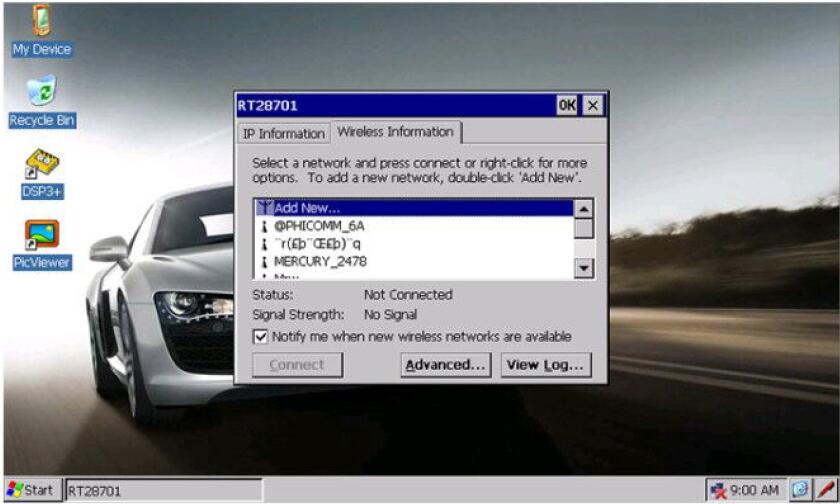
6-2
Find your wireless net work ,cli ck “Connect” .
6-3
Click the red pen in the lower right corner to call out the keyboard.
6-4
The keyboard can be dragged freely, input the password in the “Network key”.
6-5
You can click the red pen again to hide the keyboard.
6-6
clicl “ok”.
6-7
6-8
www.cnautotool.com

2020年12月5日星期六

The Porsche PIWIS Tester III is the third-generation Porsche diagnostic tool


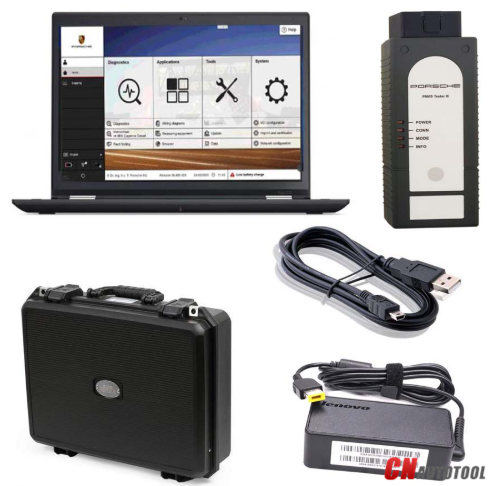
Porsche Piwis III Piwis 3 With V39.800 & 39.700 Software Plus Lenovo T440 I5 CPU Laptop Ready To Use

Porsche PIWIS Tester III is the third-generation Porsche diagnostic tool:
1.more user-friendly and efficient for auto diagnostics and online programming.
2.Work on both Old and New Porsche.
3.With New DoIP Ethernet diagnostic technology,Supports Porsche Models after 2002.

Newest Software Version: 
V39.800 + V39.700 Software, pre-installed on Lenovo T440 Laptop.

The Porsche PIWIS 3 (PST3) is the newest Diagnostic Tool in the market. It can read trouble code, clear trouble code, shows ECU information. It test live data, display actual values, and programs. On all; process malfunction navigation, showing all interior circuit diagram. Specially if  were produced after 2005. The PIWIS III has original oscillometer and multi-meter Function. It is the absolutely necessarily tool for the job.

PIWIS III with Piwis Software Overview
1. Software Version:
Dual System: V39.800 + V39.700
2. Functions: Diagnosis and Programming
3. Update: By SSD
4. Connection: Via USB or Wifi
5. Support Vehicles: Support all Porsche till 2020
7. Multi-Languages: German, English, US English, French, Italian, Spanish, Japanese, Chinese, Russia, Portuguese, Nederlands


Top 4 Reason to get  Tester III Diagnostic Tool :
1. Exclusive support for P0rsche third generation diagnostic PIWIS 3
2. New DoIP Ethernet diagnostic technology
3. Luxury car diagnosis, ultra low threshold
4. Support Porsche Models after 2002.

Piwis III Supports New & Old Cars:
All Porsche from 1998-2020:
1.Porsche 911(997) (991)
2.Boxster/Cayman (987)
3.Cayenne up to MY 2010
4.Cayenne from MY 2011
5.Panamera

Especially the latest models:
1.Paramera (971) 2018
2.Caynenne (92A) 2018
3.Macan (95B) 2018
4.911 (991) 2018
Also support All Other Old car models

Porsche PIWIS TESTER PIWIS3 Features & Functions :
1. New operating system and more intuitive software interface
2. New VCI, support for models with DoIP diagnostics after 2017
3. Maintenance, repair, control unit replacement, programming code
4. Login online anti-theft matching programming
5. Guided fault finding
6. Maintenance circuit diagram view
7. Engineer mode (development version) can support special functions such as installing, modify, Flash.

Piwis Tester 3 Lenovo (Second Hand) laptop details:
Brand: Lenovo
Model: Lenovo T440
CPU Type: Intel(R) Core (TM) i5-4300M CPU
CPU Speed: 2.60GHz
Installed memory: 4096MB

Porsche Tester III Software details :

26-2

26-3

26-4

26-5

Package Listing :
1× Porsche PIWIS Tester III
1× USB Cable
1× Software SSD
1× Second Hand Laptop Lenovo T440
1× Power Adapter

Porsche-Piwis-3-1


2020年12月4日星期五

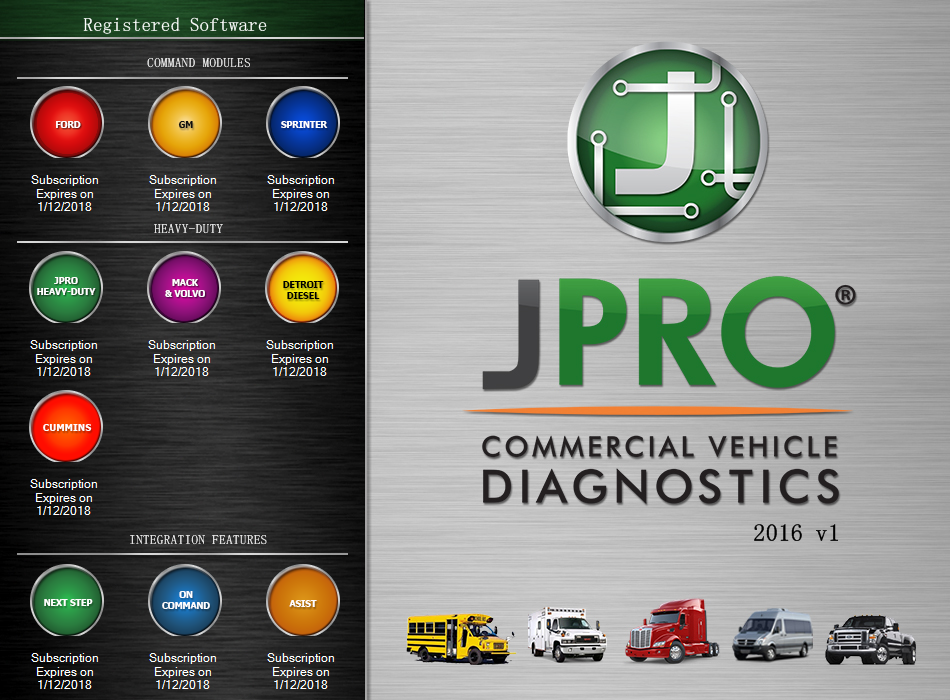
JPRO diagnostic tool for heavy, medium-duty trucks


Noregon released a major update for its in-shop diagnostic and repair system, JPRO Professional, and shared details about a new SaaS application called the Vehicle Insights Portal (VIP).

The new version of JPRO Professional Heavy Duty Truck Scanner builds upon the software’s bi-directional tests for medium and heavy-duty vehicles. This functionality was expanded across most major engine manufacturers, in addition to tests to improve evaluation of braking systems.

“JPRO is made by technicians, for technicians,” said Jason Hedman, JPRO product manager. “My staff and I address real-world issues by adding features to JPRO that make the technician’s job easier. For example, we understand the difficulties faced when trying to diagnose communication issues, so for this release we added functionality that allows JPRO to display CAN error frame data, which helps the tech locate the source of the issue.”

The company noted that all active JPRO Professional subscribers are eligible to update to the latest software at no charge.

The new VIP Services portal offers access to same-day or historical data from vehicles through built-in configurable reports and the ability to export data to back-office systems. Built-in reports cover fuel economy, parameter information such as idle metrics and detailed JPRO fault information including total scans, comprehensive fault data, and common/recurring faults.


Notice: 

1.Software use period one year from the activation date, after one year can continue activate, we provide a free registration machine

2. Software version: please use 2016V1 or 2019V1 version, if use 2017 year software ,it will prompt update. it is better not to update. because after update ,it may occur uncertain errors
3.  Hardware version is USB version( without WIFI) , Driver version : USB 4.0.5983.2
4. Operation system support Windows 7 Ultimate 32bit&64bit,Windows 7 Professional 32bit&64bit

21-1


The instruction of DSP3+ software update


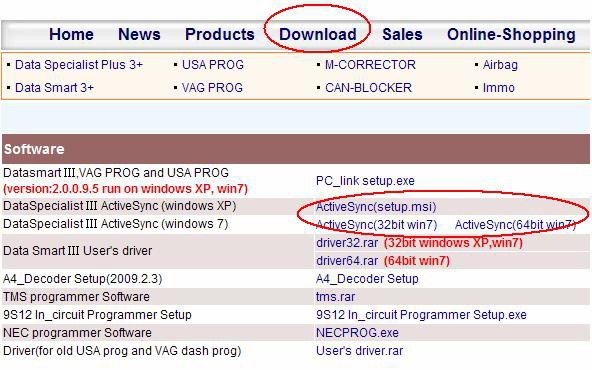
Please install ActiveSync software on your PC well before software update. Or please log in http://smelecom.com/sm/download.htm and download ActiveSync software and install it on your PC first of all.
6-1
The steps are similar among “Function Sync” and “Active Function” and “Software Update”, take “Software update” as an example:
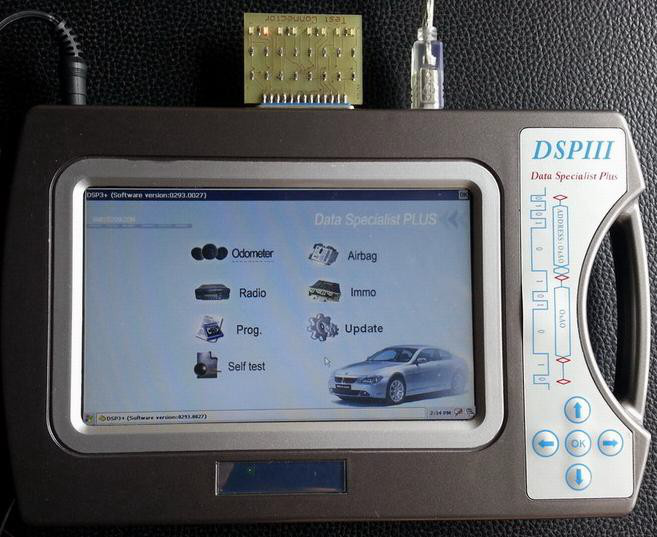
1、Connect test connector and power supply well, shown as figure 1:

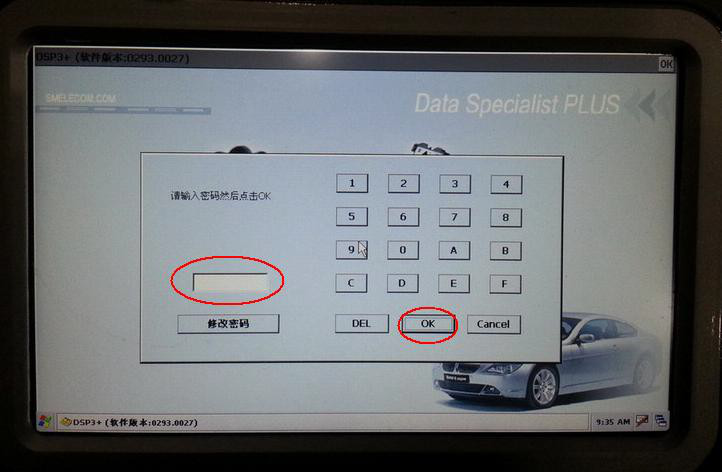
2、Click the red circle, and input the password, click button “ok”, shown as figure 2:
6-3
3、Connect USB cable to the Super DSP3+, shown as figure 3:
6-4

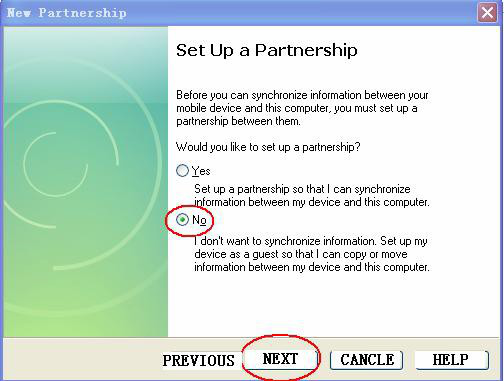
4、If your PC is windows XP operation system, set your ActiveSync software as figure 4.1:
6-5
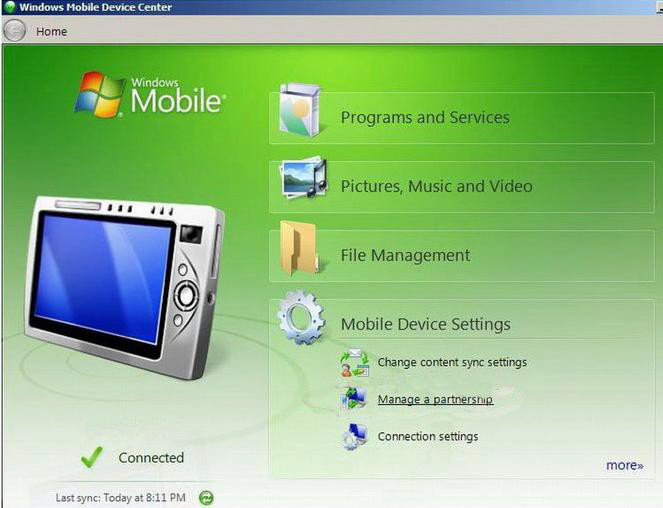
If your PC is windows7 operation system, set your pc as figure 4.2:
6-6

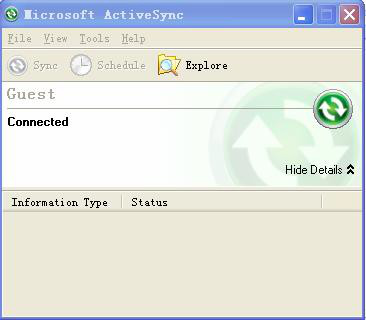
5、XP operation system set successfully, shown as figure 5.1:
6-7
Windows7 operation system set successfully, shown as figure 5.2:
6-8
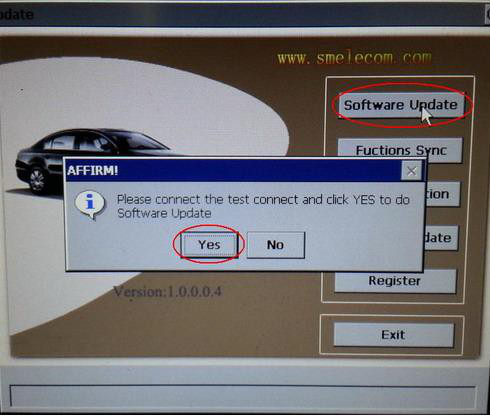
6 、 Click “Update” on the screen of DSP3+, and then click “SOFTWARE UPDATE’, shown as figure 6:

6-9
Click “YES” to start software update.
Note: this process will take about 30 minutes, during this time, do not disconnect the power supply , do not disconnect USB cable, do not change any settings on PC, wait patiently please.

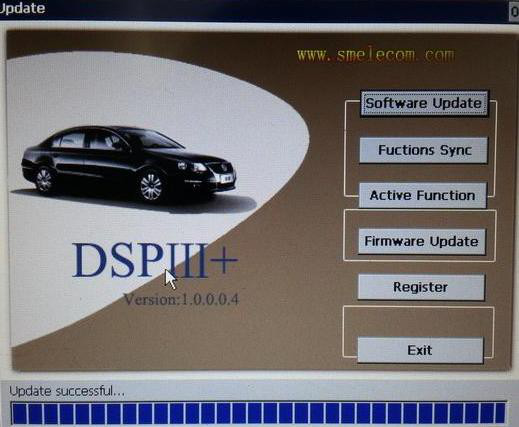
7、About 30 minutes later, you will see “update successfully” on the screen of DSP3+, shown as figure 7:
6-10
Software update successfully.


2020年12月3日星期四

Detailed Review of JPRO Professional


JPRO Professional Heavy Duty Truck Diagnostic Toolbox

1-1
The good news about JPRO Professional heavy-duty truck scan tool is that it has an ease of use with the great user experience. So it can be effectively used by average cars owners and is effective for DIY as well as experts.

It is a simple yet most comprehensive and powerful diagnostic tool that is compatible with all models. Besides, JPRO Professional heavy duty truck scan tool provides complete and real-time diagnostic services. Also, it is uniquely designed to provide a repair solution for the diagnosed problem, and better yet is equipped with bi-directional functionality.

This scan tool is so effective that you can fully diagnose your car without leaving your garage. And as such, when you want a hustle-free car diagnosis, then JPRO Professional heavy duty truck scan tool is a must have diagnosis device.

Detailed Review of JPRO Professional
Compatibility

There is good news for you! JPRO Professional heavyduty truck scan tool is compatible with all car models and types. In fact, it can see the entire care in a single pass on one screen. Astonishing, isn’t it?

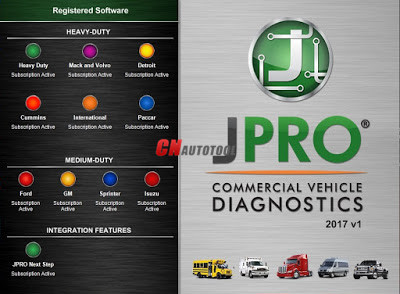
It can diagnose all problems in medium-duty diagnose and heavy-duty modules such as:

Mack
Cummins
Volvo
And PACCAR

Equally, JPRO Professional heavyduty truck scan tool works well with medium models such as:

Isuzu
GM
Ford
And Sprinter

The most interesting part of this diagnostic tool is that you are able to perform parameter changes.

Also, DPF Regens and bi-directional tests can be effectively performed using the JPRO Professional heavytruck scan tool to obtain reliable data and faults.

As if that is not enough, it can effectively run in latest windows and is compatible with iOS, Android devices. For instance, you can run this scanner with Windows 8 upwards but not any other lower version windows. Therefore if you are using MacOS 10 then you are ready to go with the latest version of JPRO Professional heavytruck scan tool.

Finally, Interestingly enough JPRO Professional heavyduty truck scan tool runs on all android devices and believe it or not, you can get a reading on your phone.

Bonus: Best Professional Automotive Diagnostic Scanners Review

Display

You agree with me that clear and simplified display forms the basis for quickly detecting a bug in your car.

Luckily, JPRO Professional heavy duty truck scan tool has user-friendly with an exceptional display system. If you own a heavy-duty truck or a mechanic, you can read and diagnose the entire truck under one minute with just a single pass.
JPRO Professional heavyduty truck scan tool provides complete and real-time diagnostic services.JPRO Professional heavy duty truck scan tool has user-friendly with an exceptional display system.

In just one screen, you will be able to get over 44,000 OE level fault codes as well as detailed repair information.

You do not have to be a technician to interpret the displayed information. JPRO Professional heavy duty truck scan tool display information in an easy-to-understand graphical interface with all the vehicle system comprehensively listed.

It, therefore, means that heavy-duty trucks owners, as well as mechanics, can quickly read and make a diagnosis using JPRO Professional heavy duty truck scan tool.

The toolbox allows you to check the entire health of your vehicles as well as view and print logo files. Other reports that you can view and print include LOV reports and Trip reports.

Besides, JPRO Professional heavy-duty truck scan tool is able to store and record data for playbacks even when not connected to your track.

Software

44-1

JPRO Professional heavy duty truck scan tool uses the most comprehensive diagnostic software you can find on the market today.

The powerful software uses enhanced OEM fault-code information with ACM resets and cylinder cut-outs capabilities.

Moreover, it has an inbuilt Next Step Services Information that helps to speed up the time taken to repair a truck.

As a result, you will be able to access digital photos, complete wiring, and installation information. Finally, it comes with a troubleshooting guide that makes diagnosis a no-brainer task.
Features and Functionalities

JPRO Professional heavy-duty truck scan tool is a number one trusted scan tool by most car technicians. Do you want to know why? The secret is in what it can do.

Here a comprehensive look at the features.
1. Bi-directional controls

It is capable of performing parameter changes for Volvo and Mack.

Equally, JPRO Professional heavy-duty truck scan tool can perform DPF Regens for Detroit Diesel, Cummins, Volvo, Mack, and Internationals.

All these tests are bi-directional with proprietary faults and data.
2. OE Level Fault Code Information

Display 99% for both medium-duty and heavy-duty fault codes with a comprehensive OEM level component as well as the trailer descriptions
3. Include heavy and medium-duty modules

Heavy duty modules include PACCAR, international, Detroit Diesel, Cummins, Volvo, and Mack. The medium-duty modules include sprinter, Isuzu, GM, and Ford.
4. Fault management

It is capable of clearing fault as well as make a quick diagnosis with easy to use application.
5. Vehicle reporting

With the JPRO Professional scan tool, you can be able to view and subsequently print logo files comprising of LOV reports, Trip Reports, and Vehicle Health.
6. Store and save data

Effectively record all the data log files with playback capabilities even when not connected to the truck.
7. Comprehensive vehicle health status

In a single pass, you can be able to see the entire vehicle.
8. JPRO professional user diagnostic software

Has a powerful software and a DLA 2.0 adapter as well as Panasonic Toughbook for enhanced diagnosis.
9. Ease of use and compatibility

Has 9-pin Heavy-Duty Cable, OBDII Cables, 6-pin Heavy-Duty Cable, and USB Cable.

JPRO Professional heavy-duty truck scan tool is a highly effective diagnostic tool with many advantages.
2020年12月1日星期二

Original DSPIII+ DSP3+ Odometer Correction Tool Software


Introduction

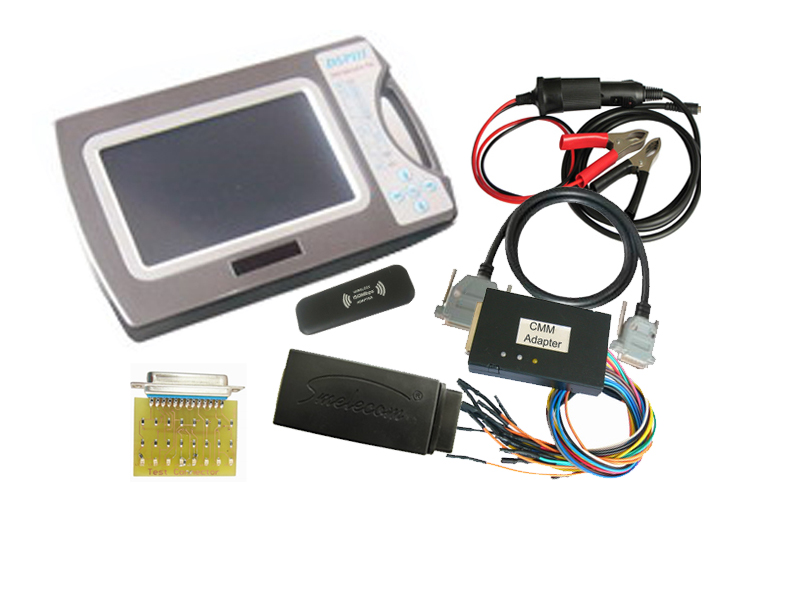
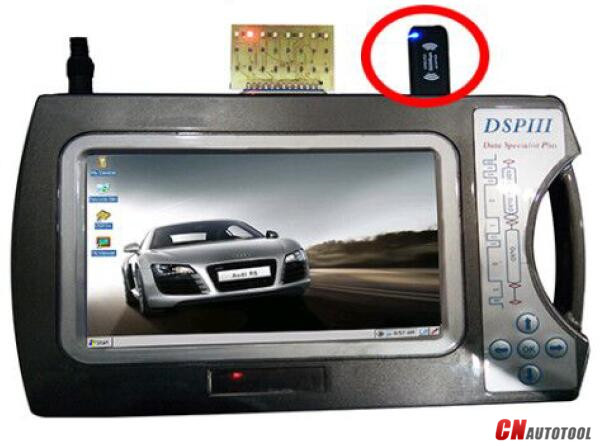
DSP3+ Odometer Correction Tool is the most complete programming device for digital odometers, airbag modules, car radios, car immobilizers. It is a high-quality embeded system, which offers a maximum of flexibility and working comfort.

Super DSP3+

Original DSPIII+ DSP3+ Odometer Correction Tool Software update news

2020 /11/20
Update Software
ODOMETER:
*FORD / F350 2017-2020 DIAG update ———— by OBD
*FORD / EXPLORER 2011 DIAG———— by OBD
*FORD / F450 2018 DIAG———— by OBD
*FORD / F550 2018 DIAG———— by OBD
MERCEDES / W205 2015 – 2017 new version added .(8 drivers)
The version number is p0:A 2059041400
p1:A 2059028404
p2:A 2059029414
CHINESE CAR / CHERY RUIHU 8 (24C16) ———— by EEPROM
CHINESE CAR / CHERY AIRUIZE GX (24C16) ———— by EEPROM
CHINESE CAR / GUANGQICHUANQI GM6 (24C16) ———— by EEPROM
CHINESE CAR / GUANGQICHUANQI GS6 2017 (24C16)———— by EEPROM
CHINESE CAR / BIYADI SONG PRO (24C16)———— by EEPROM
CHINESE CAR / CHANGAN CS75 PLUS V1 (24C64)———— by EEPROM
CHINESE CAR / CHANGAN CS75 PLUS V2 (24C64)———— by EEPROM

NOTICE:
For the option marked * , you must install FPCB in your machine , please contact our sales to buy it .

2020/11/12
Update Software
ODOMETER:
SUZUKI / SWIFT D70F3524 2017- (2 NEEDLES) DIAG———— by OBD
FORD / EXPLORER 2017 DIAG———— by OBD
FORD / EDGE 2020 SPC5604+24C32 DIAG———— by OBD
FORD / MONDEO 2017 (DOUBLE SCREEN) DIAG———— by OBD
LEXUS / RX350 2019 (93C86)———— by EEPROM

2020 /10/31
Update Software
ODOMETER:
*BENZ / W205 2015 – 2017 / W205 READ ODOMETER NUMBER ———— by OBD
SUBARU / FORESTER V2 (93C86)———— by EEPROM
PROG:
S6J3001-CFLASH ———— by MULTIPLEX
S6J3001-DFLASH ———— by MULTIPLEX
S6J32XC-CFLASH (S6J323C/4C/5C/6C/7C/8C) ———— by MULTIPLEX
S6J32XC-DFLASH ———— by MULTIPLEX
S6J32X9-CFLASH ———— (S6J32A9/B9/C9/D9) by MULTIPLEX
S6J32X9-DFLASH ———— by MULTIPLEX
S6J32XA-CFLASH (S6J32AA/BA/CA/DA) ———— by MULTIPLEX
S6J32XA-DFLASH ———— by MULTIPLEX
S6J32XE-CFLASH (S6J32EE/FE/GE) ———— by MULTIPLEX
S6J32XE-DFLASH ———— by MULTIPLEX
S6J332E-CFLASH ———— by MULTIPLEX
S6J332E-DFLASH ———— by MULTIPLEX
Notification : Write flash added in the list
S6J3XXX-ERASURE FLASH ———— by MULTIPLEX

2020/10/29
Update Software
ODOMETER:
*LAND ROVER / RANGE ROVER 2017 DIAG ———— by OBD
IMMO:
*VW / (NEC+95320) JOHNSON CONTROL———— by OBD

2020年11月30日星期一

How to use Cummins INLINE 7 Insite 8.3 software?


New Cummins engine diagnostic tool Cummins INLINE 7 Data Link Adapter has a faster processor, more robust algorithms, larger memory buffers and more sophisticated filtering than previous models while simultaneously accessing multiple vehicle data channels. INLINE 7 supports USB, WiFi and Bluetooth technologies in a single device. INLINE 7 communicates with your PC and is designed for future capability with mobile products.
1.Hardware: Cummins INLINE 7 Data Link Adapter
2.Software: Cummins Insite 8.5
3.Update Method: update by CDs
4.Multi-language: English(united states)/ Chinese(simplified)/ Danish/ Dutch/ Finnish/ French/ German/ Italian/ Japanese/ Korean/ Norwegian/ Portuguese/ Russian/ Spanish/ Swedish/ Turkish
5.Suggest Operating System: Win7 32 Bit System
6.Connection Method: WIFI/ Bluetooth/ USB

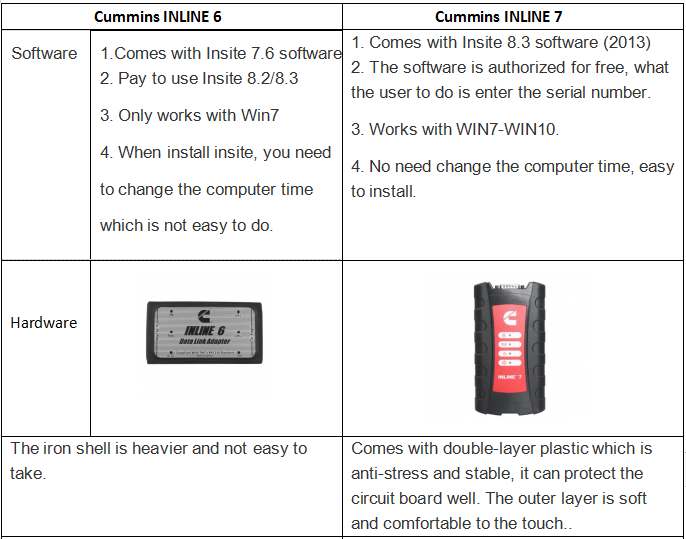
What is the difference between Cummins INLINE 6 and Cummins INLINE 7?

9-1

How to use Cummins INLINE 7 Insite 8.3 software?

Inline7 runs the same driver as Inline6

Software activation is done via server. Need to confirm by server and it may take some time, after success, the software is combined with your computer.

Do not directly open the Inline 8.3 after installed, you need to go through the server software and use Inline 8.3.

After Inline 8.3 is authorized successfully, users can use 3 years for free for 70 times, generally the user is supposed to get authorization every month (that is within 3 years, after the times is used up, users can get authorization by themselves). After 3 years, you need to pay extra license.

5. After activation, users are not allowed to change laptop motherboard, RAM and CPU. If you change them, you have to submit the Inline 7 serial number to the seller for activation.

The Calibrations in the Inline 7 U disk can be used for 6 months only, after 6 months later you can search “Inline Calibrations” online and download to use.

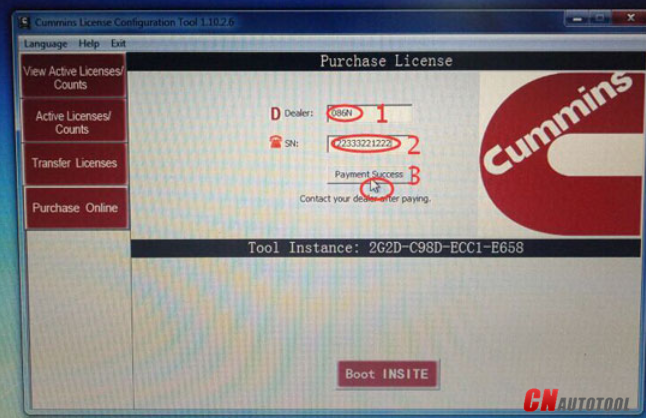
7. If you install Chinese version insite 8.3, then you have to run “Cummins License Configuration tool” in Chinese; if you choose the other language to install insite 8.3, then run the “Cummins License Configuration tool” in English, because the dealer code is not the same.

Chinese dealer code: 010C

English dealer code: 086N

After input Dealer code and serial number, please click on ” Payment success”, then provide the dealer with the serial number for processing in the server. When it is done, click on ” Payment success” again and you will receive a message indicating success.

9-2