显示标签为“Launch X431 Pro Mini OBD2 Diagnostic Scan Tool”的博文。显示所有博文

2021年5月27日星期四

LAUNCH X431 PRO MINI REVIEW: RELIABLE AND HIGH-END SCANNER


Launch x431 pro mini Diagnostic Tool-2
Launch X431 Pro mini diagnostic scanner can read and erase error codes, perform oil light reset, view live data stream, perform battery maintenance, and many other special functions. It also responds very fast and has a multi-touch screen for quickly changing from one function to another.

Unlike the Launch X431 Pro, the X431 Pro mini comes with all the features of its predecessor but with 2-years of software update and a mini-tablet style with Bluetooth and Wi-Fi connectivity. Moreover, it is compatible with more than 108 US, European, and Asian car makers and models. Read this Launch X431 Pro Mini review to know more about this scanner.

Launch x431 pro mini Diagnostic Tool-3

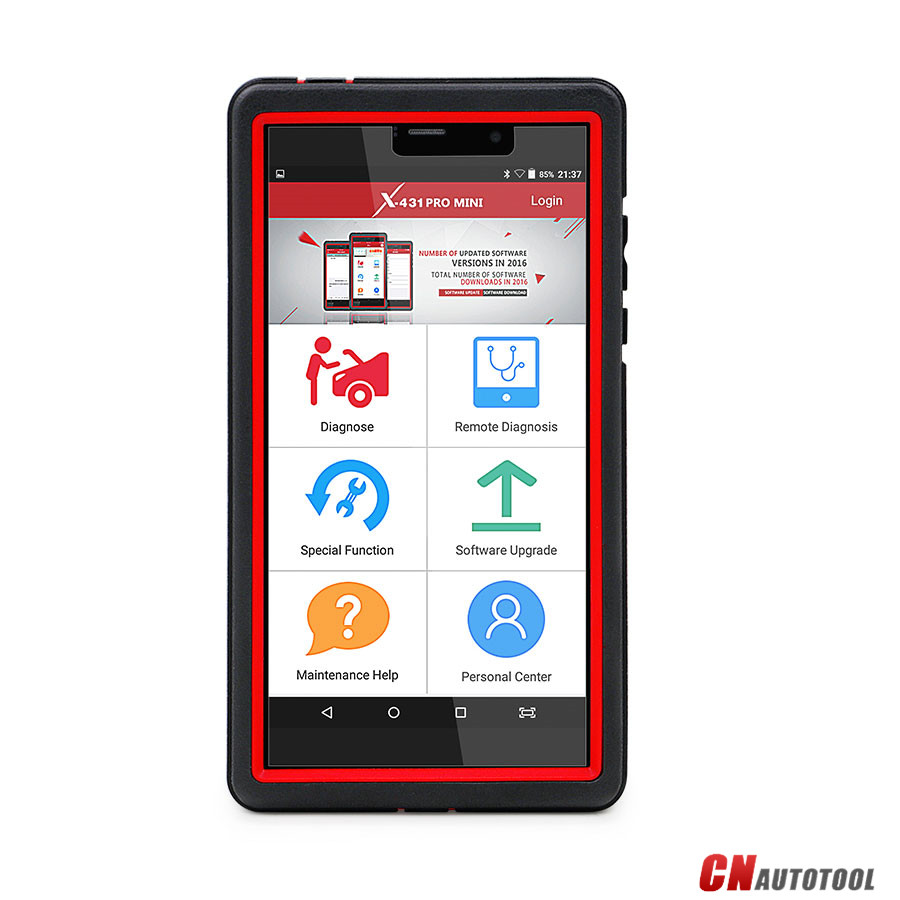
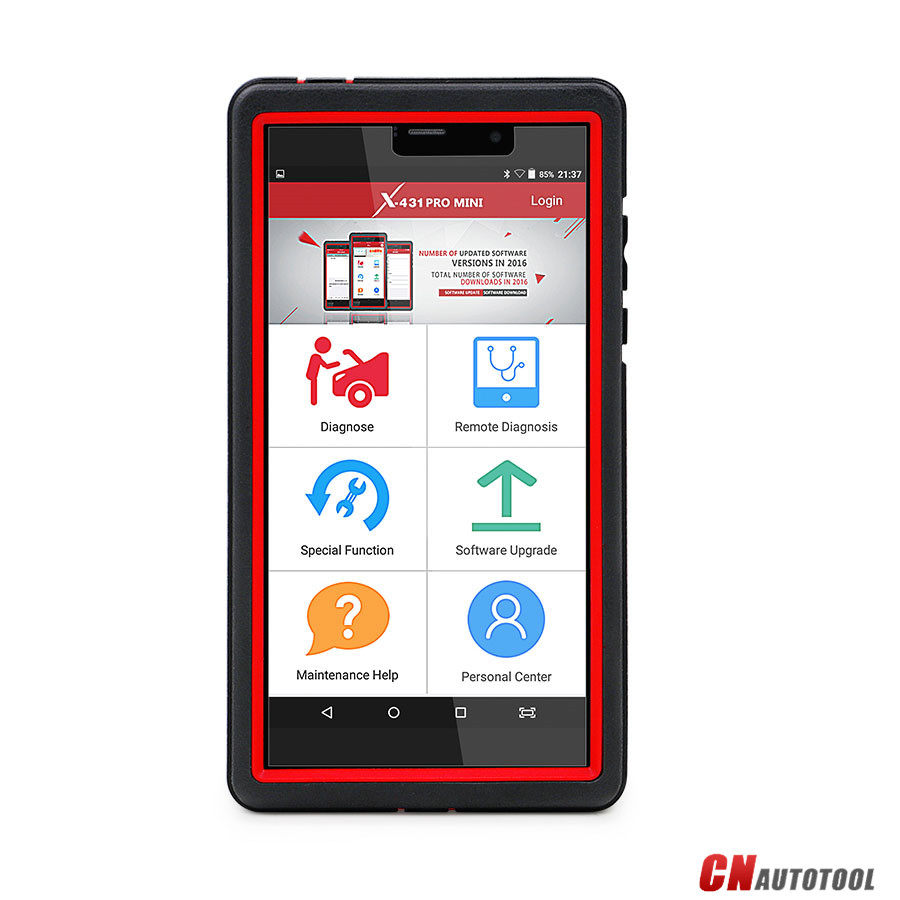
Launch x431 pro mini Diagnostic Tool
1 VCI module
2 Reset hole
3 Rear camera
4 Camera flash
5 Slot for VCI module For housing the VCI module.
6 POWER/Screen lock key In Off mode, press it to turn X-431 PRO MINI on; In On mode, turn X-431 PRO MINI off with long press or lock screen with short press.
7 Carry strap
8 Air intake vent
9 USB/Charging port To connect to the power adaptor for charging.
10 Microphone
11 LCD screen
12 VOLUME +/- Key  To adjust the volume. To print the screen, hold and press the POWER and VOLUME – key until a snapshot pops up on the screen.
The captured snapshot is saved in the “Screenshots” folder.
13 Speaker
14 Front camera
15 Earphone Jack

X-431 PRO MINI Technical Parameters:
Operating system: Android 5.1
Processor :Quad core 1.3 GHz
Memory: 2GB
Storage:16GB
LCD screen: 6.9 inch with a resolution of 1280 x 720 pixels
Camera :Front-facing 2MP camera + rear-facing 5MP camera
Battery :3.7V/3000mh rechargeable polymer lithium battery
Connectivity : Wi-Fi: WLAN 802.11b/g/n ,Bluetooth: Bluetooth 4.1
Working temperature: 0℃ ~ 45℃
Storage temperature: -10℃ ~ 50℃

VCI module:
Working voltage 9 ~18V
Average working current About 85mA
Standby current About 55mA
Working temperature -10℃ ~ 55℃
Storage temperature -20℃ ~ 70℃
Relative humidity 20% ~ 90%

DBScarIII adapter parameters:
The brand-new DBScarIII adapter is small size and can be easily plugged into the handset to diagnose and matching, it tests car models stably, it supports
CAN diagnosis also USB data transfer.
Size: 69 × 40 × 18 mm
Operating voltage: 9V DC – 18V DC
Test voltage: DC12V
Typical power consumption: ≤2W
Bluetooth distance: 100 m
Connectivity: Bluetooth + wired
Operating temperature: -10℃to 50℃
Red Indicator: Turns red when connected to power supply;
blue Indicator: Turns blue then wireless Bluetooth work;
USB work: Turns green when the connector is connected to the USB cable

Check the Main Features of the Launch X431 Pro Mini Scanner:

11 special functions
98-inch touch and high-resolution screen
ECU coding
Bluetooth & WiFi function
Unique and portable scanner
Android 5.1 operating system
Full system diagnosis
Special functions
Bi-directional control
TPMS reset
Covers more than 108 vehicles make and models
2-years free update
Durable carrying case
Launch x431 pro mini Diagnostic Tool-1

In the following content, we will discuss more features and functions of X431 Pro Mini Scanner from eleven aspects.

1.Extensive vehicle coverage

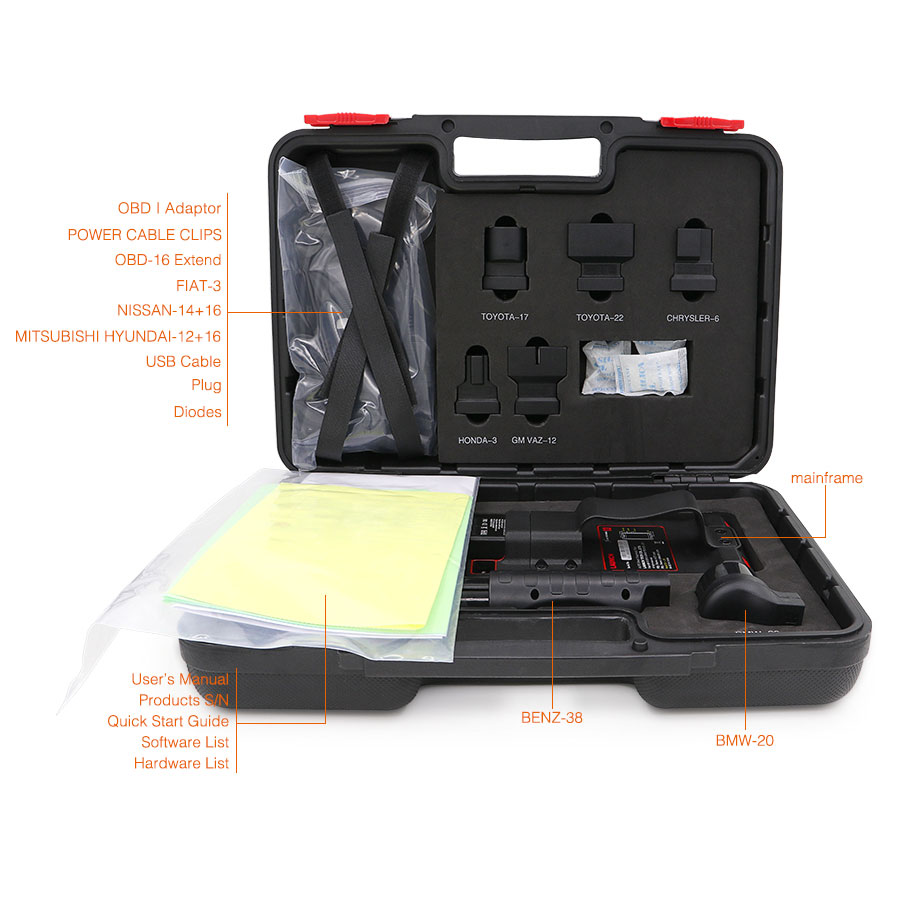
If your automotive scanner has been having compatibility issues, this is the best scan tool to use on different vehicle makes and models. The Launch X431 Pro mini diagnostic tool is compatible with more than 108 vehicle makes and models from the USA, Europe, and Asia. It comes with the Launch X431 pro mini kit with 14 connectors for OBD2 and other kinds of diagnostic standards for the European and Asian vehicle makes.


2.Wireless functionality

The Launch X431 obd2 scanner is very easy to use. It has Bluetooth and WiFi functions that allow you to use the code reader under the hood or inside the garage. The wireless connection enables you to work wirelessly and in the end, you will save money and time.

3.Intuitive user interface

Featuring a 6.98-inch touch screen with high-resolution, you will never have a hard time interpreting results using this scan tool. In addition, the icons are clear and you can easily locate the different functions. Apart from that, it has a high-resolution camera that captures still photos

4.Sturdy construction

The Mini Launch X431 is one of the most durable diagnostic obd2 scanners on the market. It is drop resistant, waterproof, and grease resistant. As a result, you can use it without any problem.

5.Special functions

Whether you want to perform basic functions like reading and erasing error codes and viewing of freeze frame data or performing special functions like oil reset, battery maintenance, electronic parking brake reset, diesel particulate filter, ABS bleeding, tire pressure monitor system rest, and many more.

6.All systems diagnosis

Additionally, it is able to diagnose all systems such as transmission, power train, emission system, engine, fuel system, body, and much more. With such system coverage, you will not have to purchase a separate device to perform different functions.

7.Anti-theft matching

This is a great safety feature. Anti-theft matching has the ability to protect your vehicle from being stolen by clearing lost key data and programming new keys into the ECU database also referred to as keys coding.

8.Unique and portable scan tool

If you’re a mechanic who travels a lot or moves around with their scan tool from one place to another, then the Launch X431 Pro Mini scanner is a great tool for you. It is compact in design and very lightweight. The code reader weighs 7.45 pounds and its dimensions are 15.9 x 11.9 x 4.2 inches. It is almost the same weight as many smartphone gadgets.

9.Android operating system

The device operates at a very fast speed and it is very accurate. This can be linked to the Android 5.1 operating system that it comes with. The Android system allows the user to install other Android apps, but they can still use the scanner to diagnose trouble codes.

10.Free software update

When you register for this scan tool, you will become eligible to download free software updates for 2 years. After 2 years, you will have to pay for the updates. Updating is simple as it can be done online by connecting your device to Wi-Fi.

11.Outstanding tech support

The launch has one of the best tech support in the industry. If you need support from the Launch team, just send them a one-click recorded video (s) and accurate diagnostic outcomes. Furthermore, the one-click update online is extremely convenient to use. You get the much-needed support and be able to diagnose the problems that your car is facing.

To sum up:

The Launch X431 pro mini diagnostic scanner is constructed for professional mechanics and small car repair shops. It performs a wide range of functions and it is compatible with different vehicle makes and models. Moreover, the scanner comes with Bluetooth and Wi-Fi function for a wireless connection.

The scanner functions very fast as it uses the Android 5.1 operating system. The large 6.98-inch touch and high-resolution screen display clear results. It is also portable and compact for easy storage and use. It covers over 108 US, European, and Asian vehicle makes and models. On top of that, it comes with 2-years of free software updates.

With such amazing features and exceptional performance, this is a reliable and high-end scanner that will serve you for many years to come.


For more information about Launch X431 diagnostic tool ,please visit our website sale@cnautotool.com

2020年8月9日星期日

Launch X431 PRO VS X431 Pro Mini

Launch X431 PRO VS X431 Pro Mini Wifi/Bluetooth OBD diagnostic tool + reset function

X431 Pro Mini is a stylish Android-based vehicle trouble diagnostic tool. It inherits from LAUNCH’s advanced diagnosing technology and is characterized by covering a wide range of vehicles, featuring powerful functions, and providing precise test result.

1-1

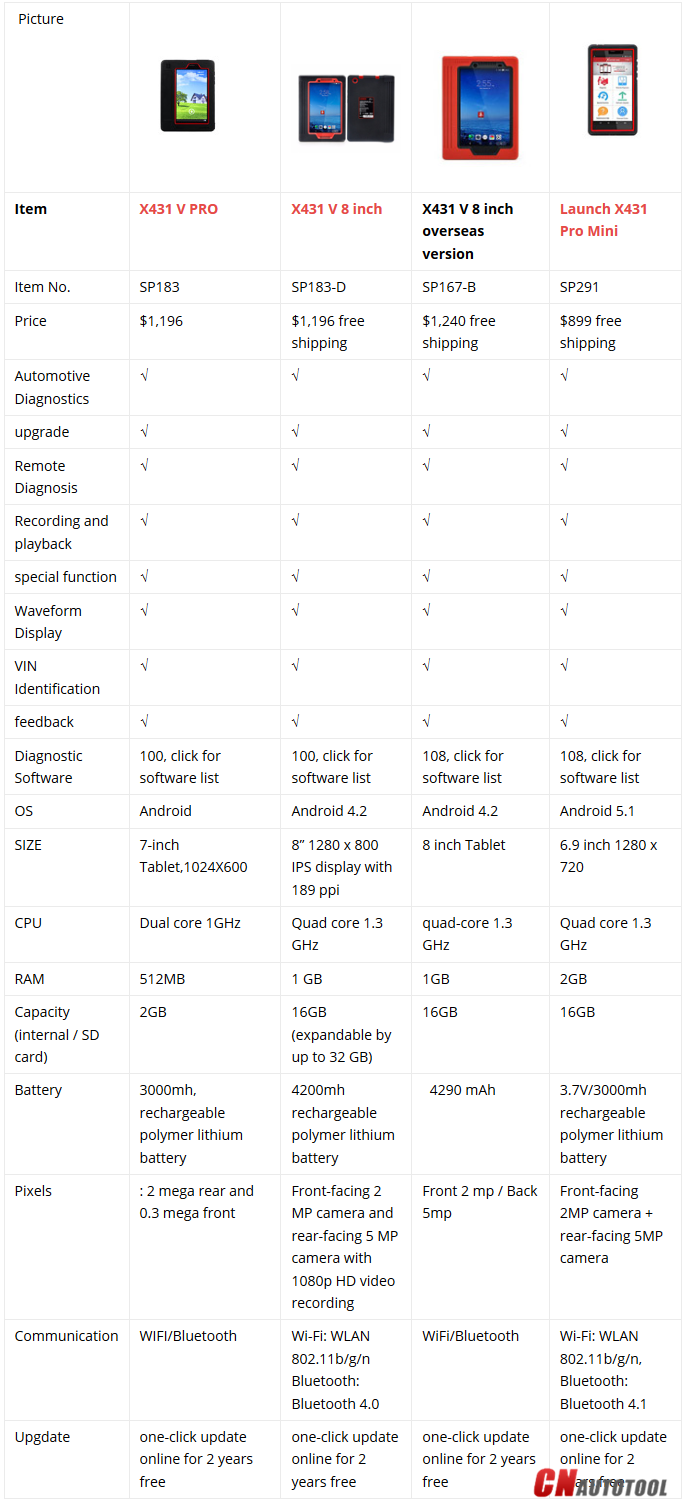
Launch X431 Pro Mini is newly available at CnAutotool.com, what it differs from Launch X431 PRO? Here a comparison table for reference. PS: Launch X431 Pro is available with X431 Pro 7” (first generation) (SP183),  Launch X431 V 8” global version (SP167-B), Launch X431 V 8” (SP183-D).

2-1

X-431 PRO MINI Technical Parameters:
Operating system: Android 5.1
Processor :Quad core 1.3 GHz
Memory: 2GB
Storage:16GB
LCD screen: 6.9 inch with a resolution of 1280 x 720 pixels
Camera :Front-facing 2MP camera + rear-facing 5MP camera
Battery :3.7V/3000mh rechargeable polymer lithium battery
Connectivity : Wi-Fi: WLAN 802.11b/g/n ,Bluetooth: Bluetooth 4.1
Working temperature: 0℃ ~ 45℃
Storage temperature: -10℃ ~ 50℃

VCI module:
Working voltage 9 ~18V
Average working current About 85mA
Standby current About 55mA
Working temperature -10℃ ~ 55℃
Storage temperature -20℃ ~ 70℃
Relative humidity 20% ~ 90%

DBScarIII adapter parameters:
The brand-new DBScarIII adapter is small size and can be easily plugged into the handset to diagnose and matching, it tests car models stably, it supports
CAN diagnosis also USB data transfer.
Size: 69 × 40 × 18 mm
Operating voltage: 9V DC – 18V DC
Test voltage: DC12V
Typical power consumption: ≤2W
Bluetooth distance: 100 m
Connectivity: Bluetooth + wired
Operating temperature: -10℃to 50℃
Red Indicator: Turns red when connected to power supply;
blue Indicator: Turns blue then wireless Bluetooth work;
USB work: Turns green when the connector is connected to the USB cable

Launch X431 Pro MINI Obd2 Scan Tool Package Includes: 
1pc x X-431 PRO MINI tablet
1pc x Password envelope
1pc x VCI module (For connecting OBD II vehicles)
1pc x OBD II extension cable
1pc x OBD I adaptor (For connecting the non-16pin diagnostic connector and the
VCI module)
1pc x Battery clamps cable
1pc x Power adaptors
1pc x Non-16pin connectors (For connecting non-OBD II vehicle)

2020年7月26日星期日

Launch X431 Pro Mini Bluetooth VS X431 Diagun, X431 Pro Mini Wins

Launch X431 Pro Mini OBD2 Diagnostic Scan Tool VS X431 Diagun, X431 Pro Mini Wins in features, function, vehicle coverage, parameters, etc.
1-1
X431 Pro Mini Wins X431 Diagun in highlights:
1.Android-based vehicle trouble diagnostic tool
2. Full car model covering prevailing vehicle models of Asian, European, American and Chinese
3.Full system vehicle trouble diagnosis
4.Wi-Fi connection
5.Bluetooth communication between the VCI module and X-431 PRO MINI
6.Perform remote diagnosis: configures X-431 PRO MINI as an I/M(Instant Messaging) tool, which enables technicians to exchange repair experience and perform remote assistance more conveniently.
7.One-click update online for 2 years free: Lets you update your diagnostic software more efficiently. To obtain better function and update service, advise you update the software regularly.
8.OBD diagnose function: Reading DTCs, Clearing DTCs, Reading Data Stream and Actuation Test
9.Special Functions: Oil Reset Service, Steering Angle Calibration, Electronic Parking Brake Reset, Battery Register / Battery Maintenance, ABS Bleeding, Electronic Throttle Position Reset / Learn, Diesel Particulate Filter (DPF) Regeneration, Tire Pressure Monitor System Reset, Gear Learning, Immobilizer Matching and Fuel Injector Coding.
   X431 Pro Mini Wins X431 Diagun in vehicle coverage:
X-431 PRO MINI supports all electronic control systems on 12V EFI models, incl. more than 150 European, American and Asian models like Maserati, Ferrari, Rolls Royce, Bentley, Mercedes-Benz, BMW, Audi.Diagnose the electronic control system of prevailing vehicle models covering Asian, European, American and Chinese. It achieves full car model and full system vehicle trouble diagnosis.
20200310072327_40844
    X431 Pro Mini Wins X431 Diagun in features:
Accurate: X-431 PRO MINI performs diagnosis (fault code, data stream, action test and other functions) as the dealership.
Quick: can perform full system diagnosis and one button to clear codes at a high speed
Record and playback Data Stream: Record and playback the data stream help you analyze the trouble when driving and solve it.
VINSCAN: Automatic scan (OBD VIN) and manual input (INPUT VIN) are available.
View History: The History function provides a quick access to the tested vehicles and users can resume from the last operation, without the necessity of starting from scratch.
Maintenance Help: Including: How-to Videos, operation skills and user manual, Q&A, Quick start guide etc.
    X431 Pro Mini Wins X431 Diagun in parameters compared:
    X-431 PRO MINI Technical Parameters:
Operating system: Android 5.1
Processor :Quad core 1.3 GHz
Memory: 2GB
Storage:16GB
LCD screen: 6.9 inch with a resolution of 1280 x 720 pixels
Camera :Front-facing 2MP camera + rear-facing 5MP camera
Battery :3.7V/3000mh rechargeable polymer lithium battery
Connectivity : Wi-Fi: WLAN 802.11b/g/n ,Bluetooth: Bluetooth 4.1
Working temperature: 0℃ ~ 45℃
Storage temperature: -10℃ ~ 50℃
    VCI module Parameters:
Working voltage 9 ~18V
Average working current About 85mA
Standby current About 55mA
Working temperature -10℃ ~ 55℃
Storage temperature -20℃ ~ 70℃
Relative humidity 20% ~ 90%
    DBScarⅢ adapter parameters:
The brand-new DBScarⅢ adapter is small size and can be easily plugged into the handset to diagnose and matching, it tests car models stably, it supports
CAN diagnosis also USB data transfer.
Size: 69 × 40 × 18 mm
Operating voltage: 9V DC – 18V DC
Test voltage: DC12V
Typical power consumption: ≤2W
Bluetooth distance: 100 m
Connectivity: Bluetooth + wired
Operating temperature: -10℃to 50℃
Red Indicator: Turns red when connected to power supply;
blue Indicator: Turns blue then wireless Bluetooth work;
USB work: Turns green when the connector is connected to the USB cable
    X431 Pro Mini Wins X431 Diagun in handset
X-431 PRO MINI handset
1 VCI module
2 Reset hole
3 Rear camera
4 Camera flash
5 Slot for VCI module for housing the VCI module.
6 POWER/Screen lock key In Off mode, press it to turn X-431 PRO MINI on; In On mode, turn X-431 PRO MINI off with long press or lock screen with short press.
7 Carry strap
8 Air intake vent
9 USB/Charging port To connect to the power adaptor for charging.
10 Microphone
11 LCD screen
12 VOLUME +/- Key To adjust the volume. To print the screen, hold and press the POWER and VOLUME – key until a snapshot pops up on the screen.
The captured snapshot is saved in the “Screenshots” folder.
13 Speaker
14 Front cameras
15 Earphone Jack

2017年11月12日星期日

Launch X431 PRO MINI Product Introduction


Launch X431 Pro Mini is a stylish Android-based vehicle trouble diagnostic tool. It inherits from LAUNCH’s advanced diagnosing technology and is characterized by covering a wide range of vehicles, featuring powerful functions, and providing precise test result.
Through the simple Bluetooth communication between the VCI module and X-431 PRO MINI, it achieves full car model and full system vehicle trouble diagnosis, which includes Reading DTCs, Clearing DTCs, Reading Data Stream,Actuation Test and Special Functions.
Moreover,it supports Wi-Fi connection, which enables you surf the Internet,update the diagnostic software online and perform remote diagnosis etc, getting your job fixed faster and easier.


Features
1. Diagnostic Tool:
A. Diagnose
?Diagnose the electronic control system of prevailing vehicle models covering Asian, European, American and Chinese. Diagnosis functions include: Read DTCs, Clear DTCs, Read data stream, Special functions etc.
?Specially designed for Android platform with clear and user-friendly interface.
?Via Bluetooth, it is simple for the VCI module to communicate with X-431 PRO MINI.
?Equipped with an exclusive X-431 PRO MINI protective sleeve to prevent it from being damaged.
B. One-click Update: lets you update your Auto Scanner Tools more efficiently.
C. Repair Data: provides abundant automotive handbook, repair case and wiring diagrams for reference and retrieval.
D. Remote Diagnosis: configures X-431 PRO MINI as an I/M(Instant Messaging) tool, which enables technicians to exchange repair experience and perform remote assistance more conveniently.
2. Browser: built-in Wi-Fi module makes surfing on the internet freely.
3. Email: allows you to send and receive emails.LAUNCH X-431 PRO MINI User Manual
4. Settings: to configure your personalized X-431 PRO MINI through it.
5. Applications: other android based applications can be customized to install or uninstall.

If you want know more,pls go to www.cnautotool.com