2018年12月5日星期三

Newly Wifi CAT ET iii Wireless Caterpillar 317-7485 Diagnostic Adapter


CAT ET iii Wifi Wireless Caterpillar 317-7485 Diagnostic Adapter with caterpillar et 2015a software. Cablesmall new function of CAT ET 3 with WIfi. CAT ET III Wifi Caterpillar Scanner New featues and Function.

CAT ET 3 Wireless Adapter III WIFI CAT3 Communication Adapter III


CablesMall CAT ET III Wifi Caterpillar Scanner Features:

Display graph and log status parameters.
Retrieve prognostic data including histograms, engine totals for fuel used and miles traveled.
View active diagnostics and clear logged diagnostics. View events where irregularities have occurred and have been logged by the ECM.
Perform calibrations to enhance performance of the ECM.
Customize the ECM with application-specific settings.
Over 100 custom Diagnostic, Information and Service features including:
2D and 3D Histogram plotting capability (engine software support required).
Custom Status screen groups
Snapshots (Download from cablesmall and display snapshot data recorded by the ECM)
Configuration Aid that allows upload/download of same configuration to multiple control modules
Customised Service Tool Options
Customized service tool name
Customized graphics for the splash screen and icons
Customized installation
Aftermarket differentiation, the tool for one customer does not work on the product of another customer.
Licensing options for customer management
Flash programming of the ECM(s)
Training demonstration allows familiarity with the toola s primary functions without connecting to ECM(s)
Major operating systems support (Microsoft Windows 95, 98, NT 4.0, 2000, ME, & XP)
Perform customized diagnostic tests to identify harness problems, cylinder or component failures (Automatic Cylinder Cutout with cylinder to cylinder fueling comparison)

2015A Caterpillar ET3 Adapter III Communication :

1. Allows communication between service tools and engine controls using various data links such as J1939/11, DeviceNet (future release), CAT DataLink, and J1708 (ATA) vehicle networks;
2. Flash program allows adapter firmware upgrades as additional features become available;
3. Uses J1939/11, high-speed data link (part of ADEM III controls), substantially reducing flash times;
4. Automatically selects J1939/11 when flashing the engine (reduces the flash time approximately 80%, from 14 minutes to 3 minutes).

2018年12月4日星期二

How to configure Xentry Connect C5

2018 Xentry Connect C5 user manual: how to configure/set up MB SD Connect C4/C5 to use for the first time
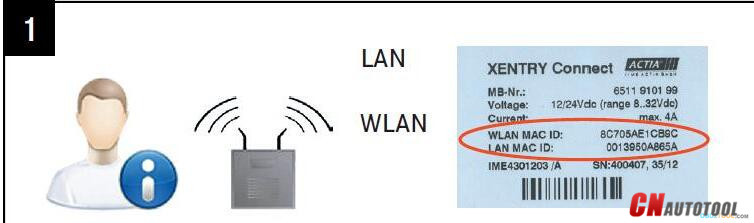
Please have your XENTRY Connect MAC addresses (Wi-fi and LAN) enabled for the workshop network byyour IT supervisor/IT service provider in advance. You can read off theMAC addresses (Wi-fi and LAN) from the stickers on the devices.
3-1
Your case already contains a printed empty network questionnaire.
Please have it filled out by your IT supervisor. Important! Do notcontinue the initial startup until the questionnaire has been filled outcompletely! This will help to avoid additional work.
3-2
The latest Mercedes diagnostic software disk came with your MB SD Connect C5.
You can start the network configuration now.
Completely charge and turn on the XENTRY Connect.
Starting the XENTRY Connect for the first time can take up to 10 minutes.
Configuration can be started whilst both devices are still charging.
Attention! Be sure to use the correct power supply units!
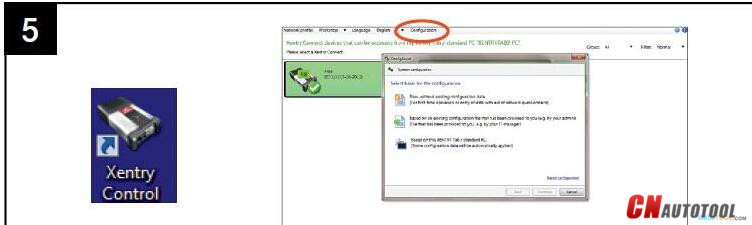
Start the XENTRY Control software using the desktop link on the laptop. ConfigAssist is already open; if not,call up ConfigAssist via the “Configuration” menu.
Note! If you work with static IP addresses, you must perform theconfiguration via the expert dialog and transfer the configuration tothe XENTRY Connect via a USB stick.
3-3
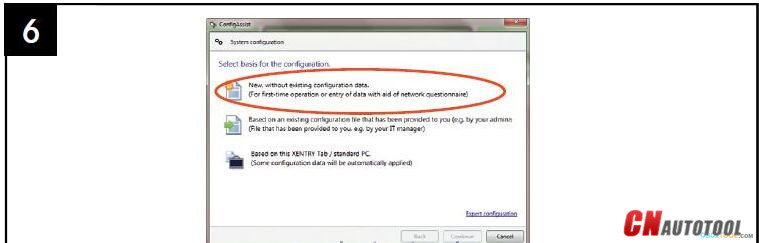
Please have the filled out network questionnaire on hand:
How would you like to configure the devices?
Select one of the 3 options.
Recommended selection: “New without existing configuration data”.
3-4
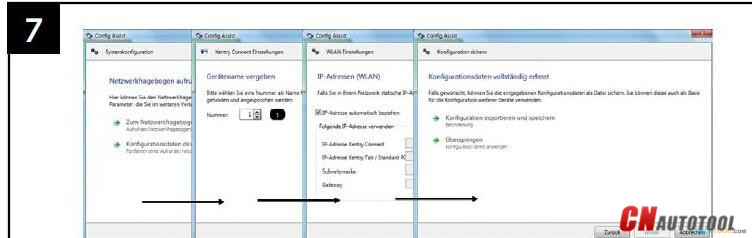
Please continue following the ConfigAssist dialogs and enter the required
data from the network questionnaire.
Next, switch on the XENTRY Connect. This has already finished installing.
3-5
In the final steps, the configuration is transferred from the laptop to the XENTRY Connect. You will be prompted to interconnectthe devices using the supplied black Ethernet connecting cable.
This cable connection is required only for configuration
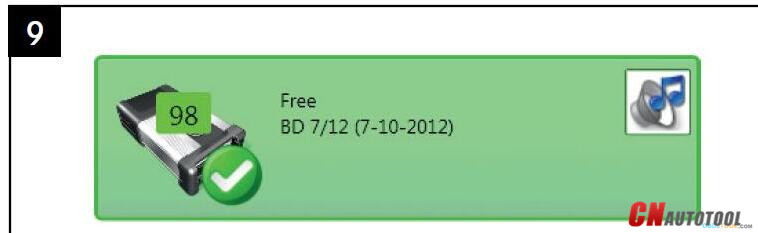
If configuration is successful, a green tile with the number of the Benz diagnostic tool XENTRYConnect C5will be displayed. You can now use the devices: Remove theblack Ethernet connecting cable to work via WLAN and with an onlineconnection. Then click on the green tile in order to read out the datafor ordering the StartKey.
3-6
Done!

2018年12月3日星期一

Lonsdor K518 Update Announcement

K518ISE Key Programmer can program Toyota/Lexus smart key all key lost via OBD by working together with extra SKE-LT Smart Key Emulator(optional)

SKE-LT: Smart Key emulator - Toyota/Lexus smart key for all key lost via OBD.(optional)
Black:  SKE-LT-DST40(94/D4) -Supports 94/D4 smart key.(optional)
Red: SKE-LT-8A(88/A8)-Support 88/A8 smart key.(optional)
Green: SKE-LT-DST80(98)-Supports 98 smart key.(optional)
Blue: SKE-LT-8A(A9)-Supports A9 smart key. (optional)

Lonsdor K518 Update Announcement

Toyota Series:
84 Smart Key
2007 Crown Key
Alphard Add Smart Key
2006 Reiz
Crown 68 chip all lost

Hyundai Series:
2013/2015 Verna Remote
2009 Rohens Add Smart Key
2014 Sonata 8 Communication
2014 IX25 Smart Key All Lost

Honda & Nissan Series:
Honda Accord 9th key
2017 Nissan Teana 4A Transponder

2018年12月2日星期日

V2.37 Scania VCI-3 VCI3 Scanner Wifi Diagnostic Tool

V2.37 Scania VCI-3 VCI3 Scanner Wifi Diagnostic Tool For Scania Truck Supports Multi-language Win7/Win8/Win10

Product Description
Scania VCI3 is a brand new tool designed by Scania to provide full maintenance for all Scania trucks, buses and other heavy vehicles or heavy duty engines made by Scania.VCI3 is a successor of well known diagnostic tool Scania VCI2
Latest V2.37 Scania VCI-3 VCI3 Scanner Wifi Wireless Diagnostic Tool for Scania
Top 5 Reasons to Get Scania VCI3:
1. Latest Version: V2.37
2. Support All Scania Trucks, Buses and other Heavy Vehicles or Heavy Duty Engines Made by Scania
3. Wifi Available
4. Support Languages:English, German, Spanish, French, Japanese, Dutch, Polish, Portuguese, Swedish, Norwegian, Suomi, Turkish, Italian, Czech, Russian, Chinese
5. Updatable (Buy New Software)


Notice:
1.The adapter does not work with trucks and engines manufactured before 2004
2.Only work on WIN7 32bit system

SCANIA VCI3 Description:
1. Scania VCI3 is designed to support all Scania diagnostic systems based on CAN network, it’s a extremely fast yet very compact diagnostic tool.
2. One of the most interesting new features that can be found in Scania VCI3 is a Wifi wireless connection (also there is a USB connector for wired connection).
3. From now you can work without wired connection to your truck, just forget these problems like damaged data cables and other disadvantages of wired connections.
4. Software support for Scania VCI3 appeared in Scania SDP3 2.18 version so if you want to use this tool you need this version of SDP3 or later versions of this software.
5. The device is designed for full service trucks, buses and other heavy vehicles, which produces the corporation SCANIA. Adapter works in conjunction with software SDP-3.
6. The adapter does not work with trucks and engines manufactured before 2004.
7. The main feature of VCI-3 - Work through a high-speed WI-FI connection. Also in the device has a USB port.

SCANIA VCI3 Features:
1. WLAN version 802.11b/g
2. Encryption protocols: WPA2/WPA/WEP128/WEP64
3. USB 2.0 (compatible with USB 1.1)
4. Lightweight aluminum housing with IP67 protection
5. Polyurethane cables for extreme conditions.
6. Operating voltage CAN BUS (7 - 40V DC)
SCANIA VCI3  Package Included:
1pc x Scania VCI 3 adapter
1pc x SDP3 latest vesrion CD


If you have any questions, please do not hesitate to contact us with
www.cnautotool.com